3-35
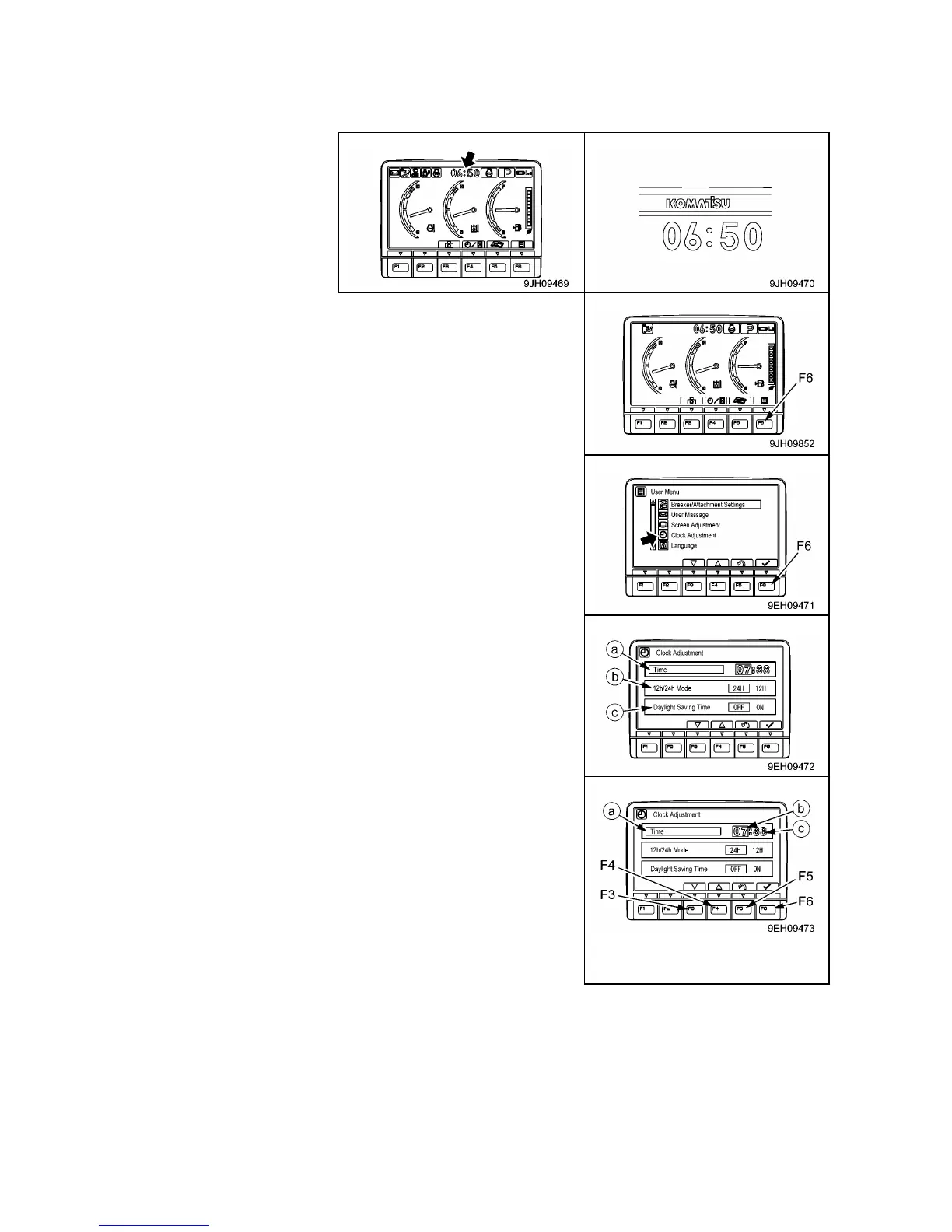
(d) Clock Adjustment
On this clock adjustment menu, it is possible to change the setting of the clock displayed on the pilot
monitor of the standard screen.
1. On the standard screen, presses switch (F6).
2. Select “Clock Adjustment” on the user menu screen, then
presses the switch (f6). The screen switches to the time
adjustment selection menu screen.
The following 3 items can be changed.
• (a): Clock setting
• (b): 12/24 hour display mode
• (c): Daylight saving time
3. On the clock adjustment selection screen, it is possible to carry
out the following operations with switches (F3 to F6).
[Time]
Adjust the hour setting.
(1) If “Time” (a) is not highlighted in yellow, press switch (F6) to
highlight “Time” (a) in yellow. When this is done, hour display
(b) changes to orange.
(2) Adjust hour display (b) with the switches as following. If it is
not necessary to change the hour setting, presses switch (F6).
• Switch (F3): Time advances 1 hour.
• Switch (F4): Time goes back 1 hour.
• Switch (F5): Cancels change and returns to user menu screen.
• Switch (F6): Accepts change and goes to setting for minutes.



 To Next Page