6 Operating modes EFA-200/-300
6-6
2. Switch between the filters using keys F1 through F3.
The last active frequency range of the selected filter is activated and
indicated in the display field F4.
The measured value changes according to the selected frequency
range.
3. Press the ESC key to return to normal measurement mode.
6.1.6 Evaluating the results
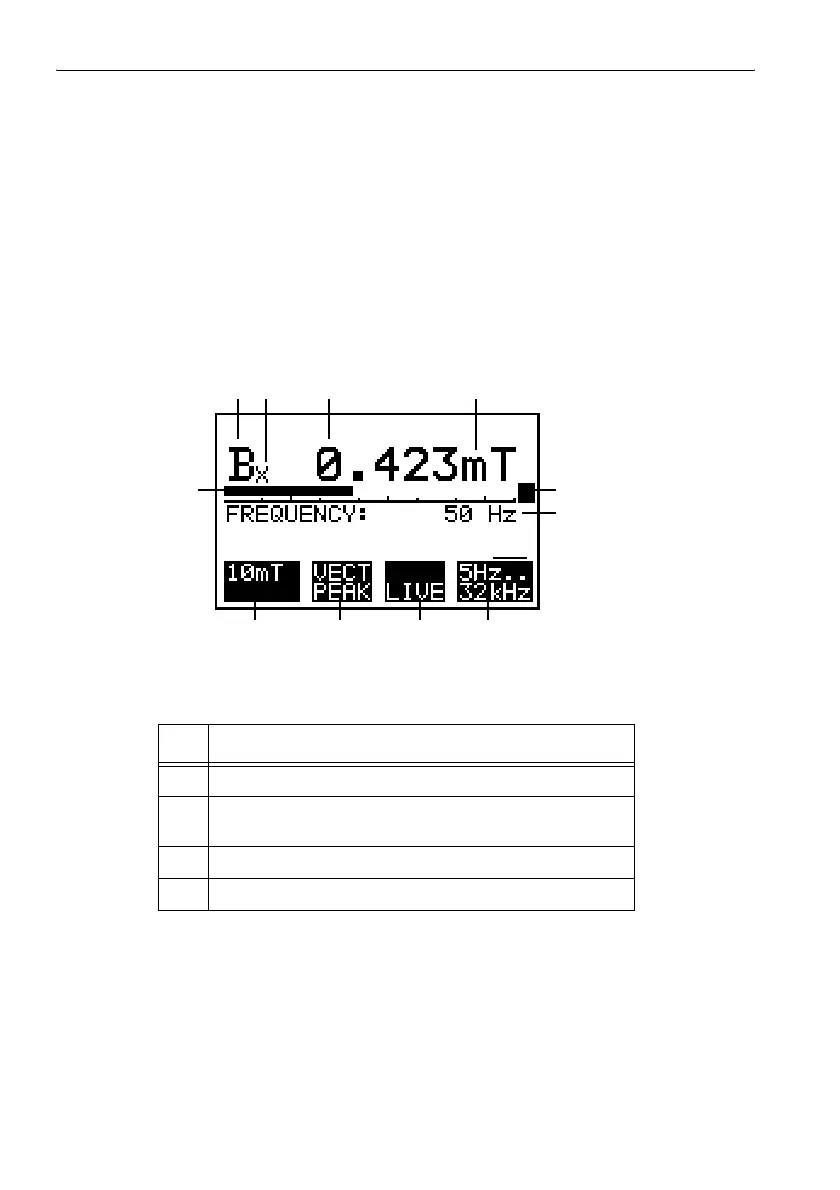
Evaluating the measurement screen
Figure 6-3 Display elements in the measurement screen for Field Strength mode
No. Function
1 Field quantity, in this case B-field.
2 Measurement axis, in this case X axis.
Without subscript: ISOTROPIC measurement
3 Digital display of measured value.
4 Units of measurement.
Table 6-2 Screen evaluation for Field Strength mode
1
2
34
11
5
10 9 8 7
6



 To Next Page