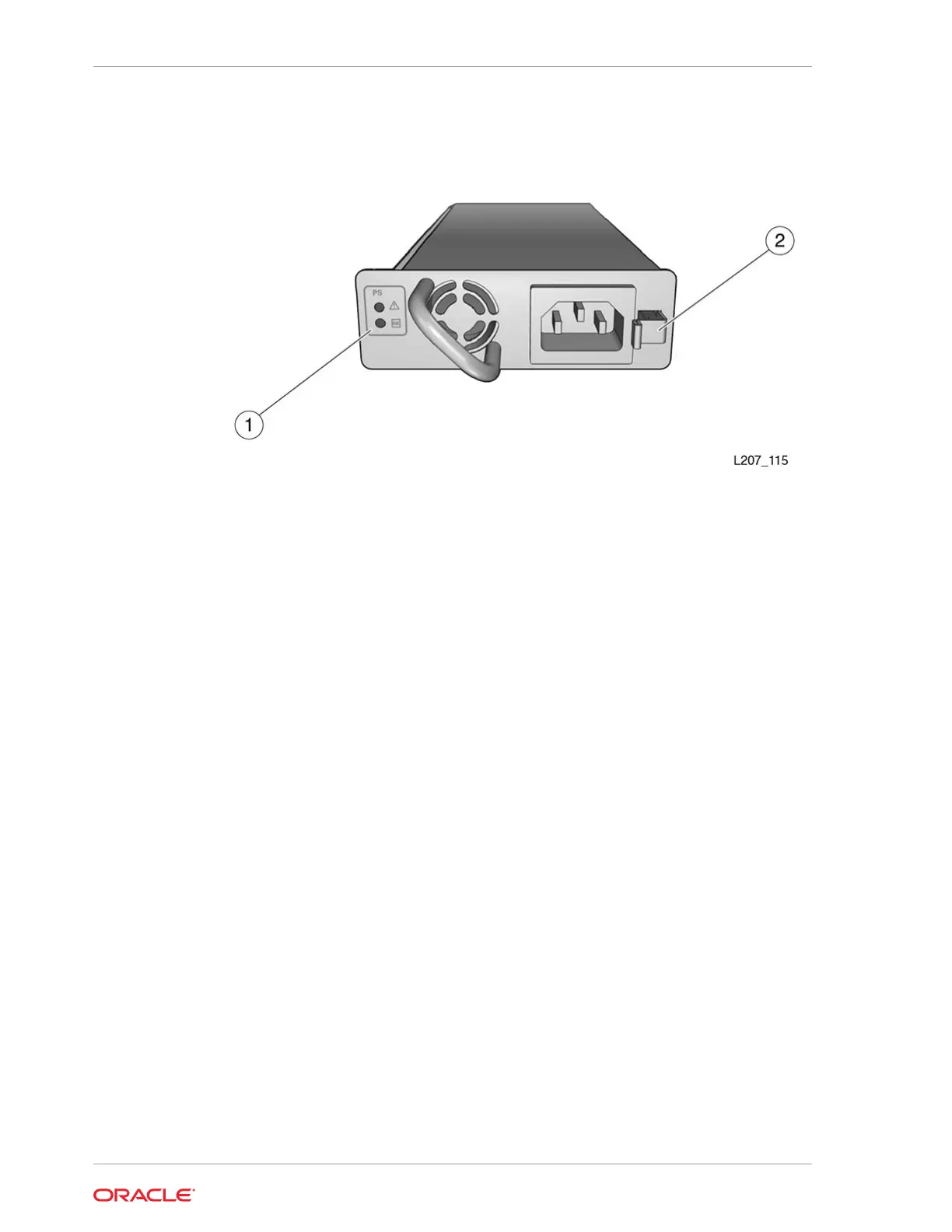
Figure 10-2 Power Supply CRU
Illustration Legend:
1 - Power Supply Indicators
2 - Power Supply Latch
Remove the Power Supply
The power supply resides in a slot in the Base Module or Expansion Module.
1. If the library only has one power supply, power off the library before proceeding
(see Power Off the Library).
2. Disconnect the power cord from the defective power supply.
3. Press the latch towards the left (toward the fan) to release the power supply.
4. Grasp the power supply by the handle, pull it out of the library, and set it aside.
Replace the Power Supply
The power supply resides in a slot in the Base Module or Expansion Module.
1. Remove the power supply filler, if necessary (see Remove the Power Supply Slot
Cover).
2. Remove the power supply from the shipping carton.
3. Grasp the supply by the handle and support the bottom with your other hand.
4. Orient the power supply as shown in Figure 10-2 (oriented with LEDs on left).
5. Align the rear of the supply with the module slot. Push the supply fully into the
module slot. Make sure the power supply is secured in the module slot.
6. Connect the power cord to the power supply receptacle.
Chapter 10
Power Supply Removal and Replacement
10-6














 To Next Page