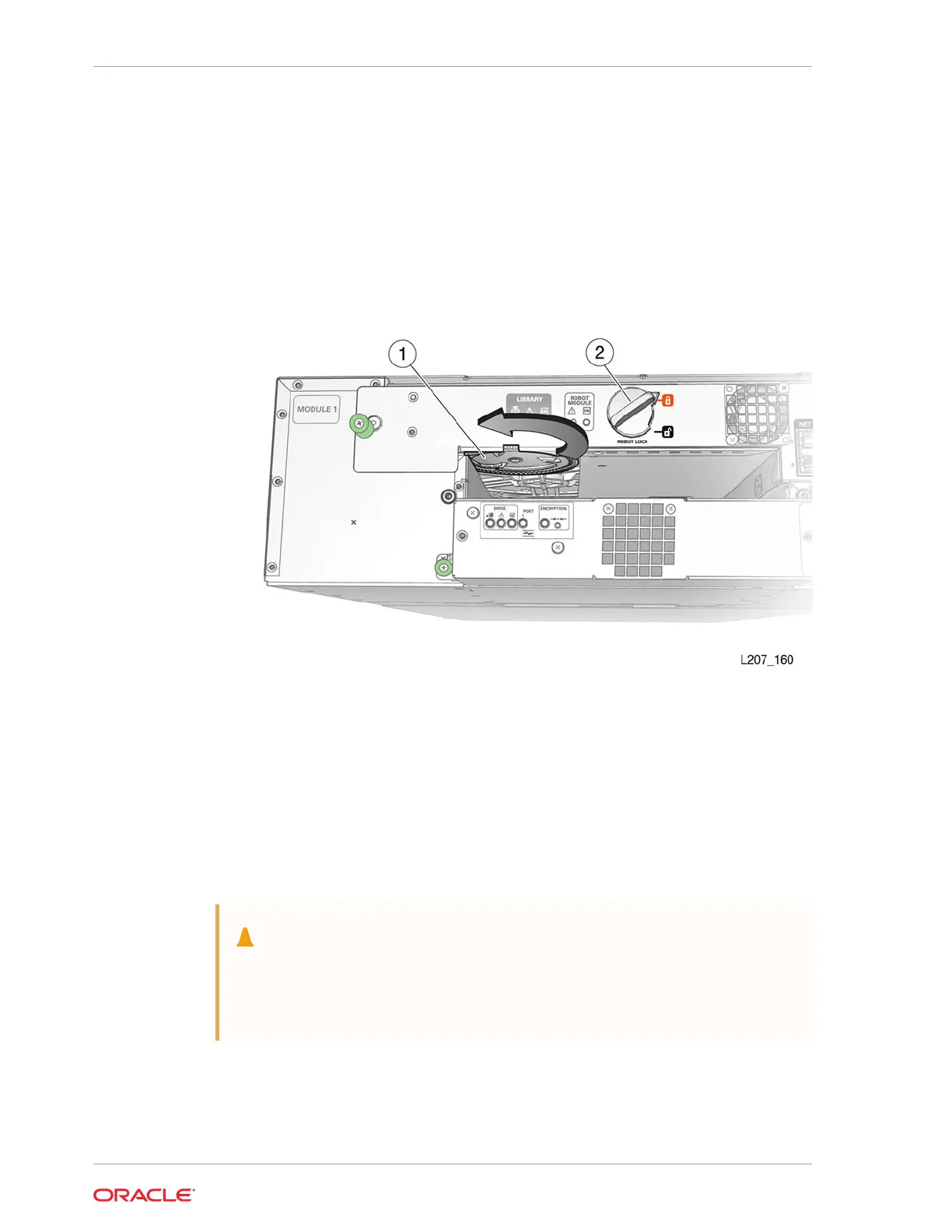
5. Turn the gear with your thumb to raise the robot, hold the gear in position with
a finger, reposition your thumb, and turn the gear. Repeat as necessary until the
robot is at the top of the Base Module.
If the robot does not retract, disengage it (see Manually Disengage the Robot).
6. Hold the bullwheel gear with the robot fully raised until you lock the robot.
7. Return to Step 5 of Park and Lock the Robot and continue through the last step of
robot removal (see Slide Robot CRU Out of Base Module).
Figure 10-4 Bullwheel Gear and Robot Lock
Illustration Legend:
1 - Bullwheel Gear
2 - Robot Lock (Improved Design)
Manually Disengage the Robot
Manually disengage the robot when you cannot get the robot to retract by other
methods. Use this as a last resort.
Caution:
Perform this procedure only if either the library power down (Step 1 of Park
and Lock the Robot) or Manually Retract the Robot does not work. This
procedure damages the robot assembly.
• Cut the Robot Cables
• Manually Remove the Robot CRU
• Manually Remove the Z Platform
Chapter 10
Robot Module Removal and Replacement
10-14














 To Next Page