Parts Required
Front rails (1 left, 1 right)
Two Mounting blocks
Two 8–32 X 5/8 screws
Complete the following tasks to install the front rails:
• Connect the Base Module Front Rail to the Back Rail
• Secure the Base Module Front Rail
• Verify the Installation of the Base Module Front Rail
• Install the Clip Nuts (square hole racks only)
Connect the Base Module Front Rail to the Back Rail
Align and slide the two pieces of the Base Module's rail together.
1. Position the front rail with the rail tabs toward the outside of the rack.
2. Slide the front rail toward the back rail to engage the tabs of the front rail.
3. Push the front rail into the rack until the front edge of the rail is approximately 60
mm (2.4 inches) from the rack stile.
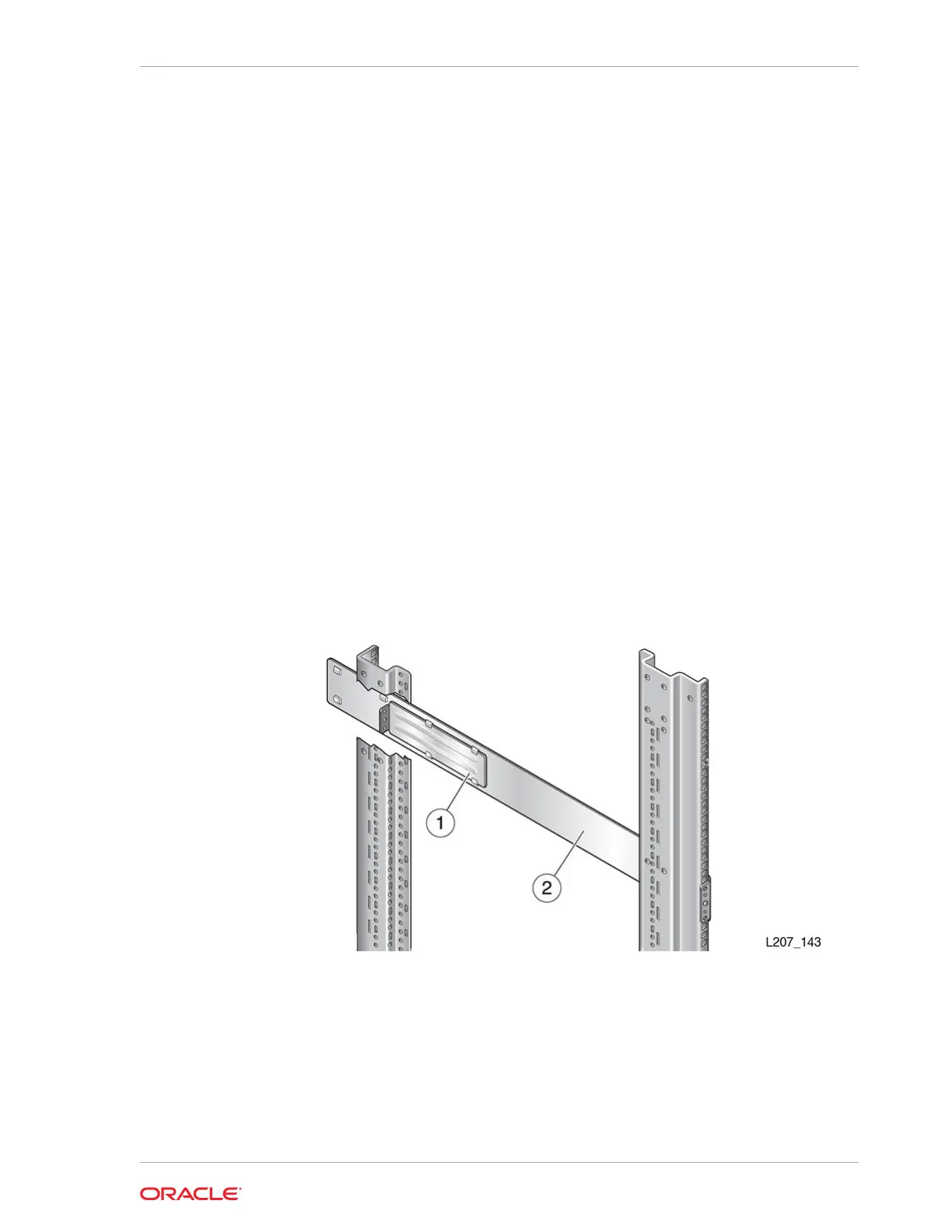
Figure 2-5 Front Rail Installation (Left Rail Shown)
Illustration Legend:
1 - Back Rail
2 - Front Rail
Secure the Base Module Front Rail
Use the mounting block and screws to secure the front rail to the rack.
Chapter 2
Install the Base Module
2-9














 To Next Page