3. Remove the drive tray from the shipping carton. Handle the drive tray by the rear
corners (close to the thumbscrews) and the bottom of the tray. Avoid contact with
the top cover of the actual tape drive.
4. Grasp the rear corners of the drive tray and guide the front of the drive tray into the
library drive slot. Push the drive tray completely into the drive slot.
5. Tighten the thumbscrews. Ensure there is no tray movement in any direction.
6. Connect the interface cable to the port on the left side of the drive.
Cable the Library
Connects cables to the Base and Expansion Modules, drives, power, and network
ports.
• Cable the Expansion Modules
• Connect Cables to the Drives and Power Supplies
• Connect the Network Port
• Align and Dress the Cables and Cords
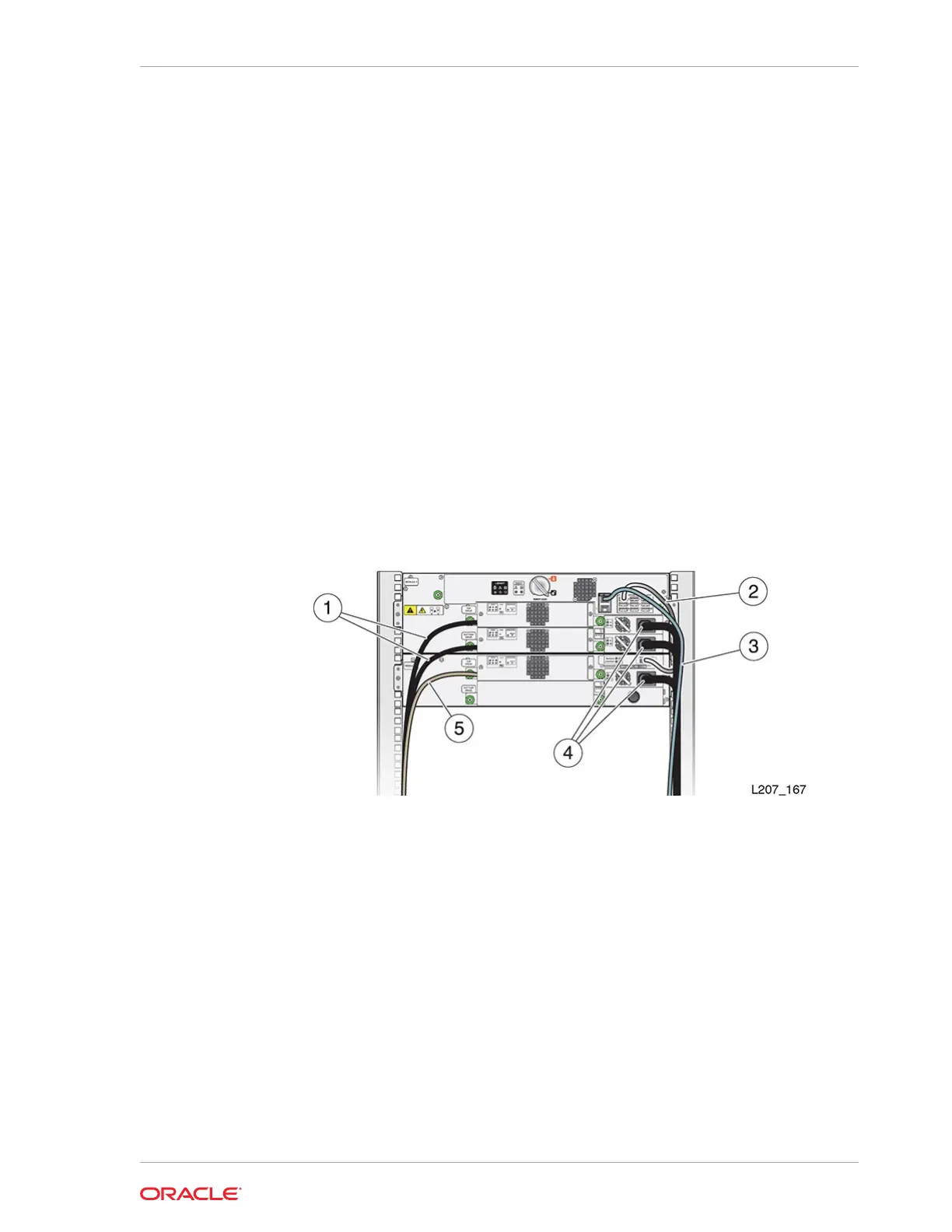
Figure 2-26 Initial Cabling Example
Illustration Legend:
1 - Tape Drive Fibre Channel Cable
2 - Expansion Cable
3 - Ethernet Cable (Net Mgt Port 1)
4 - Power Supply Cord
5 - Tape Drive Serial Attached SCSI (SAS) Cable
Cable the Expansion Modules
The Expansion Modules connect to the Base Module using USB cables.
Connect expansion interconnect cables between the ports listed in the table below or
see the diagram below (matching letters connect together).
Chapter 2
Cable the Library
2-29














 To Next Page