Handbook
November 2011 / 59-UMC0071 / Issue 01
Mercury iTC
Page 28
USER INTERFACE
Original Instructions
3.2.2 Common screen features
The following features appear on several pages of the GUI. To avoid repetition, these
features are described once in this section.
3.2.2.1 Home and Apply buttons
Figure 3-9 Home and Apply buttons
Home
Tap once to return to the Home page.
Apply
Tap once to save the changes made on the present page.
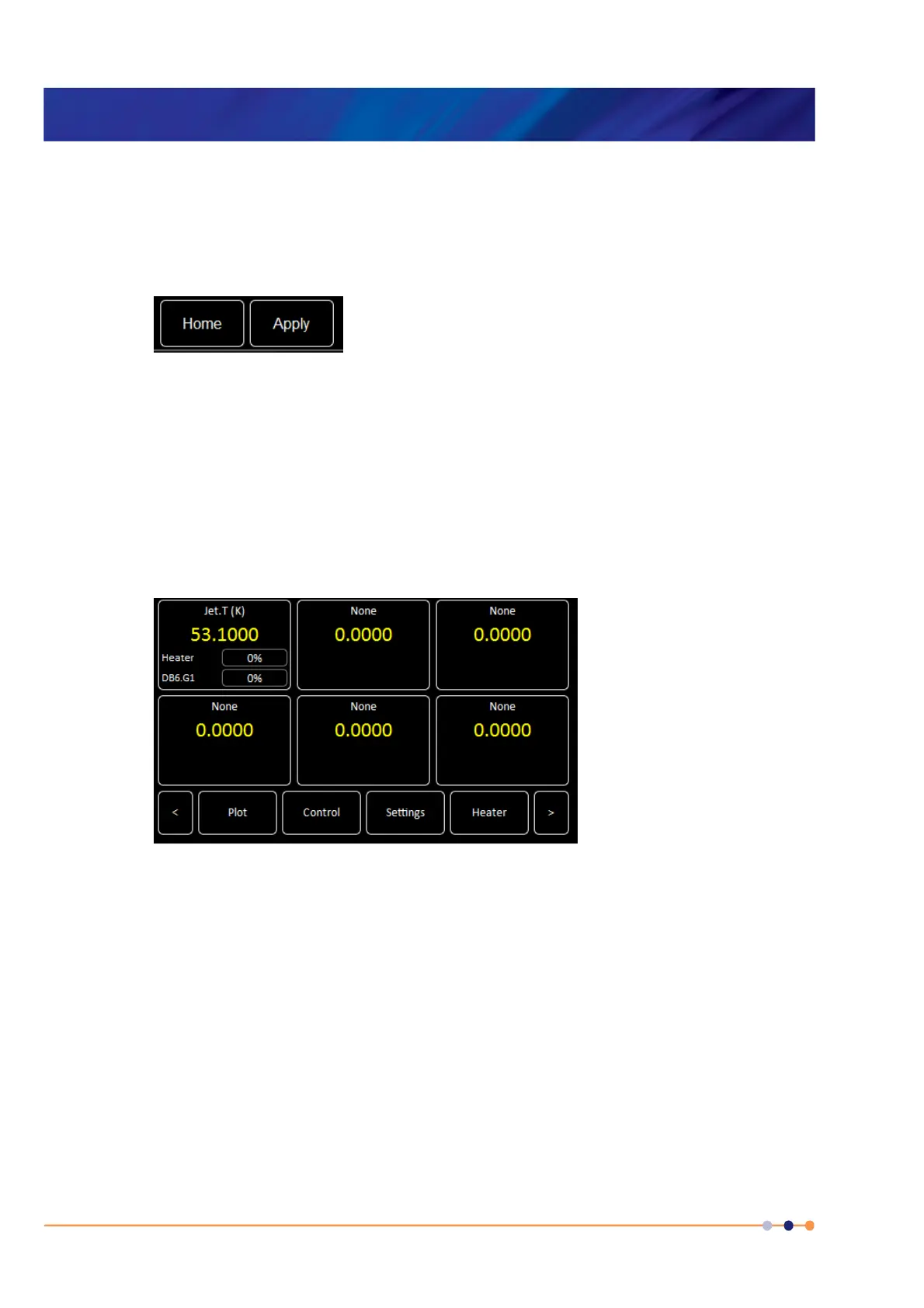
3.2.3 Home page
When the equipment is powered on, the Home page is displayed.
Figure 3-10 GUI home page
The Home page contains the following features:
Six channel-summary panels. Each displays summary information for a channel that
is enabled (see Section 3.2.3.1).
Plot button
Tap once to plot information against time (see Section 3.2.8).
Control button
Tap once to display control-loop information (see Section 3.2.9).
Settings button
Tap once to display the General Settings tab (see Section 3.2.12).
Heater button
Tap once to display the Heater Configuration page (see Section 3.2.14).
Scroll-buttons to display two more pages of summary panels.


 To Next Page
 Loading...