117
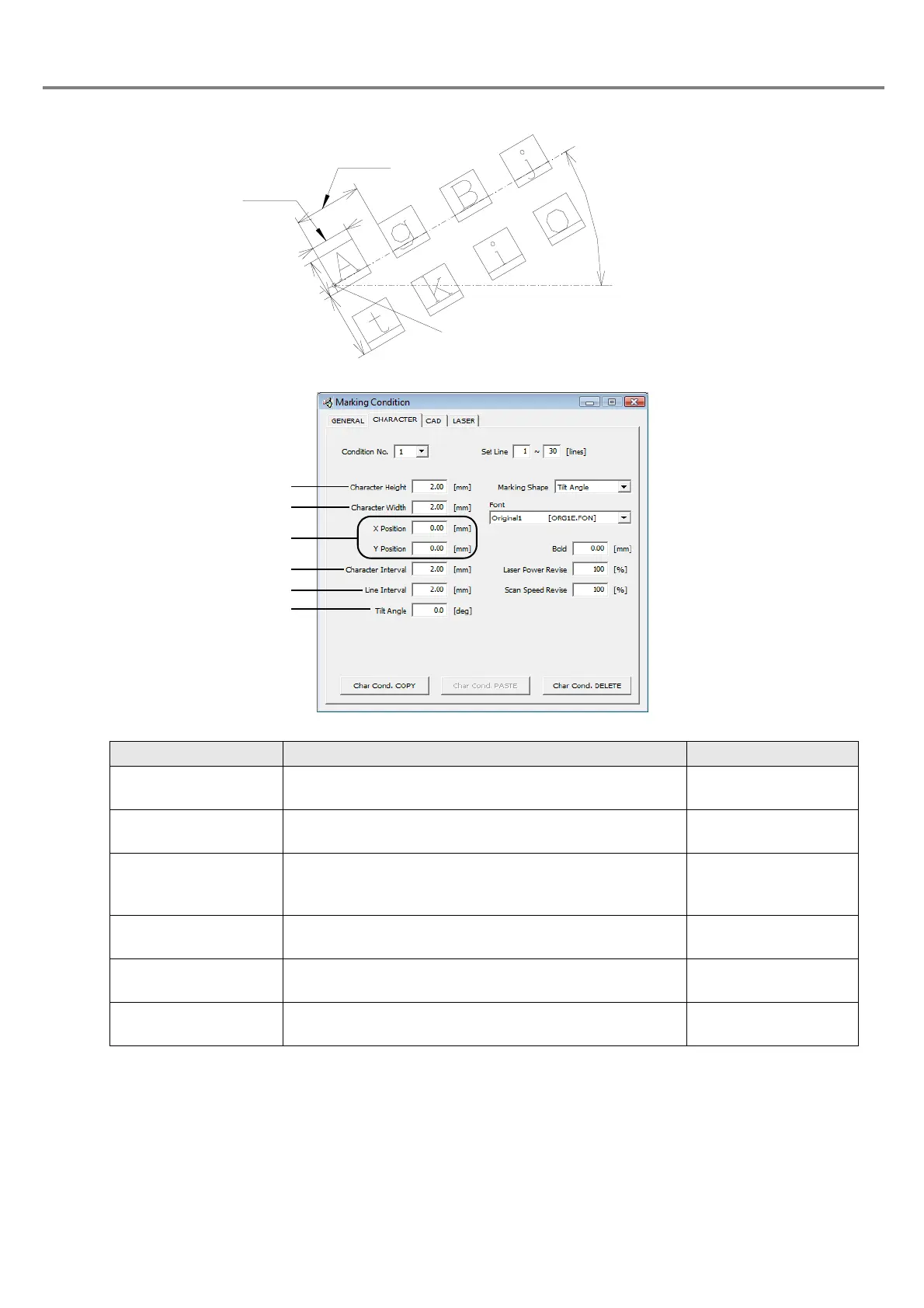
2. Tilt
Item Description Setting Range
1. Character Height Sets the character height.
0.20 to 50.00mm
(Step: 0.01mm)
2. Character Width Sets the character width.
0.20 to 50.00mm
(Step: 0.01mm)
3. X/Y Position
Moves the marking start position of the character string in
the
X direction for the X position setting and in the Y direction
for the Y position setting.
+/-25.00mm
(Step: 0.01mm)
4. Character Interval
Sets the pitch between one character and another
character.
0.00 to 25.00mm
(Step: 0.01mm)
5. Line Interval Sets the interval between one line and another line.
0.00 to 25.00mm
(Step: 0.01mm)
6. Tilt Angle
Rotates the characters around the marking start position.
The counterclockwise direction is the forward direction.
+/-180.0°
(Step: 0.1°)
Line
Character
Character
Internval
Character
Hei
ht
Tilt Angle



 To Next Page