All-New Event Presentation Switching Solutions
User Manual
The offset in lines between the end of the
output active area and the beginning of V
sync
Polarity (active high or low) of the vertical
sync pulse
After the settings are completed, select Apply for the settings to take effect.
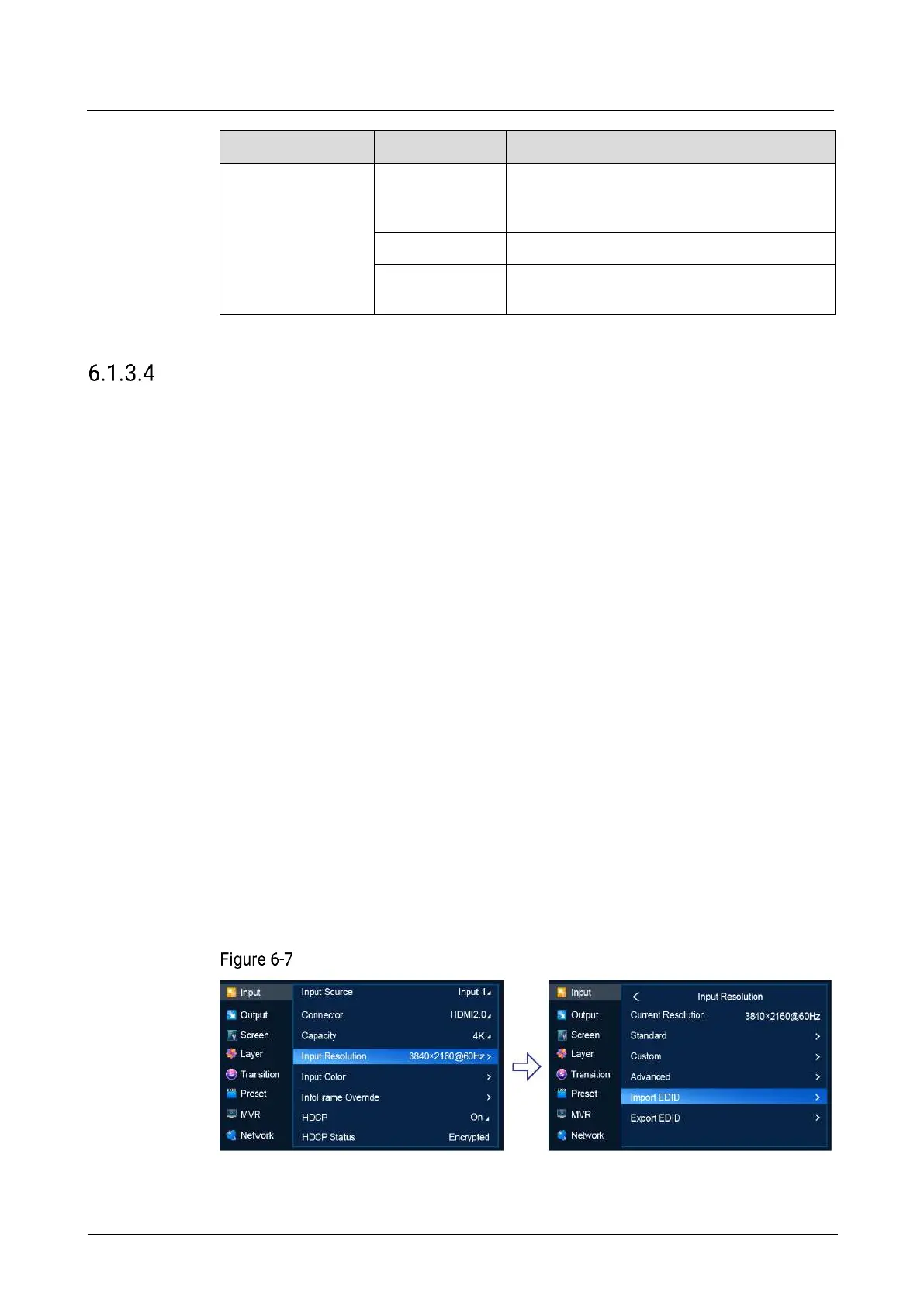
Import and Export EDID
When there is something wrong with the input connector compatibility, import EDID
files without compatibility problems into the device. Or export EDID files from the
device and provide the files for other devices or input connectors to solve
compatibility problems.
Prerequisites
Before importing an EDID file, copy the file (.bin and .dat) to the root directory of a
USB drive and insert the USB drive into the USB port on the front panel of the
P20/P10.
Before exporting an EDID file, insert a USB drive into the front panel of the
P20/P10.
An input source and connector type are selected. EDID import and export are not
available for 12G-SDI.
Notes
The USB port on the P20/P10 front panel does not support USB HUB.
Only one EDID file can be imported for an input connector and the file must be
less than 1 MB.
Menu Orientation
On the main menu screen, scroll to and select Input > Input Resolution > Import
EDID/Export EDID.
EDID import/export (P20)



 To Next Page