RealPresence Collaboration Server (RMX) 1500/1800/2000/4000 Getting Started Guide
Polycom®, Inc. 73
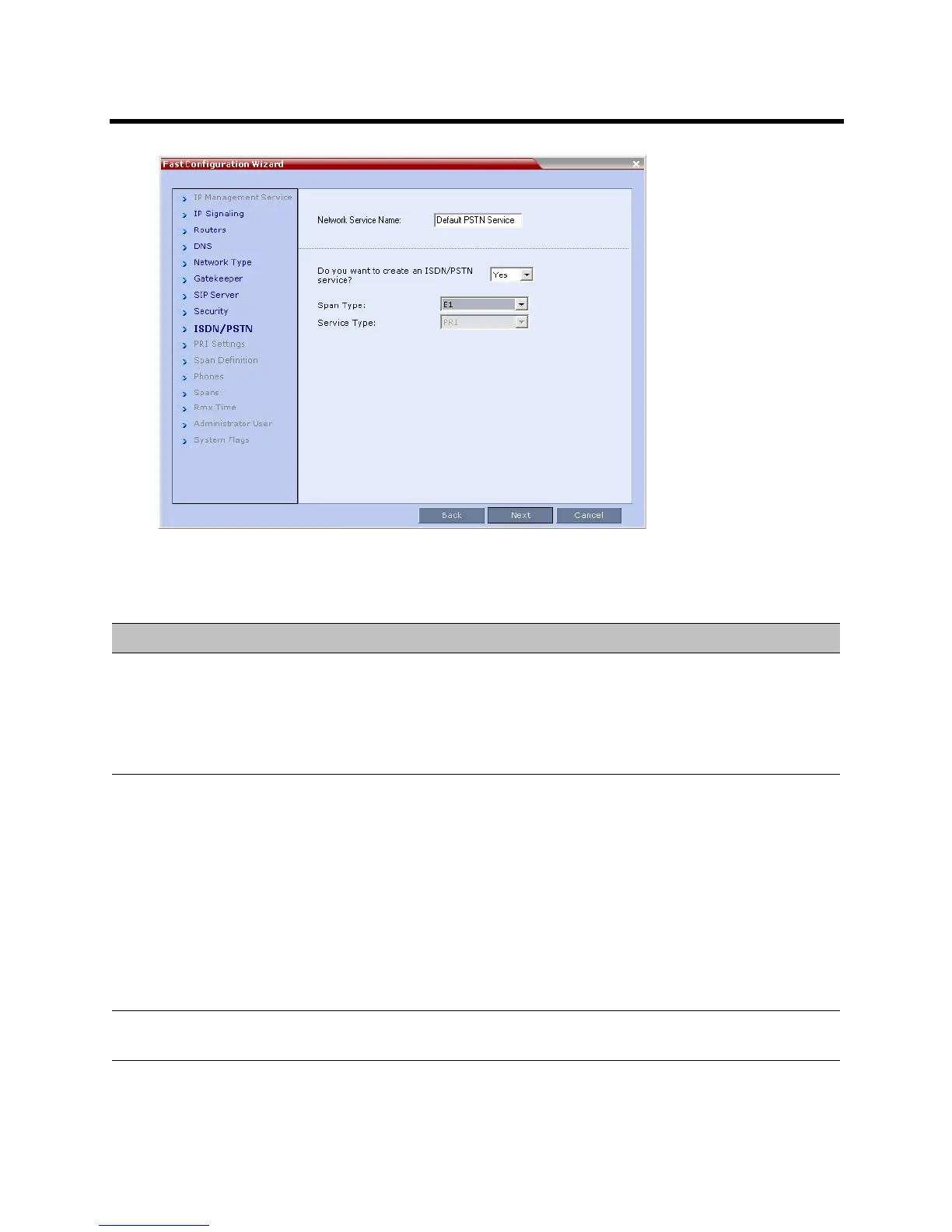
18 Define the following parameters
Fast Configuration Wizard – ISDN Service Settings
Field Description
Network Service Name Specify the service provider’s (carrier) name or any other name you choose, using up
to 20 characters. The Network Service Name identifies the ISDN/PSTN Service to
the system.
Default name: ISDN/PSTN Service
Note: This field is displayed in all ISDN/PSTN Network Properties tabs and can
contain character sets that use Unicode encoding.
Span Type Select the type of spans (ISDN/PSTN) lines, supplied by the service provider, that
are connected to the Collaboration Server. Each span can be defined as a separate
Network Service, or all the spans from the same carrier can be defined as part of the
same Network Service.
Select either:
•T1 (U.S. – 23 B channels + 1 D channel)
•E1 (Europe – 30 B channels + 1 D channel)
Default: T1
Note: Only one Span Type (E1 or T1) is supported on the Collaboration Server. If
you define the first span as type E1 all other spans that you may later define must
also be of type E1.
Service Type PRI is the only supported service type. It is automatically selected.














 To Next Page