Usin@ the _@nit@rs
Fade and Wipe Icons
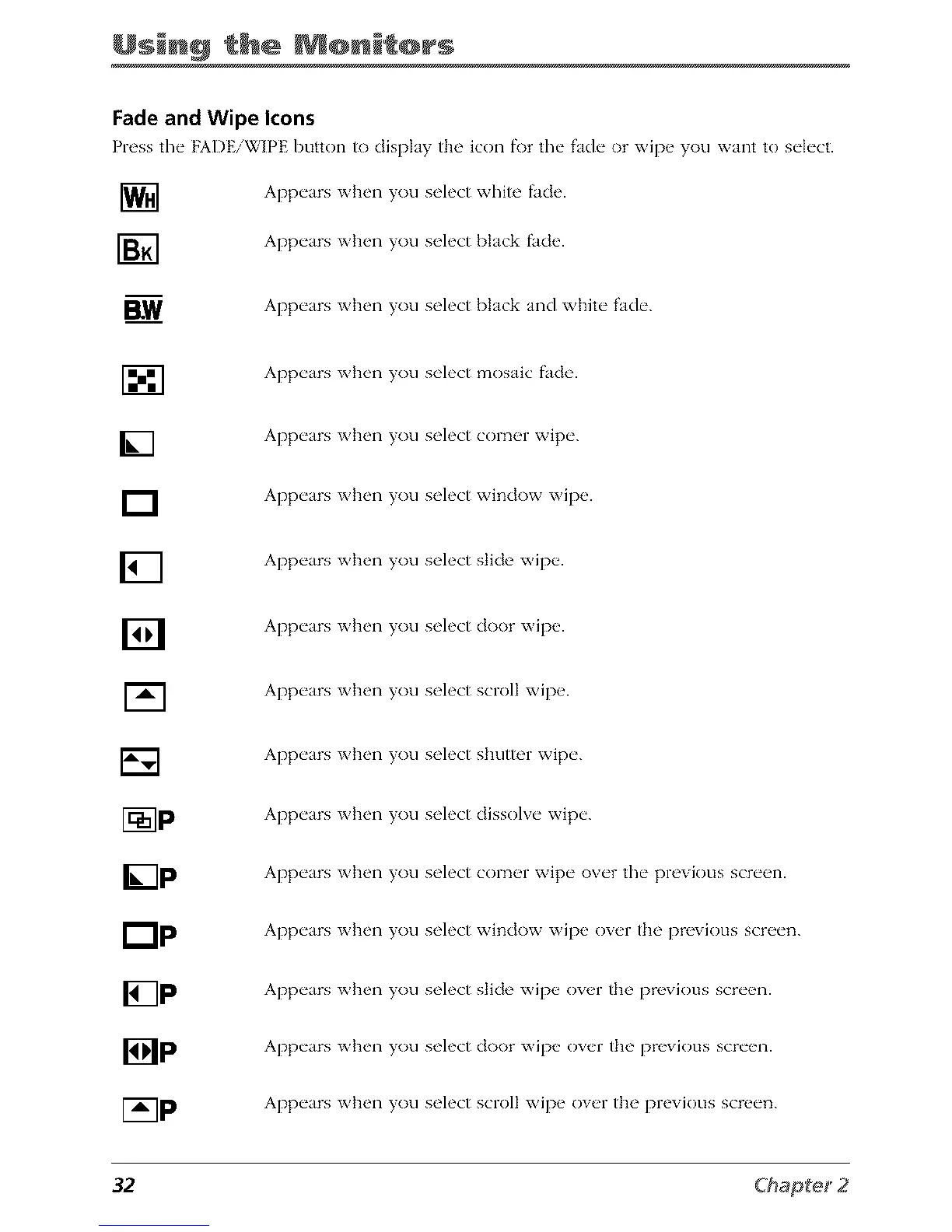
Press the FADE/WIPE button to dispI_Ly the icon f\)r the f'_Ldeor xvip__you w_tnt to select.
[]
[]
BW
[]
r--1
[]
[]
[]
I_P
[]P
lip
l-_--]p
Appe_rs when you select white f:_cle.
Appe_rs when you select bI_Lck _cle.
Appe_rs when you select bI_Lck _nd white _Lde.
Appe_rs when you select mos_Lic _cle.
Appe_rs when you select corner wipe.
Appe_rs when you select window wipe.
Appe_rs when you select slide wipe.
Appe_rs when you select door wipe.
Appe_rs when you select scroll wipe.
Appe_rs when you select shutter wipe.
Appe_rs when you select dissolve wipe.
Appe_rs when you select corner wipe over the previous screen.
Appe_rs when you select window wipe over the previous screen.
Appe_rs when you select slide wipe over the previous screen.
Appe_rs when you select door wipe over the previous screen.
Appe_rs when you select scroll wipe over the previous screen.
32



 To Next Page