104
17.4.2 SYSTEM CHECKOUT
1. Manually move the gimbal pitch and roll axis and check for binding or
obstructions.
2. Check that no wires are pinched.
3. Power on the system and confirm the gimbal properly functions and is properly
oriented.
17.5 PROPELLER REPLACEMENT
Individually damaged or worn propeller blades require the entire propeller to be replaced.
They are easily installed, removed, or replaced with a simple push-and-twist method that
requires no tools or hardware.
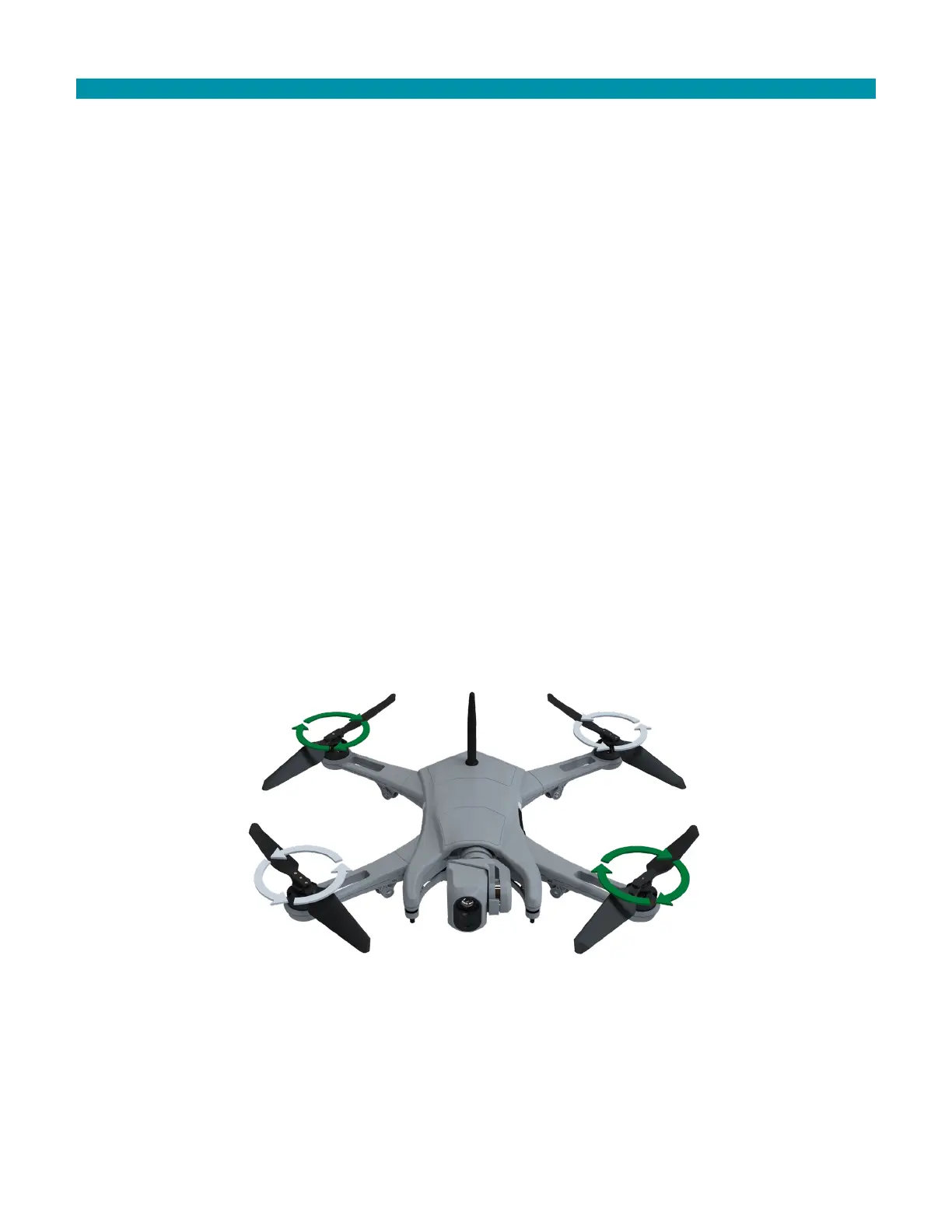
There are two CW propellers and two CCW propellers. The propellers are keyed so that
the CW and CCW props cannot be mounted to the wrong hub.
The CW propellers have black rivets that secure their blades. The CW propellers lock into
place by turning them in a CCW direction.
The CW propeller motors have a black ring below the spring. The CW propeller motors
have a black ring below the spring. The CCW propellers lock into place by turning them in
a CW direction.
The two CCW propellers have silver rivets that secure their blades. The two CCW
propeller motors have a silver ring below the spring. The CCW propellers lock into place
by turning them in a clockwise direction.



 To Next Page