88
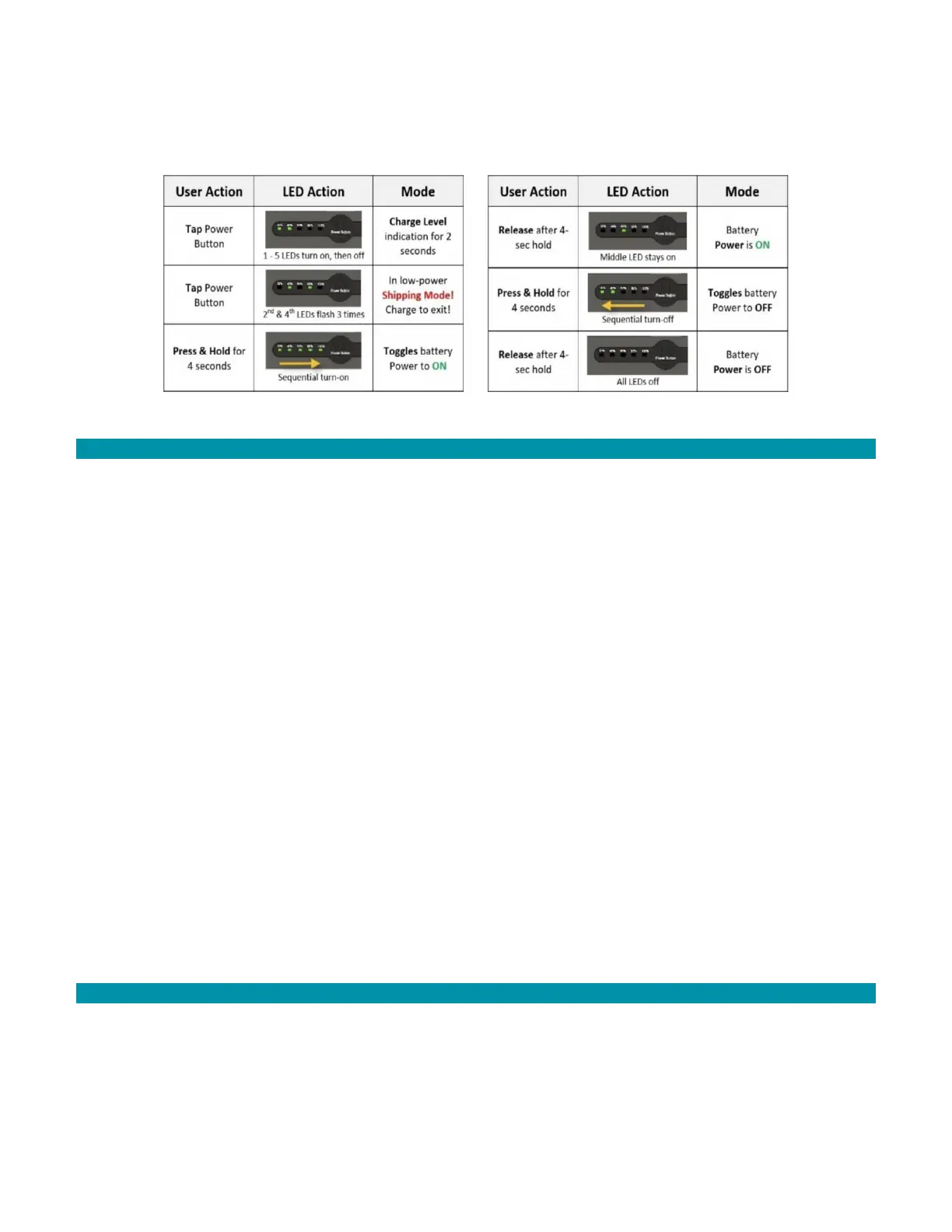
Press the battery’s power button to power on a battery pack. The charge status is
indicated by five LED lights. All five LED lights illuminate when the battery pack is
completely charged.
Figure 3 Battery Status Lights
13.4.1 BATTERY SHIPPING MODE STATUS
Batteries ship in a low-power status called shipping mode. Shipping mode is a low power
state that only consumes 15 uA.
Per regulation, battery packs are shipped at not more than 30% state of charge. Batteries
must be fully charged before using. The battery pack is configured by the factory to be in
a very. This results in a shelf life of several years.
To see if the battery is in shipping mode:
1. Press the battery power button.
2. Watch the LEDs. If the second and fourth LEDs flash three times, the battery is in
shipping mode.
3. Charge the battery. Charging the battery takes the battery out of shipping mode.
Battery packs automatically go into sleep mode after 72 hours of inactivity. Sleep mode
consumes approximately 675 uA.
If a user removes the battery pack from shipping mode without further charging, the shelf
life is 34 days from 30% to a 10% state of charge, and 52 days (7.4 weeks) to 0% state of
charge. If a user removes the battery pack from shipping mode and fully charges the
battery pack, the shelf life in sleep mode is 163 days (23 weeks) from 100% to a 10% state
of charge, and 182 days (26 weeks) to 0% state of charge.
13.4.2 BATTERY CHARGING STATUS
After placing the battery on the charger, the battery displays light sequences to indicate
the charge status of the battery. Tap the battery pack power button to view the level of
charge on the battery. Batteries charge from 10% to 80% in 36 minutes and to 100% in 65
minutes.



 To Next Page