Because RFL™ and Hubbell® have a policy of continuous product improvement, we reserve the right to change designs and specifications without notice.
Filtering
Over time the MA-427 LAN Bridge will automatically learn and store a table with up to 10,000 MAC
addresses of devices on the WAN. When the filter is on, the MA-427 LAN Bridge will use the MAC
address table to only allow frames destined for another LAN over the WAN. When the filter is off, all
frames are sent over the WAN.
Connecting The MA-427 LAN Bridge To Your LAN
You should connect the MA-427 LAN Bridge to a hub or Ethernet switch using a straight-through
cable such as a Black Box 10 ft. straight-through cable (P/N EVSA85-0010).
If you connect the MA-427 directly to a PC or a network interface card (NIC), the RJ-45 cable must
implement a UTP crossover function, such as Black Box 10 ft. crossover cable (P/N EVCRA85-0010).
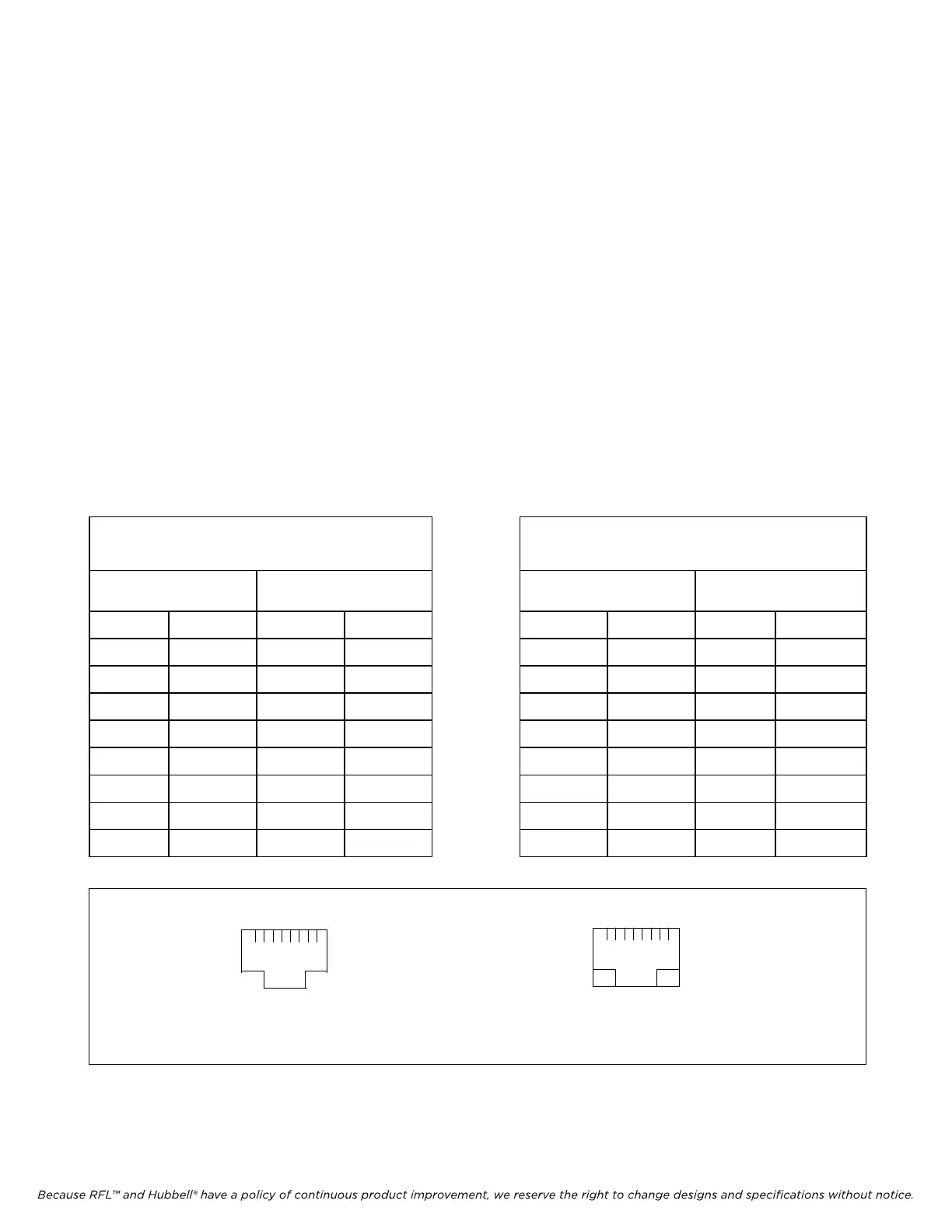
Table 14 provides information for straight-through and crossover cable pin connections. Figure 12
shows the locations of pins 1 and 8 on the RJ-45 connector and on the MA-427.
Table 14. Straight-Through and Crossover RJ-45 UTP Cable Pin Connections
RFL DS-64NC RFL Electronics Inc.
August 1, 2007 49 (973) 334-3100
Straight-Through RJ-45 UTP
Cable Pin Connections
Crossover RJ-45 UTP
Cable Pin Connections
MA-427 HUB or
Ethernet switch
MA-427 PC or NIC
Pin Function Pin Function Pin Function Pin Function
1 TX+ 1 TX+ 1 TX+ 1 RX+
2 TX- 2 TX- 2 TX- 2 RX-
3 RX+ 3 RX+ 3 RX+ 3 TX+
4 Not Used 4 Not Used 4 Not Used 4 Not Used
5 Not Used 5 Not Used 5 Not Used 5 Not Used
6 RX- 6 RX- 6 RX- 6 TX-
7 Not Used 7 Not Used 7 Not Used 7 Not Used
8 Not Used 8 Not Used 8 Not Used 8 Not Used
8 1 1 8
LAN TX/RX LINK LED
LED
MA-427
RJ-45 Connector
Figure 12. Pins 1 and 8 on RJ-45 connector and on MA-427 LAN Bridge



 To Next Page