FX-20
16
Display
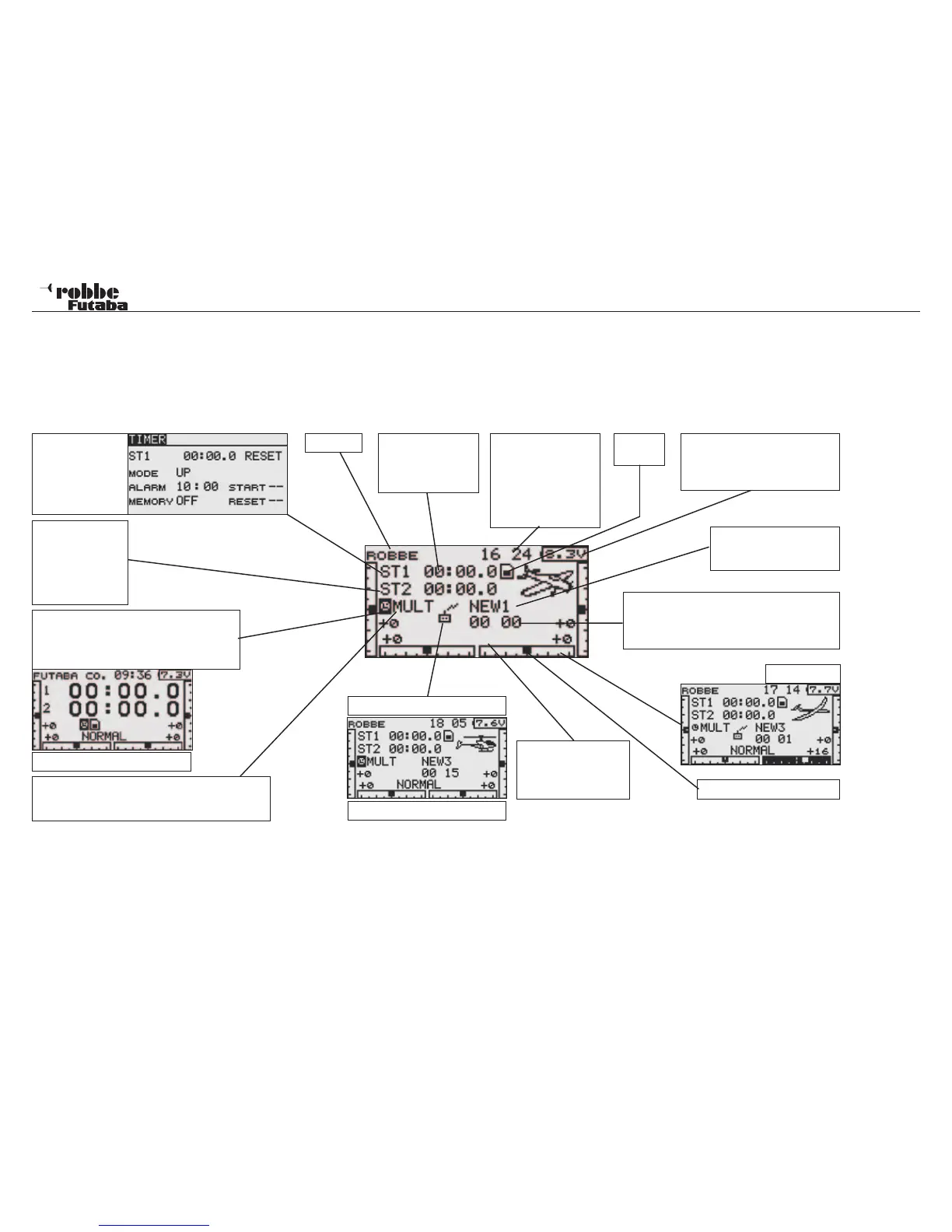
The most important information about transmitter programming is displayed in the Home/Start Display. These direct menus can be
accessed direct from the Start Display. Scroll the „CAP TOUCH SENSOR“ to highlight the required menu and touch the “RTN“ key
(see page 16) to select the relevant data entry menu.
8.1 START-DISPLAY FOR ALL MODEL TYPES
Timer 1
Display field of
Stopwatch 1. Mark
and confirm to
enter the ST1 ad-
justment menu.
Timer 2
Display of Stop-
watch 2,
Mark and confirm
to enter the ST2
adjustment menu.
Modulation indicator
Multi / 7channel
Mark and confirm to enter value adjustment menu
Large Stopwatch
Select and mark this field to enlarge the
stopwatch to full display. To reset to small
size, confirm again with “RTN“.
Start / Stop Timer
Highlight and press
„RTN“ for 1 second
to reset time.
SD card
indicator
System-Timer
Shows operating time
in hours, minutes and
seconds. Mark and
press „RTN“ for 1 sec.
resets the user name
time to 00:00.
Voltmeter
Voltage drops below 6,8 V and
an alarm sounds. Operation must
cease as soon as possible.
Model name
Mark and confirm the
model selection menu
Model-Timer
Shows operating time in hours, minutes and
seconds. Mark and press „RTN“ for 1 sec. re-
sets time to 00:00.
Trim memory
Stick trim position indicator
RF type indicator = On
RF type indicator = Off
Active Flight Condi-
tion indicator
(Only in Glider and Heli
mode)
Username
NORMAL
8. HOME SCREEN/ START DISPLAY DESCRIPTION
Reduce in size



 To Next Page