FX-20
8.3 TIMER-SETTINGS (Stopwatch)
Using the Timer-Menu, you are able to make all adjustments to
the electronic timers. The timers are displayed in two windows
of the display. You have permanent access to, for example,
the total flight time as well as the motor run time of an electric
model. The timers can be individually adjusted for every model.
Changing model memory will automatically load the custom
settings for each model. There is a choice of two timer opera-
tion modes; Count Down- (DOWN) and Count-up timer (UP).
Selecting “UP‘- timer, a maximum flight time may be entered,
e.g. dependent on tank capacity or the battery capacity. As
soon as the Timer is started, the time counts backwards, star-
ting from the entered value. The time remaining will be displa-
yed.
The Count-up timer starts at ‘0’ and displays the time since
activating the switch. During the last 20 seconds, an acoustic
signal sounds at 2 second intervals, in the last 10 seconds of
the programmed time, the stop watch alarm sounds every se-
cond. This is followed by a continuous tone for several seconds
after the programmed time has elapsed; the time will continue
to run with a negative value.
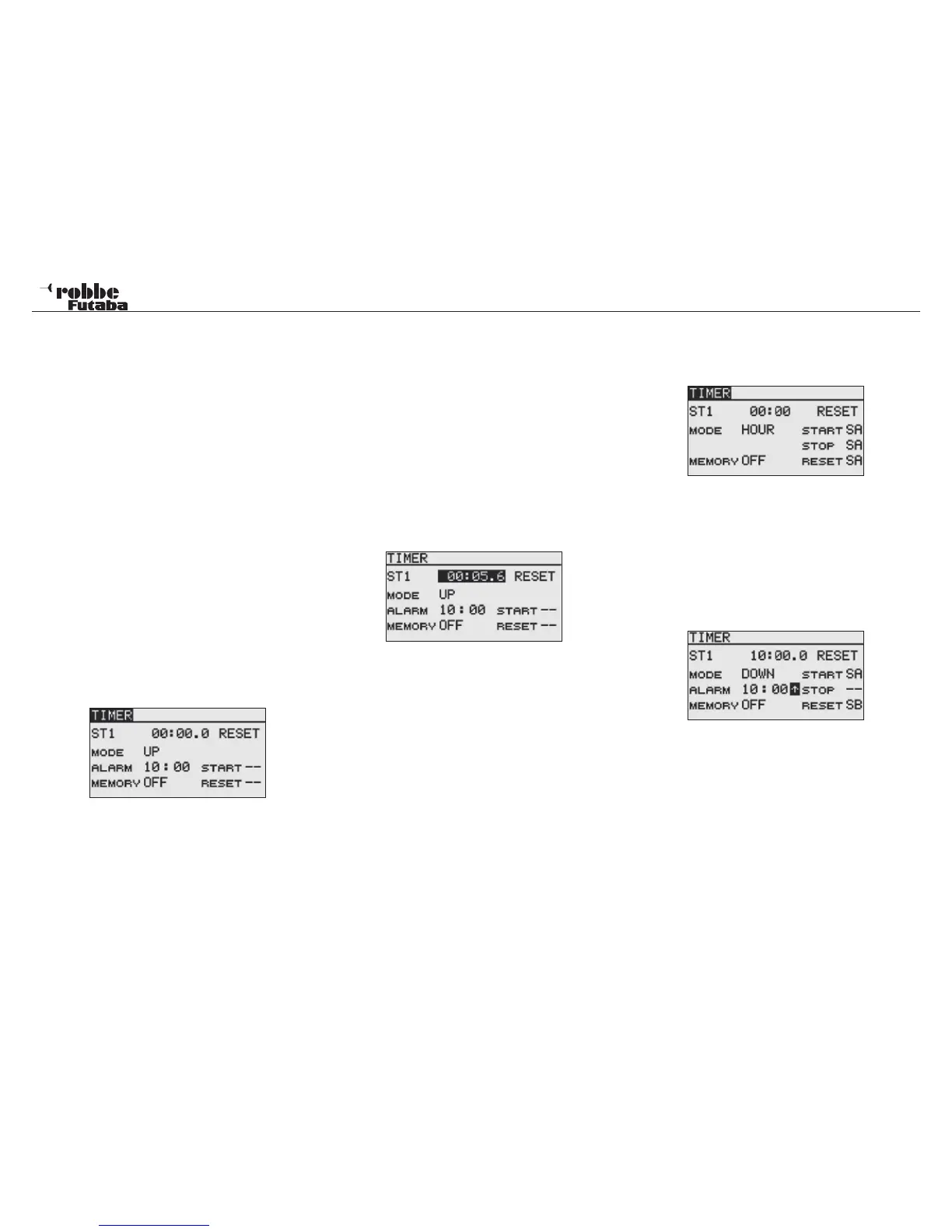
Mark with the „CAP TOUCH SENSOR“ the ‘TI1’ and „TI2“
Functions in Start-display and confirm selection with “RTN”.
The settings are entered here for TI1 and TI2. Mark the desired
function and confirm with the ‘RTN’- key. Timer 1 will be dis-
played as below:
• Select MODE (Count DOWN or UP)
Firstly you must choose whether the active Timer will func-
tion as a Count UP or Count DOWN stopwatch. To adjust,
mark the relevant field and adjust setting with the “CAP
TOUCH SENSOR“.
• Time setting
Move the cursor to the [ALARM] item and touch the RTN
button to switch to the data input mode. Set the time by
scrolling the touch sensor. [00]: [00]: [min]: [sec]. The maxi-
mum time setting is 59:59 (min: secs). Touch the RTN but-
ton to end the adjustment and return to the cursor mode.
• Switch setting
Move the cursor to the item of the switch you want to use
for the timer. One can use a switch to:
- RESET clock to zero.
- Start/ Stop the timer.
Other timer options can also be linked to the same switch, ac-
cess the switch setup screen by touching the RTN button. Se-
lect the switch and ON direction.
To reset the timer, the „RESET“ switch can be operated. There
is also the possibility, to activate ‘RESET’ oft he relevant timer
in the Start Display and confirm by pressing ‘RTN’-key.
• Memory Function
Activating this („ON“) stores the last stop time when chan-
ging model memories or turning off transmitter. When swit-
ching on again the stored time value will be used. This is
useful to record the total running time of a motor.
• Change the preset time
Timer1 and/ or Timer2 can be used to store model memory
timers this has the advantage that this Timer can count
up to 99 hours:59 minutes compared to a normal model
memory timer that can only count up to 59:59.
To set-up this timer mode, navigate using the „CAP TOUCH
SENSOR“ to „MODE“. Touch „RTN“ to select. Then scroll the
sensor to „MODL“ mode. The seconds and one-hundredths
display will be removed and only hours and minutes will be
appear.
• Alarm Piepser
By using the arrow, the alarm beeper settings can be set as
required.
In „DOWN“ mode and with the arrow pointing towards the bot-
tom, the beep sounds one minute before the set time is rea-
ched.
In „DOWN“ mode and with the arrow pointing towards the top,
the beep sounds 30 seconds before the set time is reached.
Note:
The FX-20 Tx has an automatic Timer, which reminds the
user how long the Tx has been switched on. If, after 30 mi-
nutes, there has been no control input operation of sticks,
switches etc., an alarm sounds. Move any control, the
alarm will be switched off, and the timer is reset to zero, if
required, turn off the transmitter.
18
Stopwatch



 To Next Page