FX-20
11.5 THROTTLE CURVE / DELAY
(ONLY FOR POWER AIRCRAFT MODELS)
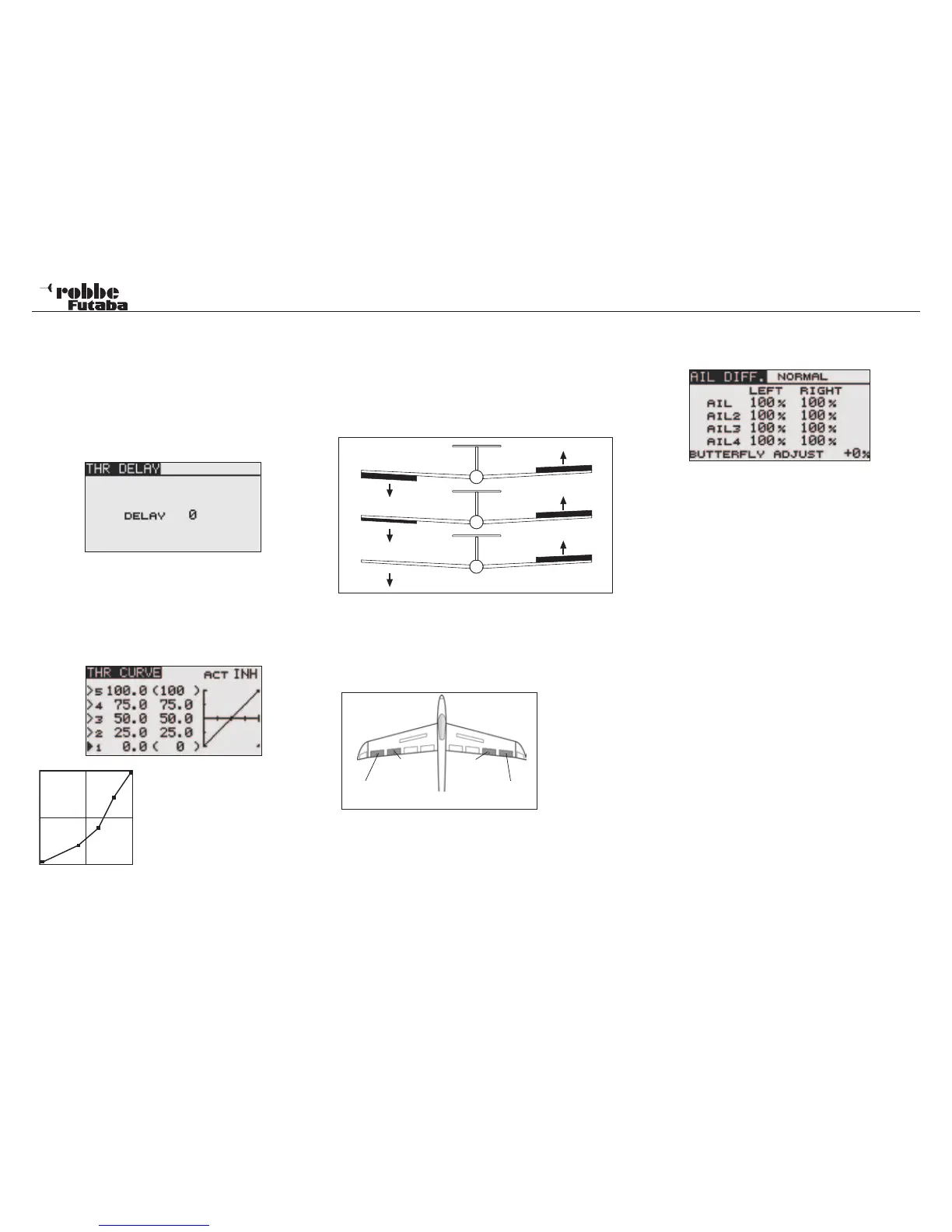
Operating the throttle stick will automatically control the throttle
servo. Using “THR CURVE“ is to slow the response of the
throttle stick.
Use “THR CURVE“ to be able to slow the response of the
throttle stick. A delayof between 0-27 steps can be program-
med. Thus allowing slower reacting carburettors to be con-
trolled with higher speed servos.
The throttle curve function is used to adjust the throttle curve
with up to five programmable points for the optimum engine
speed to suit any stick position, for example to compensate for
the non-linear carburetor response found on most model en-
gines. Highlight the “THR CURVE” function in the Model Menu
using the “CAP TOUCH SENSOR“ and confirm with “RTN”.
Program the curve so that the motor
speed follows the throttle stick, i.e.
half maximum revs is at half stick po-
sition.
11.6 AILERON DIFFERENTIAL (AIL DIFF.)
An aircraft requires differential on the aileron throw to compen-
sate for the adverse yaw tendency when applying aileron con-
trol. When an aircraft banks then the down going aileron gives
more drag as it is working in a higher pressure region of airflow
than the up going aileron. This leads to a yawing motion of the
aircraft opposing the bank caused by the ailerons.
Aileron differential movement compensates for this adverse
yaw effect by reducing the throw of the down going aileron
in relation to the up going aileron to try and equalize the drag
caused by each aileron. Thereby removing any adverse yaw
tendencies when rolling or banking the aircraft.
This function
requires the 2
separate ai-
lerons to be
mixed so that
the throw of
the “Up going
aileron” and
“Down going aileron” may be individually adjusted to suit. A
separate servo must be used for each aileron. With the T8 FG,
the control inputs allocation is programmable. In the above di-
agram, the example shows two ailerons per wing half.
Highlight “AIL.DIFF” option in model menu with the “CAP
TOUCH SENSOR“ and confirm the selection with “RTN”. The
Display has a sub menu as below:
To program, follow the steps below:
Set the differential throws
Highlight in the Display up to a maximum of four individual ai-
leron servos per left and right hand wing half that you wish
to program. The adjustment is made by scrolling the cursor
with the “CAP TOUCH SENSOR“ and data input confirmed by
the ‘RTN’-key. Scroll the touch sensor when the aileron stick
is moved to maximum left or right stops to adjust the throws
required.
Butterfly-Differential setting (Glider only)
Changing the percentage settings of “BUTTERFLY DIFF“ , the
effect of the aileron differential settings can be set as required.
The differential should be a little less, since on the landing ap-
proach, one needs maximum throw and therfore a reduced
differential value is needed.
Model menu
37
without differential
differential 50%
differential 100% (Split)
aileron 1
aileron 3
aileron 4
aileron 2



 To Next Page