FX-20
13.6 THR-MIX
This function corrects slowing of engine speed caused by
swash plate operation during aileron or elevator operation. The
method of applying clockwise or counterclockwise torque when
pirouetting can also be corrected. Before adjusting values,
select the Flight Condition to be changed. Using the CAP
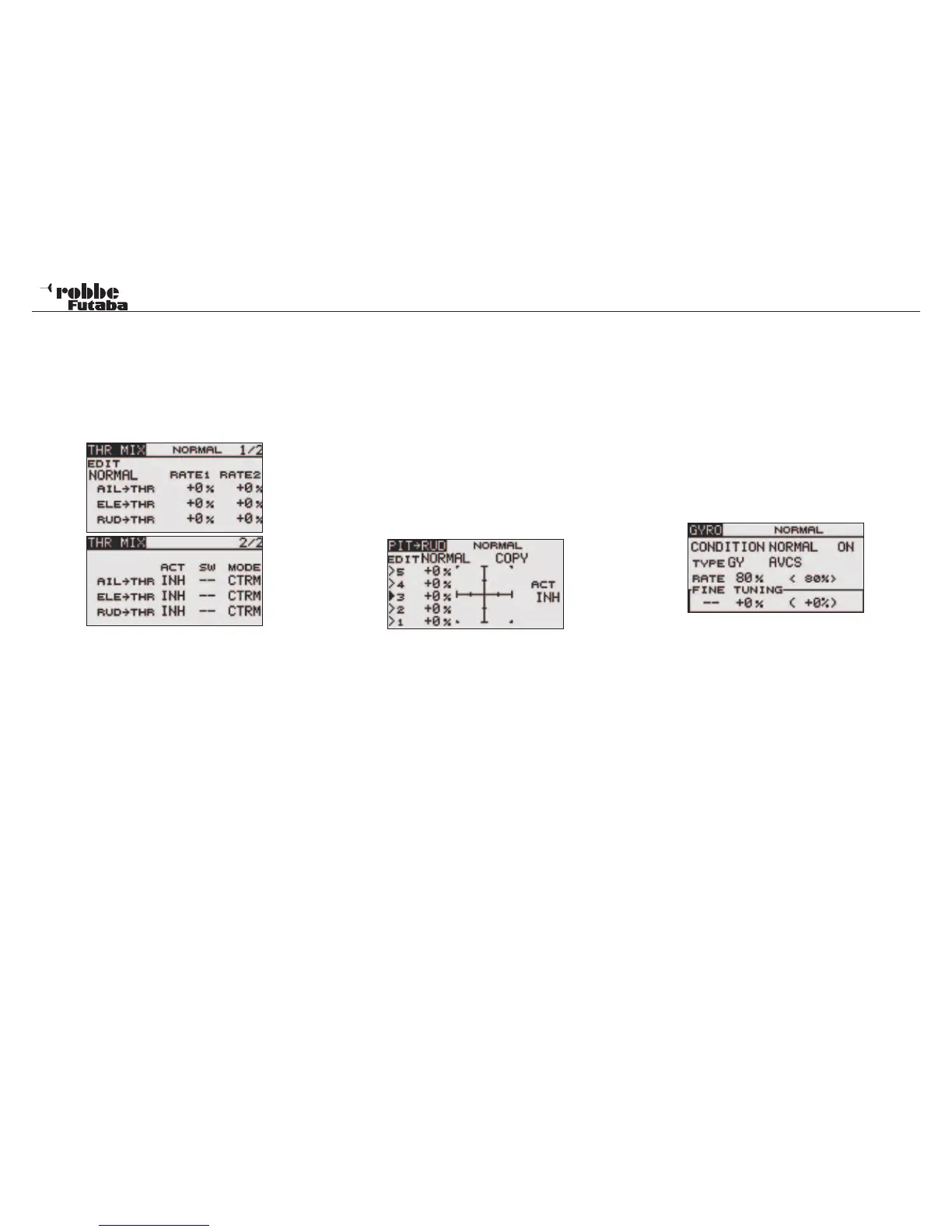
TOUCH SENSOR, select [THROTTLE MIX] at the Model menu
and access the setup screen shown below by touching RTN.
Both Displays are:
The first Display programs the Mix Rate. move the cursor and
highlight the mixing rate item you want to correct and touch
the RTN button to switch to the data input mode. Adjust the
rate independently by scrolling the touch sensor. The RATEs
are displayed as %ages and have an adjustment range of
-100~+100% for each mixer and in both servo directions (When
the RTN button is touched for one second, the rate is reset to
the initial value). Touch the RTN button to end the adjustment
and return to the cursor mode. The second column is used to
activate every mix that is required. When [[--]] is set, the swash
mixing function is operated by selecting the flight condition.
When setting an [ON]/[OFF] switch, move the cursor to the
[SW] item and touch the RTN button to call the H/W SELECT
screen. Set the switch and its ON position. To set the Opera-
tion MODE, Move the cursor to the [MODE] item and touch the
RTN button to switch to the data input mode. Select the opera-
tion mode by scrolling the touch sensor to select either: CTRM
mode which corrects near the center only, or LINear mode
which corrects the complete range. Touch the RTN button to
change the operation mode and return to the cursor mode.
In the ‘SW’ cell, a switch can be assigned and its operating
direction defined in H/W SELECT menu. The pre-set condition
is always on when the display is set to ‘--’.
13.7 PIT -> RUD (REVOLUTION) MIXING
Use this mix when you want to suppress the reaction torque
generated by main rotor pitch and speed changes during pitch
operation. Adjust so that the nose does not move in the rudder
direction. When a GY Series or other modern heading hold
gyro is used, since correction is performed by the gyro, this
mix is not utilised.
If this function is used when the gyro operation mode is
the AVCS mode, the neutral position will change.
Before adjusting settings, select the relevant flight condi-
tion switch or the “EDIT“ function.
Select PIT to RUD in the Model Menu and access the single
setup screen shown below by touching the RTN key.
When using this function, move the cursor to the ACT item and
touch the RTN button to switch to the data input mode. Select
the ACT mode by scrolling the touch sensor. Touch the RTN
key to activate the mixing and return to the cursor mode. (ON
is displayed.) In most cases, a straight-line mix curve is ideal
for the Revolution Mixer.
To copy the curve, move the cursor to COPY item and touch
the RTN key to switch to the data input mode. Select the copy
destination IDLE UP condition, by scrolling the touch sensor
and touch the RTN key. Select the YES and touch the RTN
key. Now the relevant IDLE UP curve can be finely adjusted.
Make adjustments in small steps and check each change by
making short test flights. When adding or reducing pitch from a
stable hover, the nose of the helicopter should not rotate at all.
13.8 GYRO MIXING
This function used to adjust gyro sensitivity. The sensitivity as
%age and operation mode (Normal mode/ AVCS mode) can
be set for each flight condition. The gyro gain/sensitivity can
be switched by either each flight condition OR using separate
switches with up to 5 gains/sensitivities being available to use.
Before making any adjustments, select the flight condition
or activate switch mode by highlighting the “CONDITION”
field and changing it to “SWITCH” oder dem Flugzustands-
funktiond Feld auswählen (NORMAL, GASVORW1, etc.)
Select GYRO in the Helicopter Model Menu and access the
setup screen shown below by touching RTN:
This function is normally switched ON in every Flight Condi-
tion. To turn it OFF, scroll to the ON field and select INH in the
normal manner.
Move the cursor to the gyro TYPE selection item and touch the
RTN button to switch to the data input mode. Select the gyro
type by scrolling the touch sensor. Select GY: when a Futaba
GYA gyro is used Or NORM: When other than Futaba GYA
gyro is used touch the RTN button to change the gyro type
and return to the cursor mode. The TYPE item can be used to
select either an AVCS or NORM gyro type. Further advice will
be found in the instructions of your gyro being used.
Depending upon the Flight Condition selected, the gyro gain/
sensitivity or RATE can be adjusted as a %-age value. Using
the normal method, scroll to the RATE item with the “CAP
TOUCH SENSOR” and adjust the sensitivity. The Initial value
is 80%. Touching the ‘RTN’-key for 1 second will reset to fac-
tory pre-set value.
Here, one can make fine adjustments to the mixer settings
using FINE TUNING . Select the transmitter control required
for these adjustments. Using the CAP TOUCH SENSOR move
the cursor to the [--] item and touch the RTN button to ac-
Model menu helicopter
57



 To Next Page