FX-20
kage Menu.
Highlight the “AIRBRAKE” Option in Model Menu with the “CAP
TOUCH SENSOR” and confirm with “RTN”. The Display has
two sub-menus, which are as follows:
If no control stick or knob (Auto SW) is assigned to operate
the Airbrake, then it is possible to assign any switch to operate
the Airbrake surfaces and elevator compensation. The throws
of the aileron, flap and elevator surfaces can be programmed.
Also the operation SPEED in both directions can also be set for
all the airbrake control surfaces.
Using the second page of the menu, activate the mixer in the
ACT/INH field. Using the usual method, program a switch field
to operate the Airbrake. The preset condition is ‘--’ and the
mixer is permanently on.
If you wish to use a joystick control to operate the AIRBRAKE
automatically, mark the AUTO-SW field and select in H/W SE-
LECT, the desired stick control and its On/Off switching posi-
tion using the usual method.
11.25 FUEL MIX (ONLY MOTOR MODEL)
This function works only in the Airplane and Helicopter Model
Types. It allows a separate servo to be used for mixture control
of the carburetor mixture. The advantage is that the mixture
servo throw can programmed as a 5 point curve to operate
in conjunction with the throttle curve, thereby ensuring the
optimum mixture setting throughout the throttle range. An ad-
ditional acceleration function ensures that when opening the
throttle that the engine receives more fuel than normal.
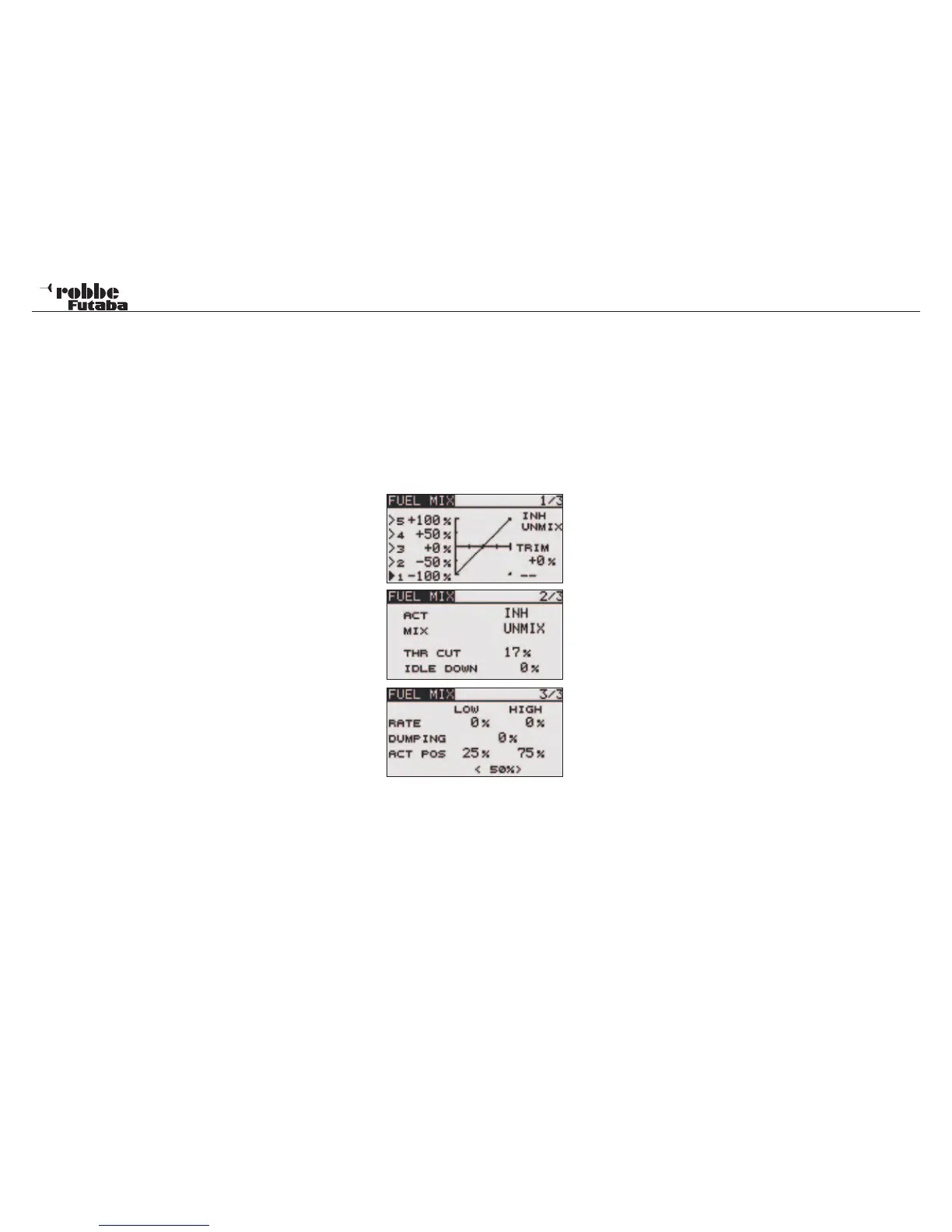
Highlight FUEL MIX in the Model Menu. The Display has three
pages of sub menus:
To program this function, please do as follows:
Activate the Function
To be able to use the automatic Fuel Mix function, it must be
activated. On page 2/3, set the ACT/INH field to ACT to acti-
vate.
Setting 5 point Curve
The Mix type (MIX/UNMIX) must be selected. Highlight and
select the mixer type in the MIX field. If MIX is selected, then
the Master Data from the programmed throttle curve will be
applied. If UNMIX is selected, then the Master Data is depen-
dent upon the actual position of the throttle stick. n. The 5-point
curve programming is made on page 1 and highlights each
point and adjusts the %age values to set each of the five ad-
justment points.
Needle High Trim setting
Page 1/3 has a TRIM function to allow fine-tuning of the High-
speed mixture. A switch or knob should be assigned; this is
made in the usual way. The pre-set is ‘--’, i.e. the function is al-
ways turned on. After highlighting the field, the switch or rotary
knob selection may be made in H/W SELECT menu.
Acceleration RATE setting
When opening the throttle the engine requires more fuel and
it is helpful to momentarily richen the mixture when the throttle
is being opened quickly. The RATE may be adjusted for LOW
and HIGH throttle openings. Highlight the field to be adjusted
and the %age set to suit. The adjustment range is between
0-100 %. During the throttle opening, the mixture servo moves
to the mixed position. At 0%, the mixture servo opens at the
same rate as the throttle servo, at 100 %; the mixture servo
opens 10 - 15° in front of the throttle and then returns to the
programmed setting. The pre-set for this is 0%. Touching
‘RTN’-key for approx.1 sec. will return to pre-set %age.
The acceleration function may also be damped (DUMPING),
so that the motor doesn’t suffer from a sudden rich mixture.
Highlight the DUMPING field, and adjust between 0 % to 100
%. The pre-set value is 0 %. Touching RESET key will return
to initial value.
Using the ACT POS fields, the operation point setting can be
adjusted in page 3/3. Two ranges are available, for the lower
range, from 0 to 49% (Min.) and for the upper range, from 50
to 100 % (Max.) can be programmed. The %-values is shown
in the respective fields.
47
Model menu



 To Next Page