FX-20
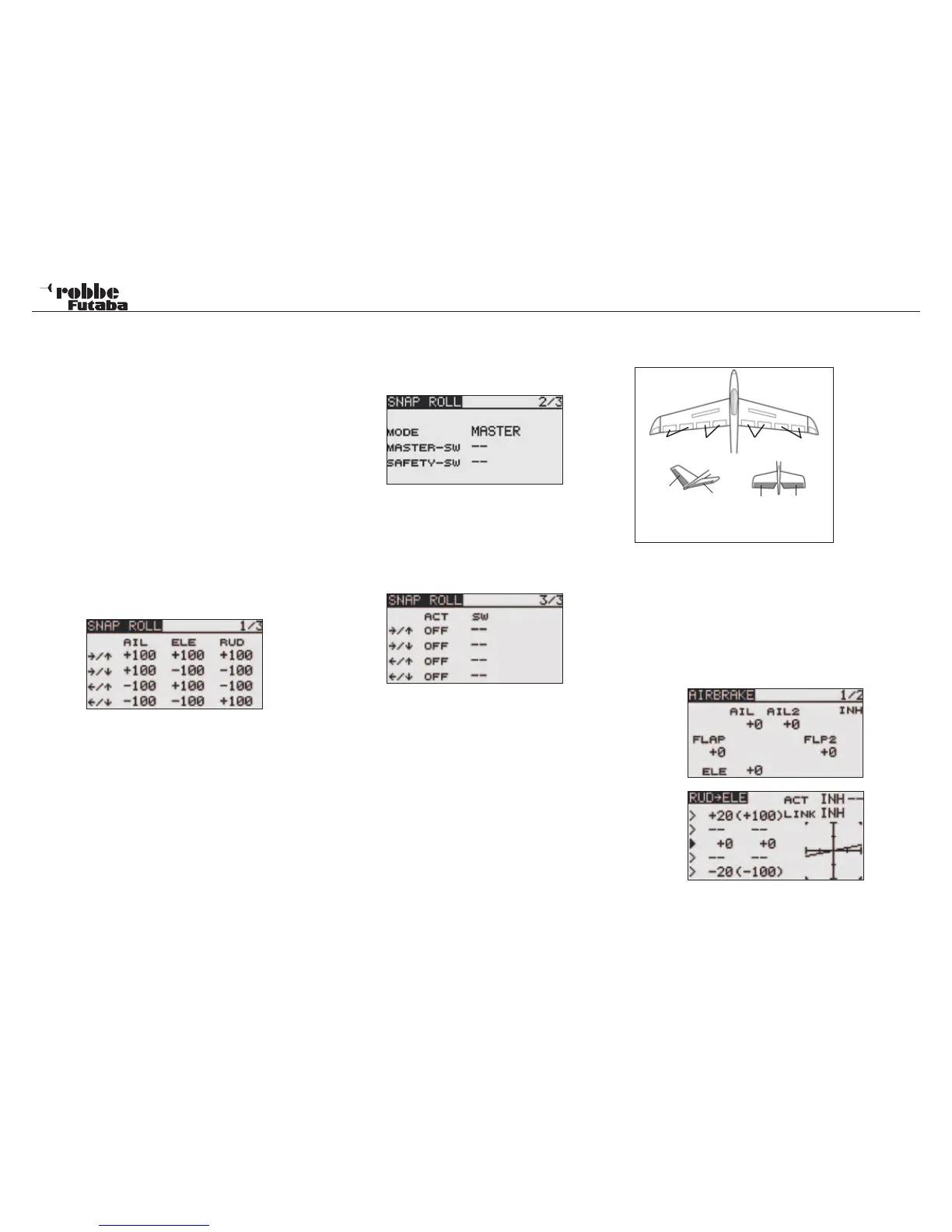
11.23 SNAP-ROLL-FUNCTION
This Function defines the switch and throw adjustments of ai-
lerons, elevator and rudder when performing a “Snap Roll”.
When required, a switch operates this manoevre. The servo
movements cannot be over-ridden. For this manoevres, the
three main control surfaces (aileron, elevator and rudder) can
be assigned with up to four settings (right/up; right/down; left/
up; left/down). MASTER or SINGLE operation modes can be
selected, where the Snap Roll function is turned ON/OFF by
the master switch. It is possible to set the direction switch to the
direction in which you want to snap roll. When [Single] mode
is selected, The snap roll in each direction can be executed by
means of independent switches and positions.
A safety switch can be set to prevent the inadvertent activation
of the snap roll. For example, the landing gear is lowered; even
if the switch were turned on accidentally the snap roll would not
be executed. The snap roll switch is activated only when the
safety switch is OFF.
Highlight and the “GYRO” option in the Model Menu using the
“CAP TOUCH SENSOR and confirm with “RTN”.
The servo throws can be set as %ages in the first menu page
for all three controls (ailerons, elevator and rudder).
Using the usual method to adjust settings, highlight the relevant
field with the “CAP TOUCH SENSOR and confirm with “RTN”.
In the second menu the operation MODE and switch assign-
ment can be made for ‘MASTER’- or
‘SINGLE’- mode.
As already described, as well as the master switch, ‘MASTER’-
Mode requires a safety switch to be assigned using the usual
method in H/W SELECT. In the third menu, switches can be
programmed for each of the four snap roll directions by the
usual method of highlighting, selecting and data entry using the
“CAP TOUCH SENSOR“. Dependent upon the switch positions
the ACT condition will be displayed as ON or OFF.
Finally, double check all settings on the ground before flying
with Snap Roll activated.
11.24 AIRBRAKE MIXER
(Active only with Airplane Model Type)
This function
is used to in-
crease t he
aircraft‘s drag
and is useful
for landing or
diving, etc.. The
preset eleva-
tors and flaps
(camber flap,
brake flap) off-
set amount can
be activated by
a switch.
The offset amount of the aileron, elevator, and flap servos can
be adjusted as needed. Also the operation SPEED of the ai-
leron, elevator, and flap servos can be adjusted in both direc-
tions. If the Auto Mode is activated, this will link the Airbrake
to a stick, switch, or knob. A separate stick switch or knob can
also be programmed as the ON/OFF switch.
When operating the Airbrake, most models have a pitch trim
change and an Elevator compensation can be programmed to
counteract this.
The Function will only be active when the Model Type Airplane
and FLAP Wing Type i.e. 2 AIL+1 or 2FLP is selected in Lin-
Model menu
46
AIL1 FLP1 FLP2 AIL2
ELE
ELE
ELE2
RUD
V-TAIL AILVATOR



 To Next Page