FX-20
10.14 WARNING
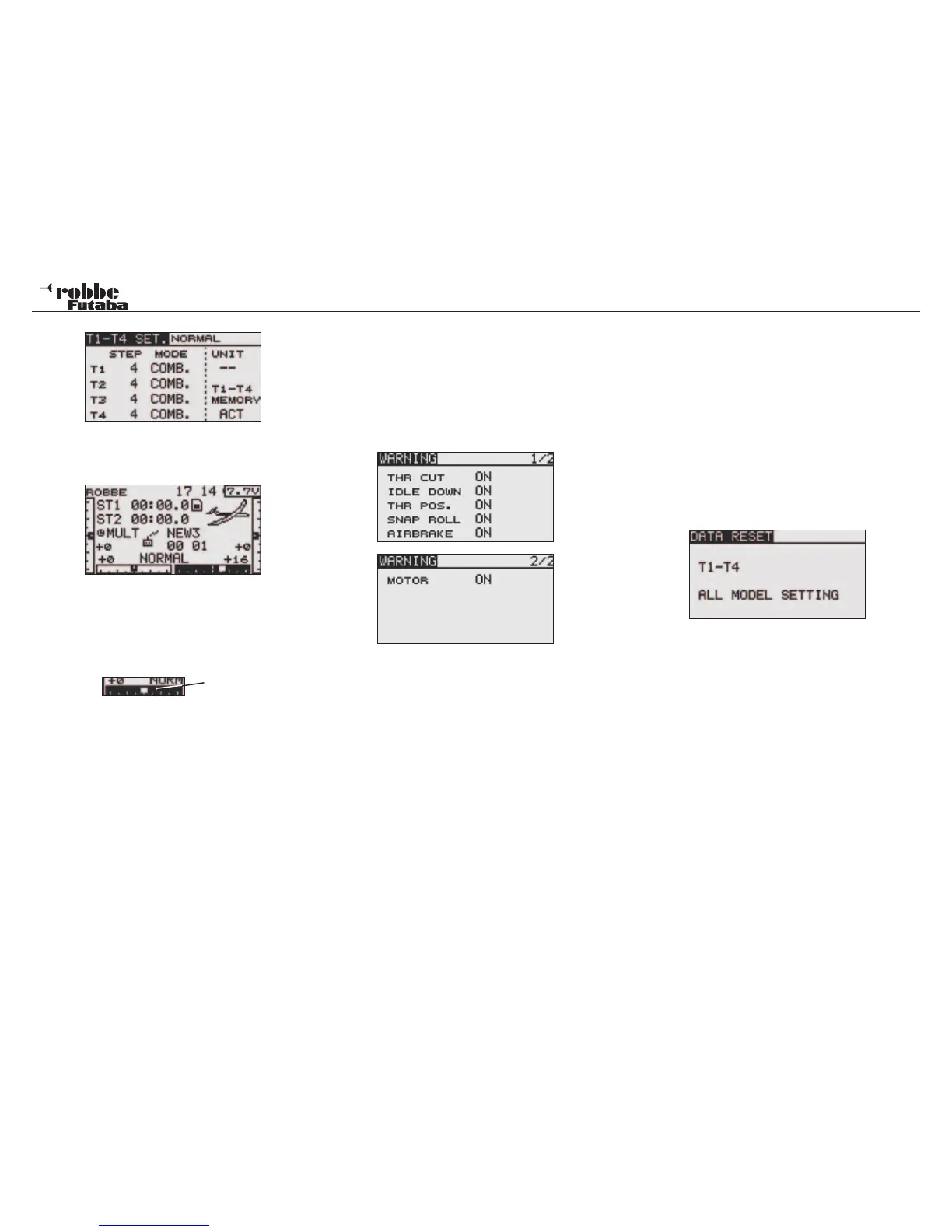
One can programm an alarm to warn of unwanted mixers as
well as incorrect flight conditions being active during the trans-
mitter switch on sequence.
This function serves as safety device for the operator and the
model, by preventing inadvertent settings on the transmitter,
such as incorrect stick position being used during motor star-
ting.
As delivered from the factory, all Mix Alarms are set to „ON“.
To be able to switch of the alarm, switch „OFF“ the relevant
control or mixer, or turn the transmitter on wit RF radiation swit-
ched off.
Then select the appropriate control trim display scale and press
“RTN“ key for at least 1 second. The setting is confirmed when
a beep is heard and the trim display re-sets to 0%.
To reset the indicator to „0“, the trim value difference is buf-
fered in the transmitter. Thereby allowing a quick visual check
to be made on the Display, to see whether all trims are set to
„0“, as well as checking whether further trim adjustments have
been carried out.
The stored trim value difference is shown in the Display.
The memory for this is limited. If the end point has been rea-
ched and it can no longer be stored, then the linkage must be
mechanically adjusted to suit.
Separate (SEPARAT) / Combined (COMB.) Trim
The function “COMB.“ / „SEPARAT“ is used to determine
whether the trim is the same for all flight conditions = “COMB“,
(combined). If set to “SEPARAT“ (separate), the trim can be
individually set for each flight condition. The display will change
when operating the flight-condition switch. The combination of
both combined and separate functioning trims is also possible.
Note:
This function only works with glider and helicopter model types.
10.15 DATA-RESET
When setting up a new model memory, this allows you to reset
all the stored data to factory pre-set values.
• Reset trim settings (T1-T4 active Flight Condition)
This sub-menu resets all trim settings saved in the active
flight condition back to factory pre-set
• All Model Data Reset
This sub-menu resets all Linkage- and Model- menus
except for frequency, Model Select and Model Type.
Highlight ‘DATA RESET’ using the “CAP TOUCH SENSOR“ in
the Linkage Menu and confirm selection with “RTN”. The set
up screen is as below:
Highlight with the “CAP TOUCH SENSOR“ the item that you
would like to reset and confirm with ‘RTN’-key. Pressing this
key again for 1 second will make the chosen reset process.
Touching another key will interrupt the reset process.
Linkage Menu
33
Trim difference



 To Next Page