FX-20
9.9 INFORMATION
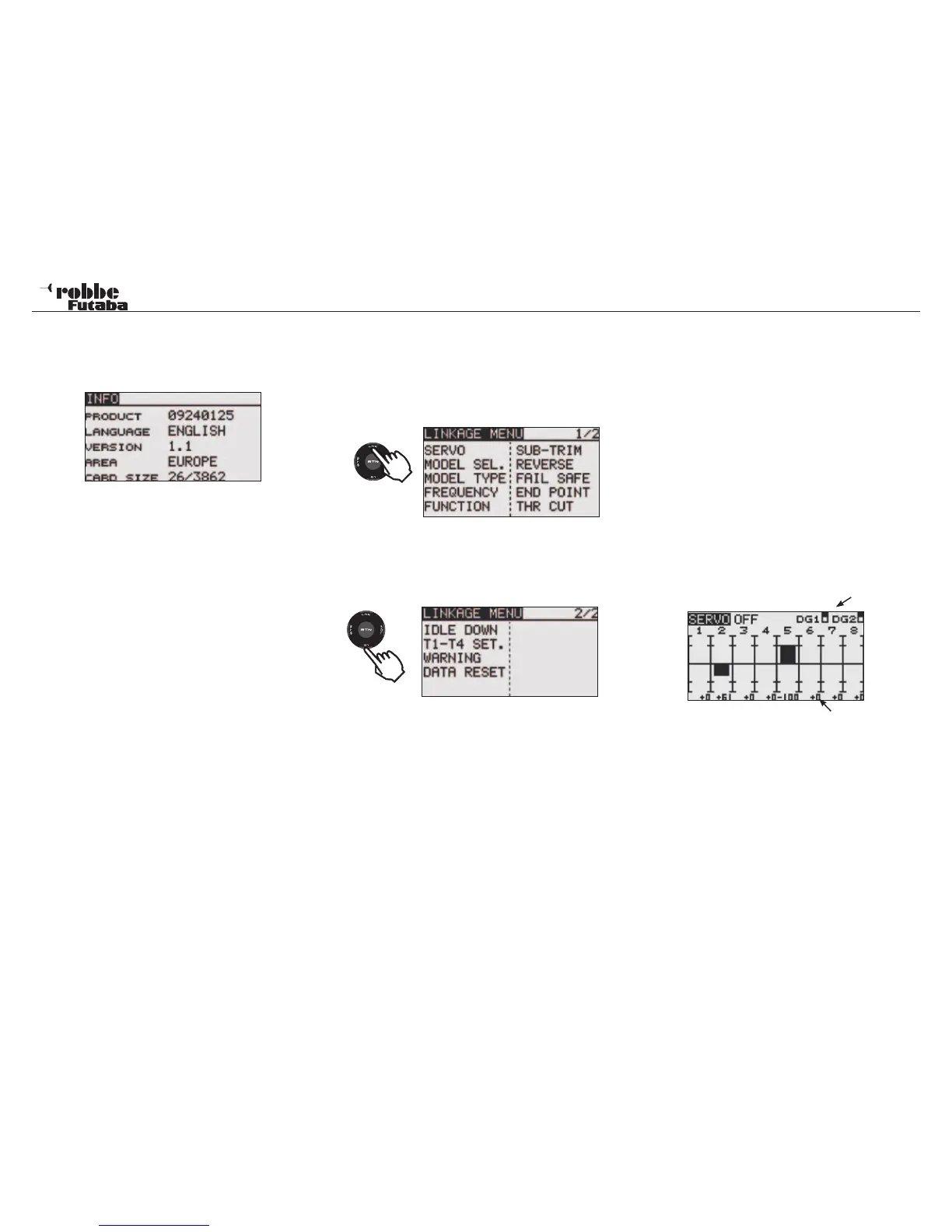
This menu has information about the product serial number,
language, software version, geographical area and model me-
mory.
Serial number: The transmitter serial number
Language: Choice of German, Dutch, French,
Czech, Russian, Italian, English and
Japanese languages.
Version: The Version number of the user software
can be seen in the field “Version”.
Area: Displays the Area Code for the homolo-
gated area.
Modl Memo: As soon as a SD-card is fitted to the
transmitter, the number of model memo-
ries in use will be displayed (Model data).
The transmitter can accept SD cards up
to 2 GB= 3862 Models.
Should no SD-card be used, then there will be no display.
Example.: 49/3862
Where 49 is the number of memories in use and 3862 is the
total memory capacity available on the SD-card in use.
10. LINKAGE-MENU
The Linkage Menu is made up of functions, which perform
model addition, model type selection, frequency setting, end
point setting, and other model basic settings. Their data will be
stored within a model memory in a separate memory.
The linkage menu is described in detail below:
The S1 key is used to move between display 1/2 and 2/2.
Scrolling the Cap Touch Sensor over the last position, will au-
tomatically switch to the next page. The selection takes place
by scrolling the Cap Touch Sensor in the required direction.
The second linkage menu is described as follows:
The following function options are:
Servo: Servo monitor, which displays the servo test and
operation position,
Model Sel: Select model memory, Model addition, call, dele-
tion, copy, and model name setting
Model Type: Model type, wing type, swash type, etc. selection
Frequency: FASST mode selection and area mode selection
Function: Channel assignment of each function can be
changed
Sub Trim: Adjusts the neutral position of each servo
Reverse: Reverses the servo travel direction
Fail Safe: Fail-safe function and battery fail safe function
setting
End Point: Servo travel adjustment and limit setting
THR Cut: Stops the engine safely and easily (airplane and
helicopter only)
Idle Down: Lowers the idle speed of the engine
Trim-Adj: Trim step adjustment + Trim memory
Mix Alarm: Warning of any mixers
Data Reset: Reset data to factory default
Note:
Dependent upon the chosen model type, there are some small
differences in the individual displays in the airplane, glider and
helicopter linkage menus.
10.1 SERVO
The „SERVO“ menu shows the servo throw, which have been
adjusted graphically on a bar chart with a percentage value.
Select [SERVO] in the Linkage menu by using the CAP Touch
Sensor and access the setup screen shown below by touching
the RTN key.
switched channels 9 + 10
Throw display in percent
The Servo test has 3 different modes:
Servo test (OFF)
This mode will display the current servo position (travel and
position) to manually check mix functions and throw settings of
the individual servo channels.
Operate the chosen control. The display will show the servo
throw as a bar chart and as a percentage.
23
Linkage Menu
2 x
1x



 To Next Page