FX-20
cess the H/W SELECT Display screen. Move the cursor to the
rate item and touch the RTN button to switch to the data input
mode,. adjust the trim rate by scrolling the cursor; the current
settings and direction are displayed. The initial value is 0% and
the adjustment range is -20~+20%. When the RTN button is
touched for one second, the gain/sensitivity is reset to the initial
value. Touch the RTN button to return to the cursor mode.
If the GYRO settings in the FUNCTION menu (LINKAGE) have
been assigned a separate transmitter control i.e. (Rotary Knob
LD) to make the trim adjustments, the menu settings and con-
trol position will work against each other. The Gyro function
can, however, be accessed via a switch.
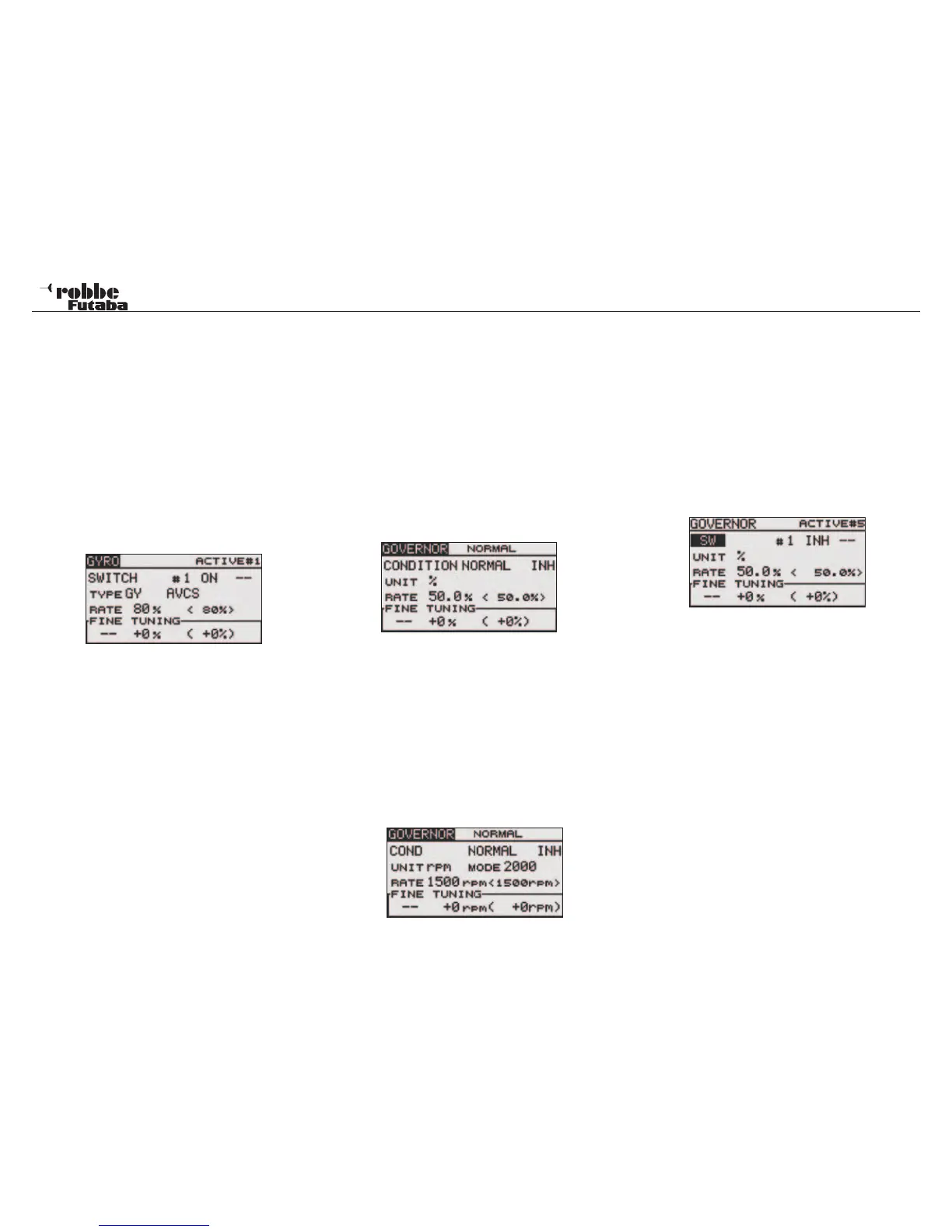
To do this, access CONDITION in the Display using the CAP
TOUCH SENSOR, change the selection to SWITCH, which
may then be assigned. The Display is as follows:
Also this
function must firstly be activated in the ‘ACT/INH’ field. High-
light the required selection with the “CAP TOUCH SENSOR“
and activate with RTN. This field will now indicate “ON” or
“OFF”, dependent upon the switch position.
In the „SW“ item, by using the normal method, a switch can be
assigned and its operating direction defined in H/W SELECT
menu.
The pre-set condition is set to ‘--’, i.e. it is always turned on.
To access any of the ACTIVE # 1….5 gyro settings, use the
“CAP TOUCH SENSOR”, select “#1“ and touch “RTN“ key to
select between #1..#5.
All other gyro adjustments are made in exactly the same man-
ner as the “CONDITION” mode.
For FINE TUNING settings, move the cursor to the “--“ item and
touch the RTN button to access the selection screen. Select
the control, e.g. “RG” in H/W SELECT. Move the cursor to the
RATE item and touch the RTN button to switch to the data input
mode. Adjust the trim rate by scrolling the touch sensor. Initial
value: 0% (0 rpm). Adjustment range: -20~+20% (-200~+200
rpm). When the RTN button is touched for one second, the
sensitivity is reset to the initial value. Touch the RTN button to
return to the cursor mode.
A switch may also operate the Governor function. Using the
“CAP TOUCH SENSOR“, highlight “CONDITION in the Dis-
play. Select “SWITCH” and the Display is as follows:
This function must be activated by selecting ACT in the INH
field with the “CAP TOUCH SENSOR“ and activate by touching
“RTN”. The Display will now show either “ON” or “INH”.
Go to the SW field to assign a switch in the usual method to
turn the governor rate ON or OFF as required. The preset
switch status is ‘--’, i.e. The Gyro Gain is always turned on.
To access any of the ACTIVE # 1…. 5 governor settings, use
the “CAP TOUCH SENSOR”, select “#1“ and touch “RTN“ key
to select between #1. #5. All other governor adjustments are
made in the same manner as when the “CONDITION” mode
is active.
13.9 GOVERNOR MIXING
When using a Futaba GV-1 governor, this function is used to
switch the RPM of the helicopter‘s rotor head. The rotor head
speed can be switched with each flight condition or a sepa-
rate switch to access up to 5 different speed settings from the
transmitter. The governor is used by connecting the governor
speed setting channel to CH7 (initial setting). The required
head speed is entered as a %age value. Fine-tuning can be
made by assigning a transmitter knob or trim.
Before making any adjustments, select the flight condition
or activate switch mode by highlighting the “CONDITION”
field and changing it to “SWITCH”.
Select GOVERNOR in the Helicopter Model Menu and access
the setup screen shown below by touching RTN:
This function must be activated by selecting ACT in the INH
field with the “CAP TOUCH SENSOR“ and activate by touching
“RTN”. The Display will now show either “ON” or “INH”.
Depending on the selected flight condition, the rotor head rpm
can be programmed by moving the cursor to the RATE item,
touch the RTN button to switch to the data input mode. Adjust
the rpm by scrolling the touch sensor. Initial value is 50% (1500
rpm) Adjustment range is OFF, 0~110% (OFF, 1000~2100
rpm). When the RTN button is touched for one second, the
sensitivity is reset to the initial value. Move the cursor to the
UNIT item and touch the RTN button to switch to the data input
mode. Select the unit (% age or rpm) by scrolling the touch
sensor. Touch RTN to confirm.
58
Model menu helicopter



 To Next Page