A B
T T
I~--+--+--+-----+-I
----t-
Loop Recording
Loop Recording is a useful way to record a
Drum
Part,
as
it
lets
you
layer
drum
sounds as the pattern plays over and over.
This type
of
recording process is similar to
the
recording
process
used
by
many
professional drum machines.
1 2 3
4
..
5 6
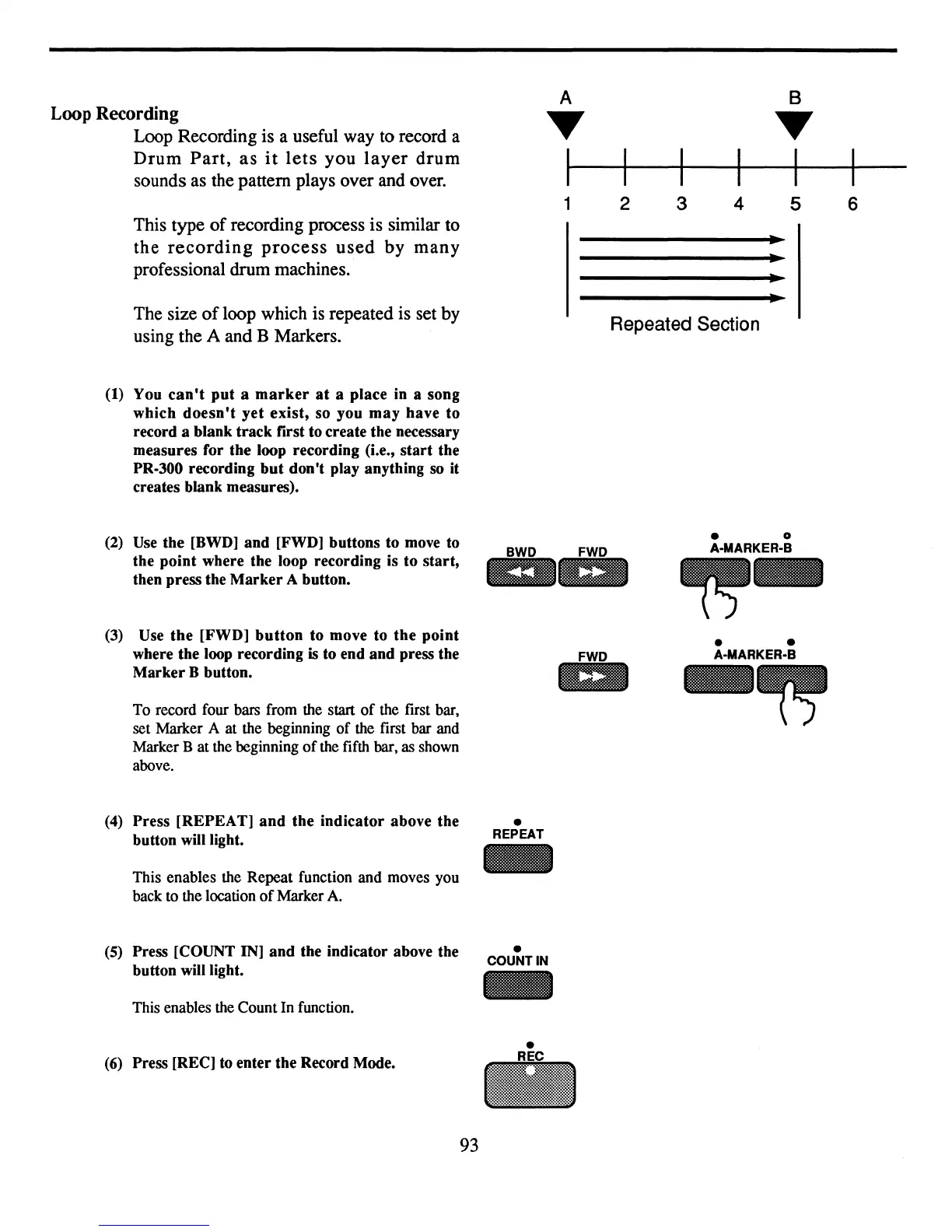
The size
of
loop which is repeated is set by
using the A and B Markers.
(1) You
can't
put
a
marker
at
a place in a song
which
doesn't
yet
exist, so you
may
have to
record a blank track first to create the necessary
measures for the loop recording (i.e.,
start
the
PR-300 recording
but
don't play anything
so
it
creates blank measures).
Repeated Section
•
(2)
Use
the
[BWD]
and [FWD] buttons to
move
to
BWD
FWD
the point where the loop recording is to start,
l1:li
1m
then press the
Marker
A button.
(3)
Use the [FWD]
button
to move to the point
where the loop recording
is to end and press the
FWD
Marker B button.
1m
To record four bars from the start
of
the first bar,
set Marker A at the beginning
of
the first bar and
Marker B
at
the beginning
of
the fifth bar, as shown
above.
(4) Press [REPEAT]
and
the indicator above the
•
button will light.
REPEAT
-
This enables the
Repeat
function
and
moves you
back to the location
of
Marker A.
(5) Press [COUNT IN] and the indicator above the
•
COUNT IN
button will light.
-
This enables the Count In function.
• 0
A-MARKER-B
~-
• •
A-MARKER-B
-~
(6)
Press [REC]
to
enter the Record Mode.
•
..
93


 To Next Page