Making the Connections
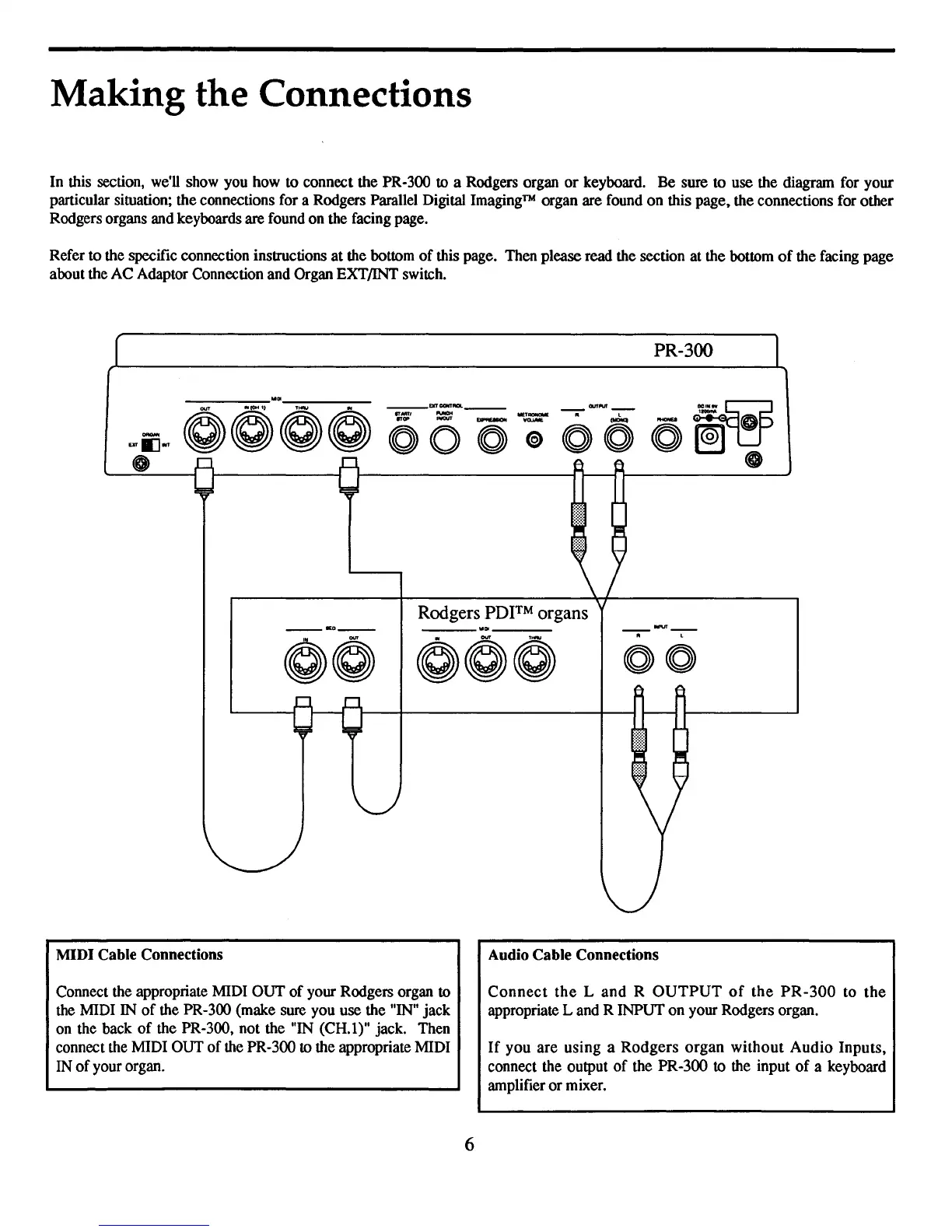
In this section, we'll show you how to connect the PR-300 to a Rodgers organ
or
keyboard. Be sure to use the diagram for your
particular situation; the connections for a Rodgers Parallel Digital Imaging™ organ are found on this page. the connections for other
Rodgers organs and keyboards are found on the facing page.
Refer to the specific connection instructions at the bottom
of
this page. Then please read the section at the bottom
of
the facing page
about the AC Adaptor Connection and Organ EXT/INT switch.
PR-300
• L
OOO~
---_
...
~~-~-
0000000";
Rodgers
PDITM
organs
__
IEO
__
MIDI Cable Connections Audio Cable Connections
Connect the appropriate MIDI OUT
of
your Rodgers organ
to
the MIDI IN
of
the PR-300 (make sure you use the "IN" jack
on the back
of
the PR-300, not the "IN (CH.l)" jack. Then
connect the MIDI OUT
of
the PR-300
to
the appropriate MIDI
IN
of
your organ.
Connect
the
Land
R
OUTPUT
of
the
PR-300
to
the
appropriate
Land
R INPUT on your Rodgers organ.
If
you are using a
Rodgers
organ
without
Audio
Inputs,
connect the output
of
the PR-300 to the input
of
a keyboard
amplifier or mixer.
6


 To Next Page