Part 2
Channel 2
Track 2 French
Hom
I~.
e
User's Guide (instead
of
using MIDI
Channell,
as
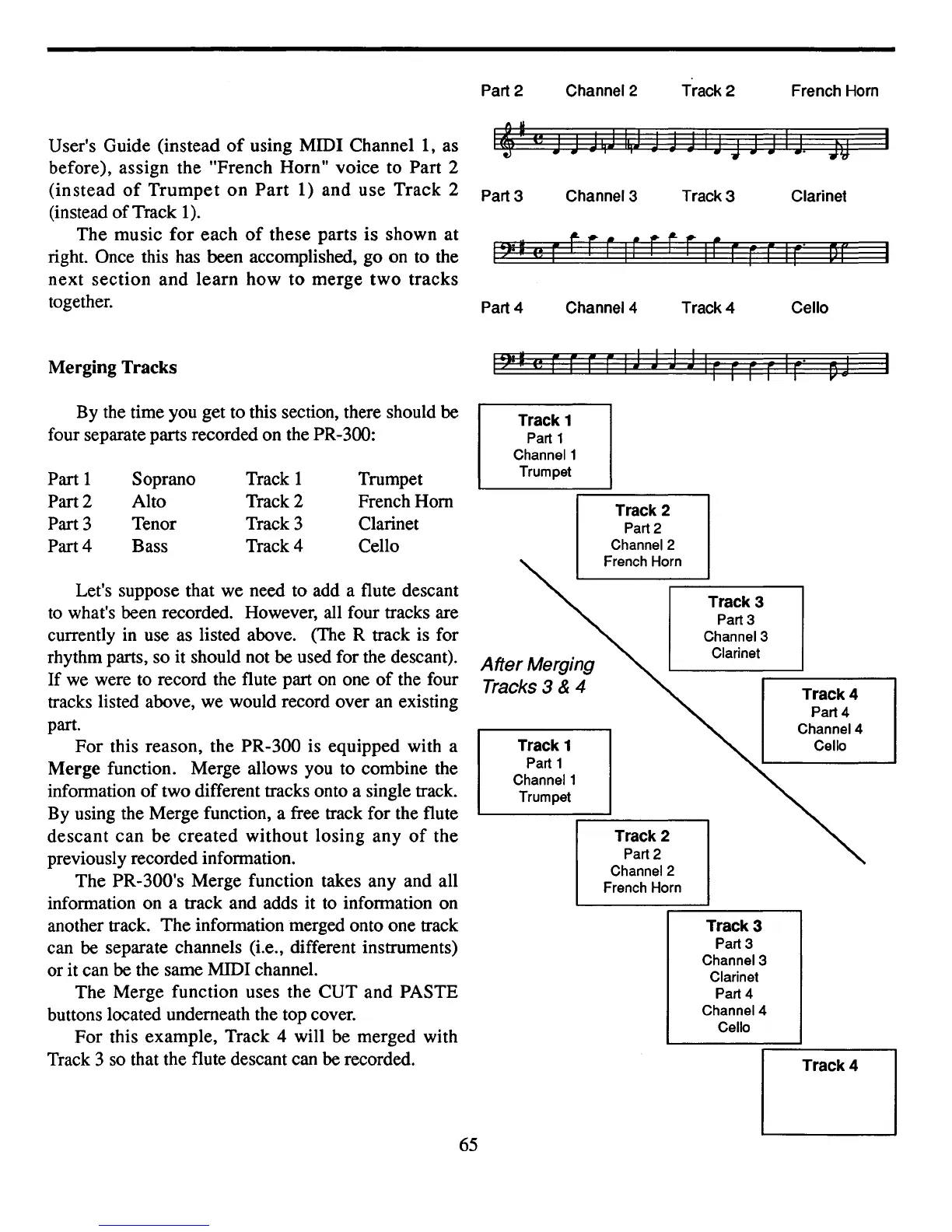
before), assign the "French Horn" voice to Part 2
(instead
of
Trumpet
on
Part
1) and use Track 2
(instead
of
Track
1).
The music for each
of
these parts is shown at
right. Once this has been accomplished, go on to the
next section and
learn
how
to
merge two tracks
together.
Part 3
Part 4
Channel 3
Channel 4
Track
3
Track 4
Clarinet
Cello
Merging Tracks
1?I'e-rrrr~
By the time you get to this section, there should be
four separate parts recorded on the PR-300:
Let's suppose that we need to add a flute descant
to
what's been recorded. However, all four tracks are
currently in use as listed above. (The R track is for
rhythm parts, so
it
should not be used for the descant).
If we were to record the flute part
on
one
of
the four
tracks listed above, we would record over
an
existing
part.
For this reason, the PR-300 is equipped with a
Merge function. Merge allows you to combine the
information
of
two different tracks onto a single track.
By using the Merge function, a free track for the flute
descant can be created without losing any
of
the
previously recorded information.
The PR-300's Merge function takes any and all
information on a track and adds it
to
information on
another track. The information merged onto one track
can be separate channels (Le., different instruments)
or
it
can be the same MIDI channel.
The Merge function uses the CUT and PASTE
buttons located underneath the top cover.
For this example, Track 4 will be merged with
Track 3
so
that the flute descant can be recorded.
Track
1
Part 1
Channel 1
Trumpet
Track
4
Track
4
Part 4
Channel 4
Cello
Track
3
Part 3
Channel 3
Clarinet
Track
3
Part 3
Channel 3
Clarinet
Part 4
Channel 4
Cello
Track 2
Part 2
Channel 2
French Horn
Track
2
Part 2
Channel 2
French Horn
Track 1
Part 1
Channel 1
Trumpet
After
Merging
Tracks
3 & 4
Trumpet
French Horn
Clarinet
Cello
Track
1
Track 2
Track 3
Track 4
Soprano
Alto
Tenor
Bass
Part
1
Part 2
Part 3
Part 4
65



 To Next Page