PR-300
--_
..
~---
000
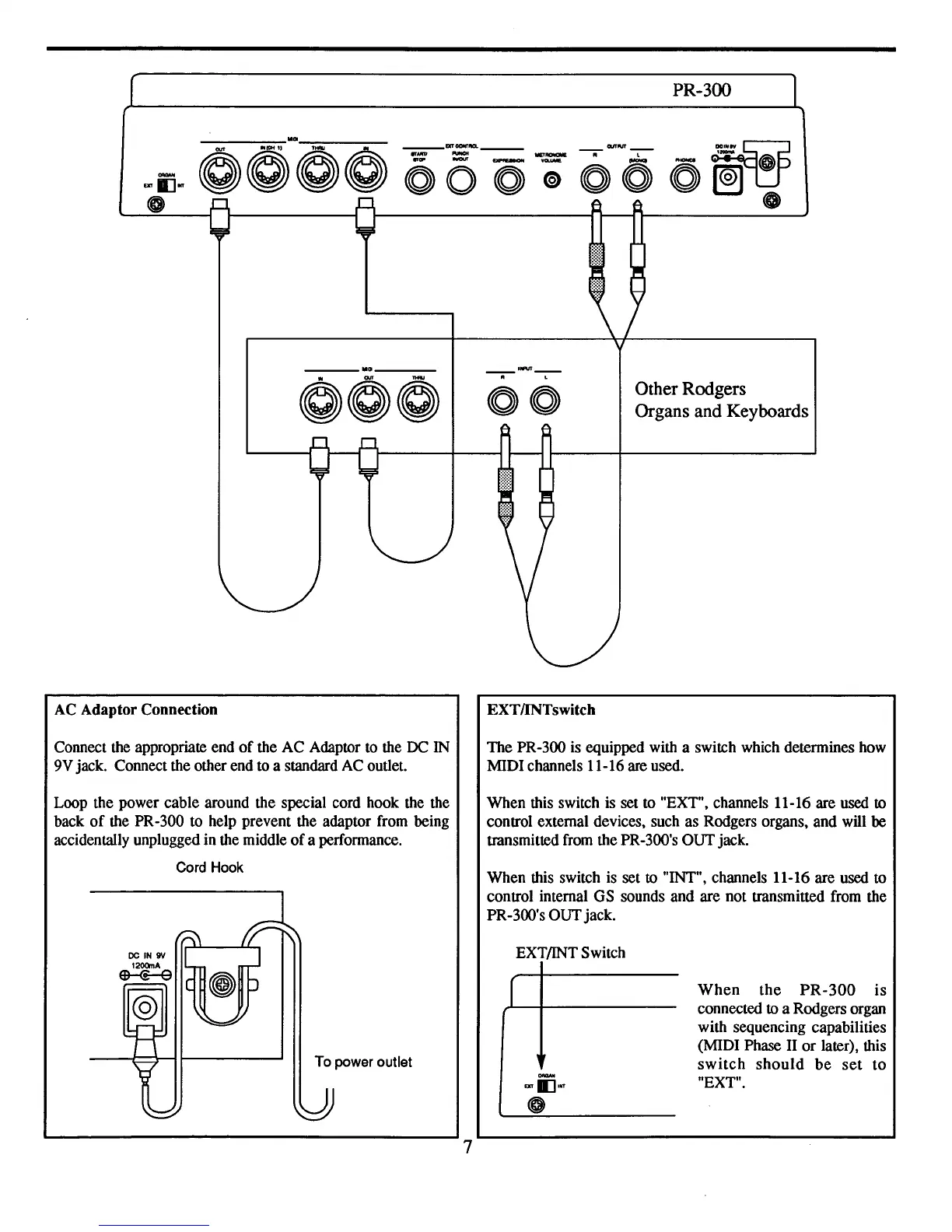
Other Rodgers
Organs and Keyboards
AC
Adaptor Connection
Connect the appropriate end
of
the AC Adaptor
to
the
DC
IN
9V jack. Connect the other end to a standard AC outlet.
EXTIINTswitch
The PR-300 is equipped with a switch which determines how
MIDI channels 11-16 are used.
When this switch is set to "EXT", channels 11-16 are used
to
control external devices, such as Rodgers organs, and will be
transmitted from the PR-300's OUT jack.
When this switch is set
to
"INT", channels 11-16 are used to
control internal GS sounds and are not transmitted from the
PR-300's OUTjack.
Loop the power cable around the special cord hook the the
back
of
the PR-300 to help prevent the adaptor from being
accidentally unplugged in the middle
of
a performance.
Cord Hook
To power outlet
7
EXT/INT Switch
r
.....
EXT
II:JINt
When
the
PR-300
is
connected
to
a Rodgers organ
with sequencing capabilities
(MIDI Phase II
or
later), this
switch
should
be
set
to
"EXT".


 To Next Page