EasyManua.ls Logo

Rodgers PR-300 - Control Functions

Rodgers PR-300
198 pages
Print Icon
To Next Page IconTo Next Page
To Previous Page IconTo Previous Page
Loading...
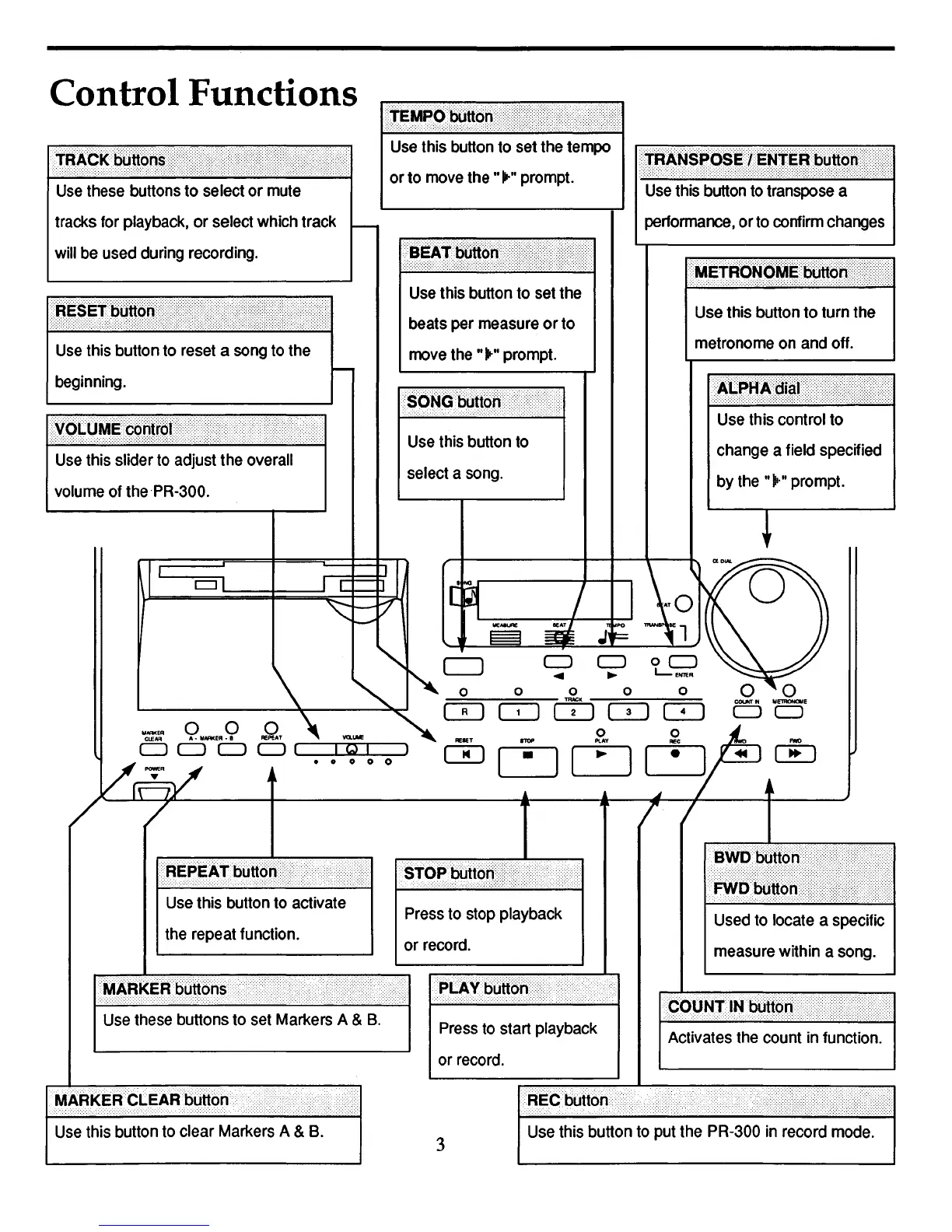
Control Functions
Use
this slider
to
adjust the overall
volume
of
thePR-300.
Use
this
control
to
change
a field specified
by
the
"~.,,
prompt.
Use
this button to turn the
metronome
on
and
off.
•••
TRAN$PQ$~tENTEijblJttQH
•••••••••••
·U
Use
this
button
to
transpose
a
performance,
orto
confirm
changes
Use
this button
to
set
the
beats
per
measure
orto
move
the
"~"
prompt.
Use
this
button
to
select a
song.
Use
this
button
to
set
the
tempo
or
to
move
the
"~"
prompt.
tracks
for
playback,
or select which track
will
be
used
during
recording.
..
lET
IT)
CJ
~
o 0 0 0 0
[==R=I~1
=1=-1-:'
m;"
1
CQ
~
o 0
t:J[:J~
Use
this button
to
put
the
PR-300
in
record
mode.
Used
to
locate a specific
measure
within a
song.
Press
to
start playback
or
record.
3
Use
this
button
to
activate
the
repeat function.
Use
these
buttons
to
set
Markers
A &
B.
Use
this
button
to
clear
Markers
A &
B.
IIIIARkER··CLEARbUttOn

Table of Contents