Selecting Reverb and Chorus Type
SOUND
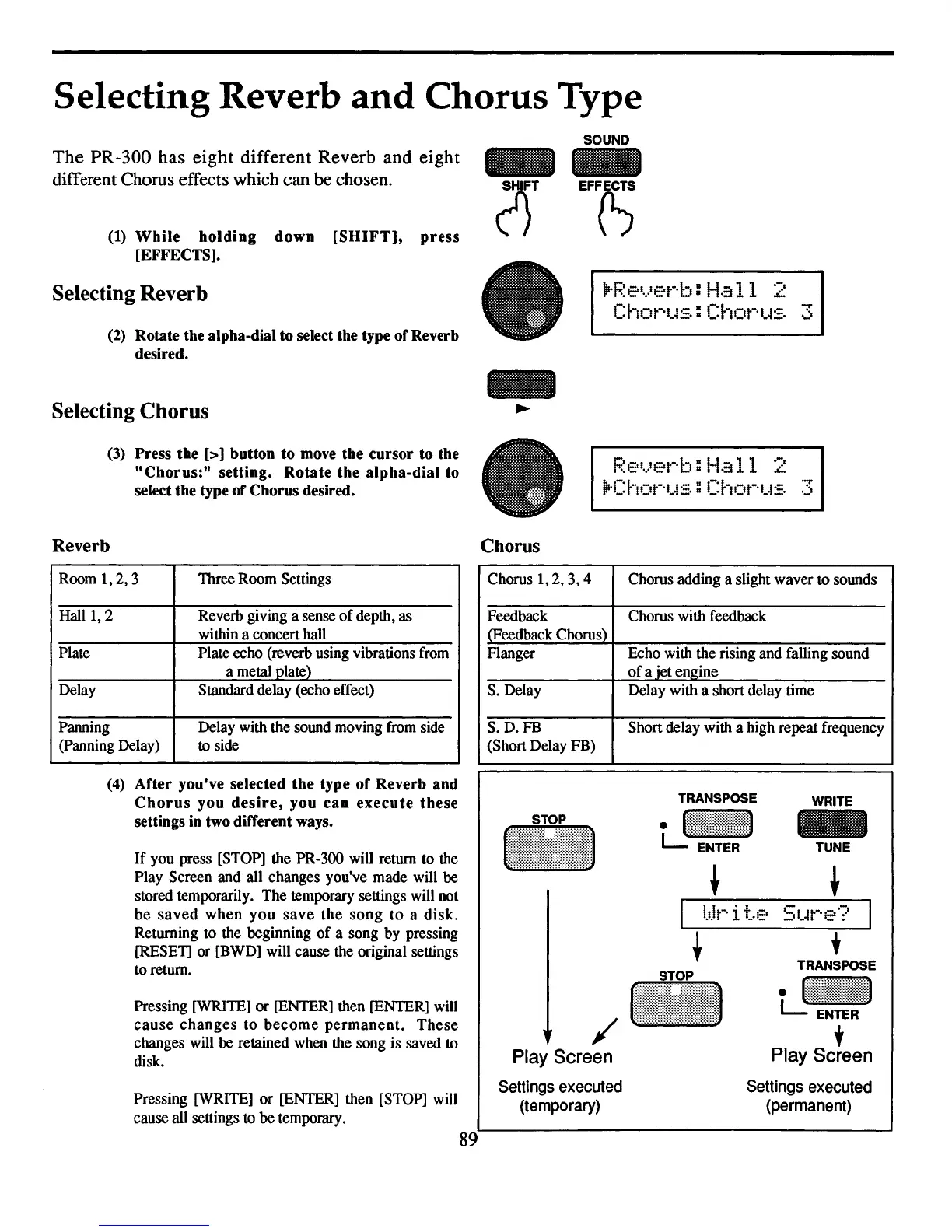
The PR-300 has eight different Reverb and eight
different Chorus effects which can
be chosen.
(1)
While
holding
down
[SHIFT],
press
[EFFECTS].
Selecting Reverb
(2) Rotate the alpha-dial to select the type
of
Reverb
desired.
EFF(S
lP-F.~e'.)et··b:
Ha
11
2
Chor'us:
Chot-·tt::. 3
Selecting Chorus
(3) Press the
[>]
button
to
move
the
cursor
to the
"Chorus:"
setting.
Rotate
the
alpha-dial
to
select the type
of
Chorus desired.
F.~el.}Elt-·b:
Ha
11
2
jP·Chot-·t4:=.
:
ChOt-·t4:=.
3
Reverb
Chorus
/-
Play Screen
Settings
executed
(temporary)
Chorus with feedback
WRITE
-
TUNE
t
,
TRANSPOSE
i
~jj~jjj!!![!j!j~jji
t
Play Screen
Settings
executed
(permanent)
TRANSPOSE
tJ:jjj~!!~j!j![jjjj
Delay with a short delay time
Chorus adding a slight waver
to sounds
Echo with the rising and falling sound
of
a iet engine
Short delay with a high repeat frequency
..
Flanger
Chorus
1,2,3,4
S.D.FB
(Short Delay FB)
S.
Delay
Feedback
(Feedback Chorus)
89
Pressing [WRITE] or [ENTER] then [ENTER] will
cause
changes
to
become
permanent.
These
changes will be retained when the song is saved to
disk.
Pressing
[WRITE] or [ENTER] then [STOP] will
cause all settings to be temporary.
If
you press [STOP] the PR-300 will return to the
Play Screen and all changes you've made will be
stored temporarily. The temporary settings will not
be
saved
when
you
save
the
song
to
a
disk.
Returning to the beginning
of
a song by pressing
[RESET] or [BWD] will cause the original settings
to return.
(4)
After
you've
selected
the
type
of
Reverb
and
Chorus
you
desire,
you
can
execute
these
settings in two different ways.
Room
1,2,3
Three Room Settings
Hall
1,
2 Reverb giving a sense
of
depth,
as
within a concert hall
Plate Plate echo (reverb using vibrations from
a metal plate)
Delay
Standard delay (echo effect)
Panning Delay with the sound moving from side
(panning Delay)
to side



 To Next Page