Recording Multiple Time Signatures
Earlier in this manual, we showed you how to
select a time signature at the beginning
of
a song. It is
also possible
to
have multiple time signatures within a
song.
To have multiple time signatures within a song,
it's necessary to
fIrst record all
of
the different time
signatures on a blank track. Once this has been
accomplished, you can record song information on the
blank track without losing the time signature changes.
In this example, we'll show you how to assign a
time signature
of
3/4
to
measures 1 through 8 and 6/8
to measures 9 through
16.
SONG
lCJb]
I
000
..
~
..
o
o
t·iEbJ
SOt·iG
1
1Ir4.···'4
iI!
=
12[j
ti
r-,! '-I-It
1,-·
.
1:.11
-.
",-
..
__
1-'
1 4.···'4.J =
12~:1
BEAT
(5)
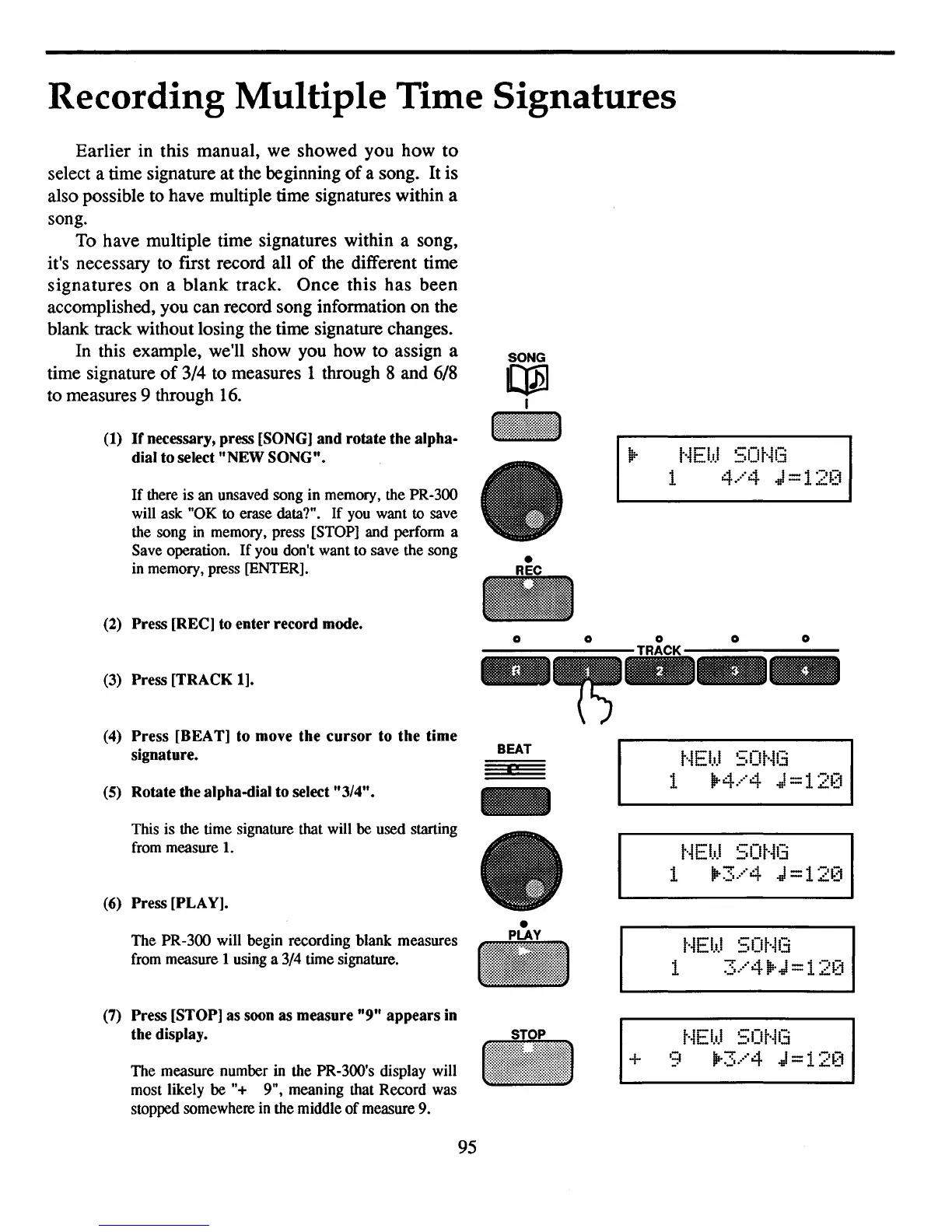
Rotate the alpha-dial to select "3/4".
(3)
Press [TRACK 1].
(2)
Press [REC] to enter record mode.
If
there is an unsaved song in memory, the PR-300
will ask "OK
to
erase data?". If you want to save
the song
in
memory, press [STOP] and perform a
Save operation.
If
you don't want to save the song
in
memory, press [ENTER].
(4)
Press [BEAT] to move the cursor to the time
signature.
(1)
If
necessary, press [SONG] and rotate the alpha-
dial to select "NEW SONG".
This is the time signature that will be used starting
from measure
1.
(6)
Press [PLAY].
•
t·iEbJ
SOt·il3
1
1Ir3.···'4.J
=
12[1
The PR-300 will begin recording blank measures
from measure 1 using a 3/4 time signature.
•
PLAY
t·iE
bJ
SO
t-1(:i
1
3.···'4.·.J
=
12~:1
(7)
Press [STOP] as soon as measure "9" appears in
the display.
The measure number in the PR-300's display will
most likely be "+ 9", meaning that Record was
stopped somewhere in the middle
of
measure 9.
+
t·iEl.d
SOt·il3
9
1Ir3.···'4.J
=
12~:1
95



 To Next Page