Listening
to
a
Song
on
Disk,
cont.
Using the Count-In Feature
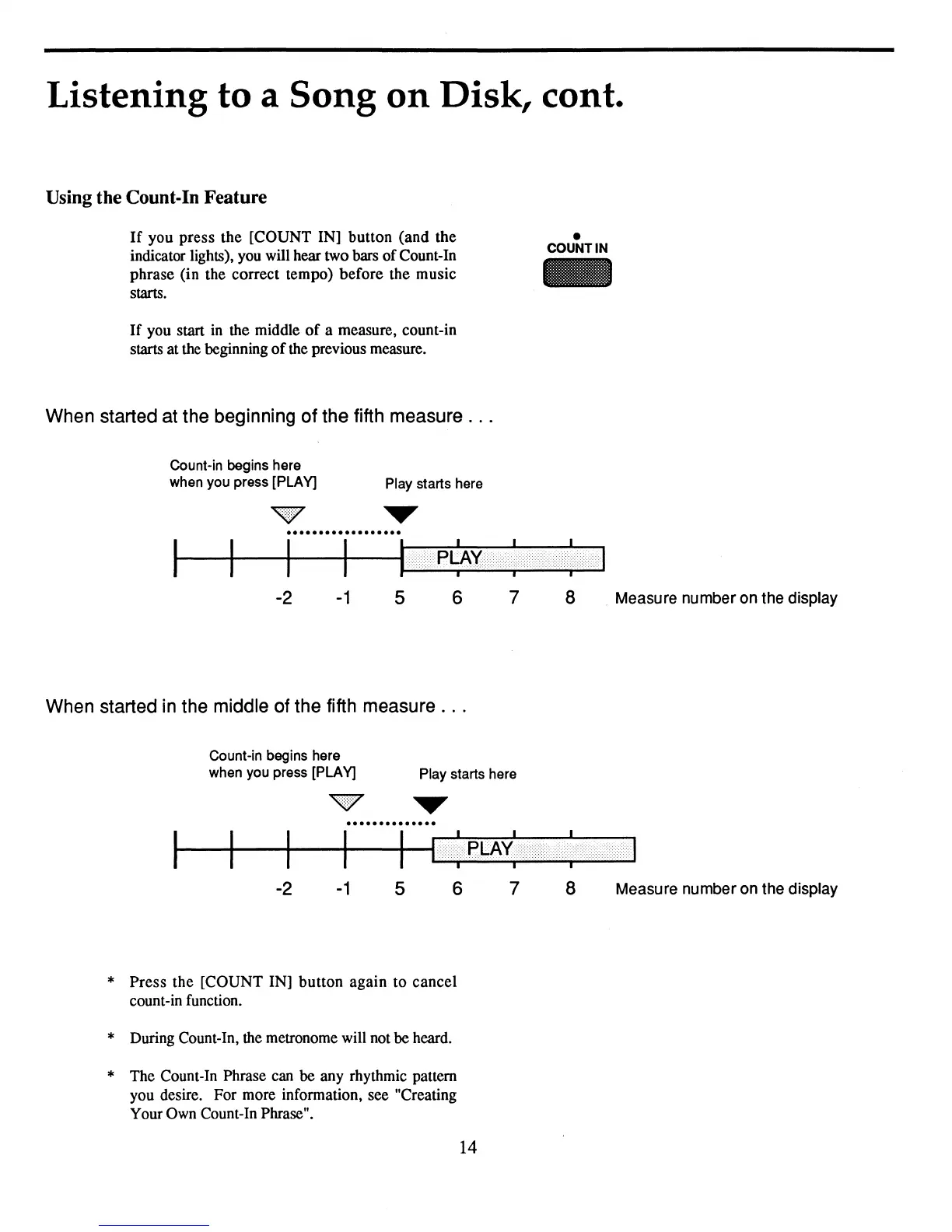
If
you
press
the
[COUNT IN] button
(and
the
indicator lights), you will hear two bars
of
Count-In
phrase (in the correct tempo)
before
the music
starts.
•
COUNT IN
-
If
you start
in
the middle
of
a measure, count-in
starts at the beginning
of
the previous measure.
When started at the beginning of the fifth measure
...
Count-in begins here
when you press [PLAY]
Play starts here
-1
-2
~~.....--.-le~x<:<><:<1
5 6 7 8 . Measure number on the display
When started
in
the middle of the fifth measure
...
Count-in begins here
when you press [PLAY]
Play starts here
T
..............
~~~.....--.H
.•..•••
;
••.
PLAX;
••••••••••••••
)
••••.•••
;.
···.·.·.·.··<·.···.·.·
..
·
..
·.·.1
-2
-1
5
6
7
8
Measure number on the display
*
Press
the [COUNT IN]
button
again
to
cancel
count-in function.
* During Count-In, the metronome will not
be
heard.
* The Count-In Phrase can be any rhythmic pattern
you desire. For more information, see "Creating
Your Own Count-In Phrase".
14



 To Next Page