How does Variation Select work?
Variation
Select
127
•
As
you've
already
seen,
you
can
select
128
different sounds using
Program Change messages.
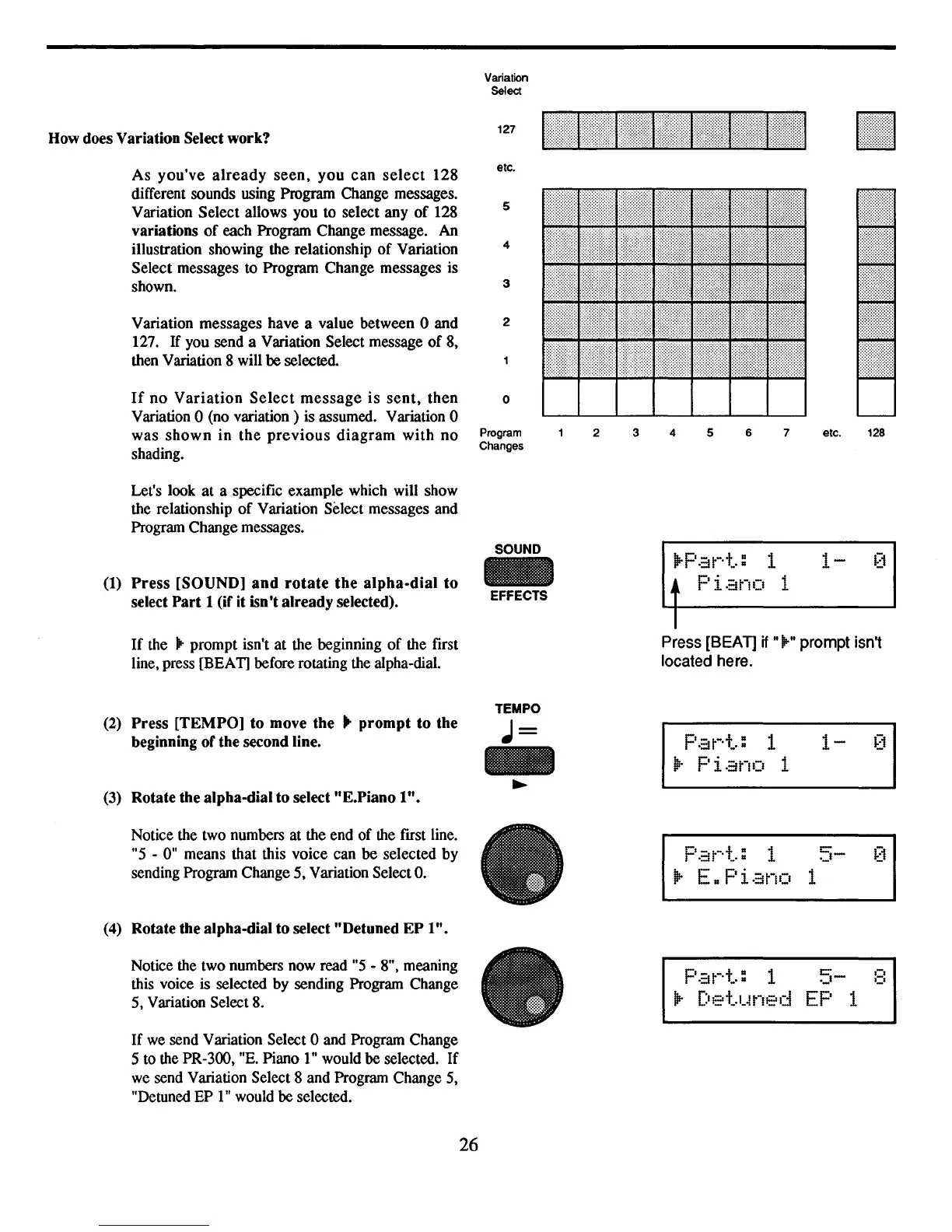
Variation Select allows you to select any
of
128
variations
of
each Program Change message. An
illustration showing the relationship
of
Variation
Select messages to Program Change messages is
shown.
Variation messages have a value between 0 and
127.
If
you send a Variation Select message
of
8,
then Variation 8 will
be selected.
If
no
Variation
Select
message
is
sent,
then
Variation 0 (no variation) is assumed. Variation 0
was
shown
in
the
previous
diagram
with
no
shading.
Let's look at a specific example which will show
the relationship
of
Variation Select messages and
Program Change messages.
etc.
5
4
3
2
o
Program
Changes
2 3 4 5 6 7 etc. 128
(1)
Press
[SOUND]
and
rotate
the
alpha-dial
to
select
Part
1 (if it isn't already selected).
SOUND
EFFECTS
!l.-Cr - t-·t· 1
ii'"1
d _
.•
Piano
1
1-
If
the
.-
prompt isn't at the beginning
of
the first
line, press [BEAT] before rotating the alpha-dial.
Press [BEAT]
if
".-" prompt isn't
located here.
(2)
Press
[TEMPO] to move the ..
prompt
to
the
beginning
of
the second line.
(3) Rotate the alpha-dial to
select"
E.Piano
1"
•
TEMPO
J=
Pat-·t.: 1
~.
Piano
1
1-
Notice the two numbers at the end of the first line.
"5
- 0" means that this voice can be selected by
sending Program Change 5, Variation Select
O.
(4) Rotate the alpha-dial to select "Detuned
EP
1".
Notice the two numbers now read
"5
- 8", meaning
this voice
is
selected by sending Program Change
5, Variation Select 8.
If
we
send Variation Select 0 and Program Change
5 to the PR-300,
"E.
Piano
1"
would be selected.
If
we send Variation Select 8 and Program Change
5,
"DetuDed
EP
1"
would
be
selected.
~
..
E.
Pi.::ino 1
p.::it-·t.:
1
5-
:::
llr
Det.uned
EP
1
26



 To Next Page