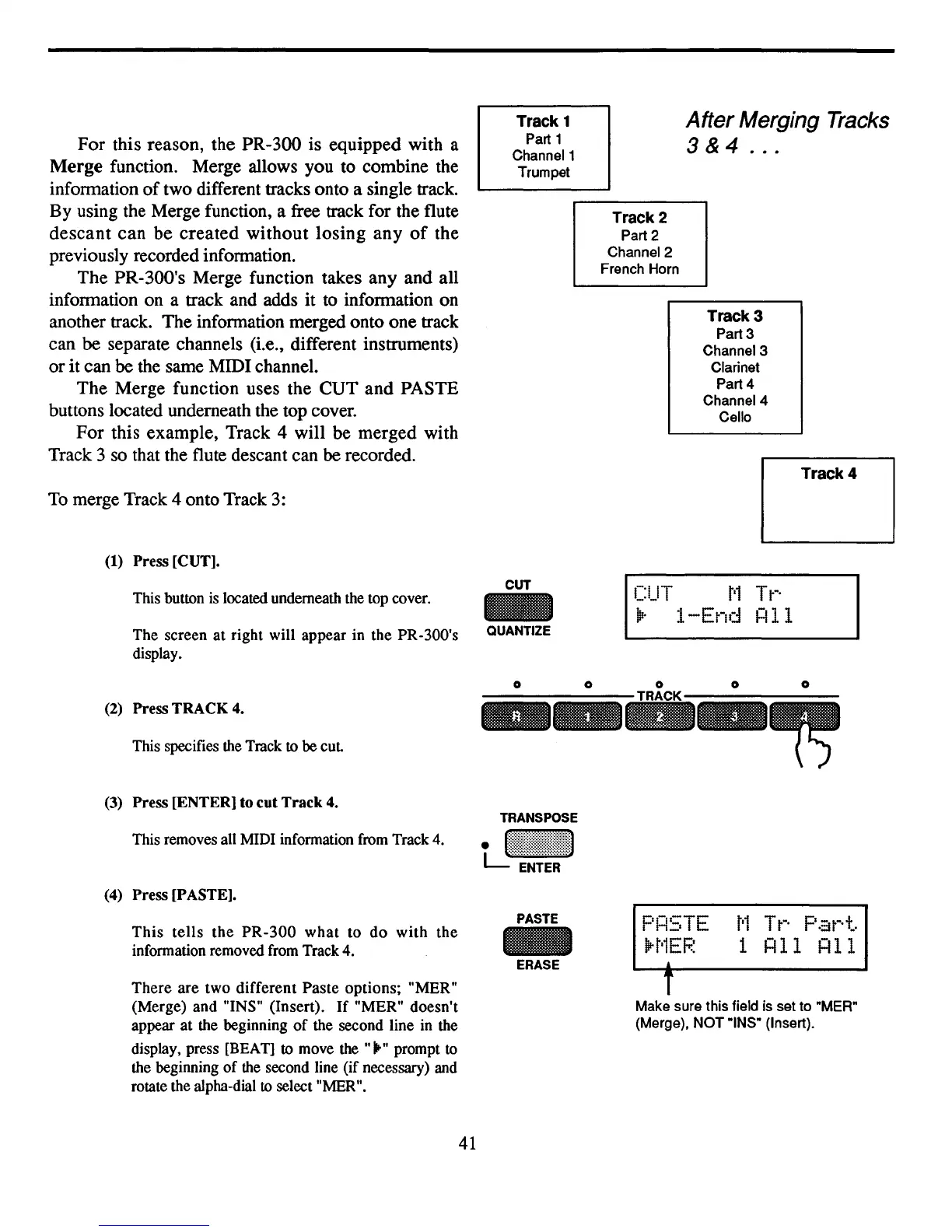
For this reason, the PR-300 is equipped with a
Merge
function. Merge allows you to combine the
information
of
two different tracks onto a single track.
By using the Merge function, a free track for the flute
descant
can
be
created
without
losing
any
of
the
previously recorded information.
The PR-300's Merge function takes any and all
information on a track and adds
it
to information on
another track. The infonnation merged onto one track
can
be separate channels (Le., different instruments)
or
it
can
be
the same MIDI channel.
The Merge function uses the
CUT
and
PASTE
buttons located underneath the top cover.
For
this example, Track 4 will be merged with
Track 3 so that the flute descant can
be recorded.
To
merge Track 4 onto Track 3:
(1)
Press [CUT].
This button
is
located underneath the top cover.
The screen at right will appear in the PR-300's
display.
Track 1
Part 1
Channel 1
Trumpet
CUT
QUANTIZE
After
Merging Tracks
3 & 4
...
Track 2
Part 2
Channel 2
French Horn
Track 3
Part 3
Channel 3
Clarinet
Part 4
Channel 4
Cello
Track 4
CUT
t'1
Tt-·
~.
I-End
HII
(2)
Press TRACK
4.
This specifies the Track to be
cut
(3)
Press [ENTER] to cut
Track
4.
This removes all MIDI infonnation from Track 4.
(4) Press [PASTE].
TRANSPOSE
tJ~~~~:~!!!~!!::::1
T
Make sure this field is set to "MER"
(Merge),
NOT
"INS" (Insert).
This
tells
the
PR-300
what
to
do
with
the
infonnation removed from Track 4.
There
are two different
Paste
options; "MER"
(Merge) and "INS" (Insert).
If
"MER" doesn't
appear at the beginning
of
the second line in the
display, press [BEAT]
to
move the
.......
prompt
to
the beginning
of
the second line (if necessary) and
rotate the alpha-dial
to
select "MER".
41
PASTE
ERASE
F'H5TE
lH'1EF.~
•
t'l
T
tN.
F'
a
tN.
t.
1
HII
HII



 To Next Page