EasyManua.ls Logo

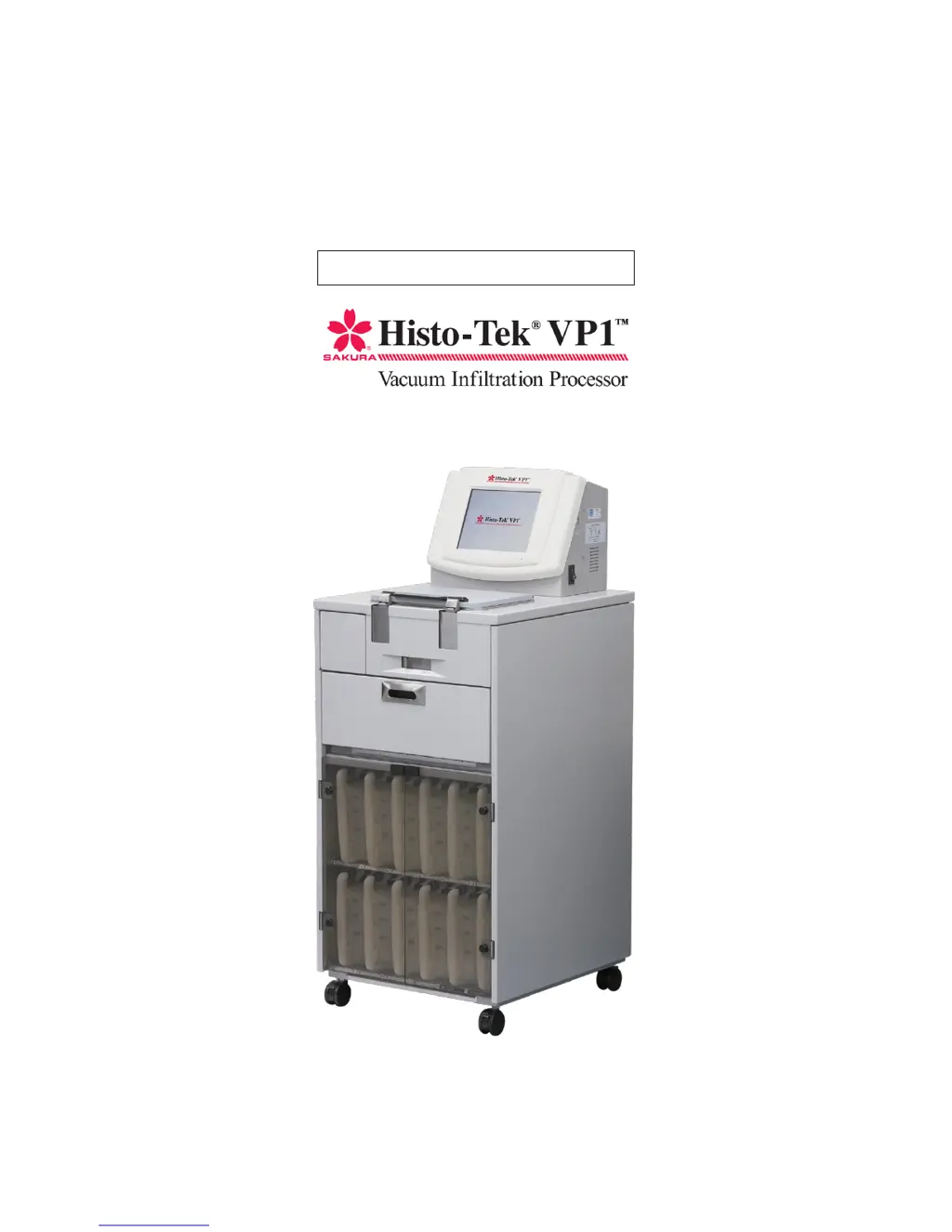
Sakura Histo-Tek VP1 - User Manual

Sakura Histo-Tek VP1
130 pages
Print Icon
To Next Page IconTo Next Page
Loading...
[0]
Operating Manual

Table of Contents

Questions and Answers

Summary

Introduction to the Histo-Tek VP1

Safety Precautions for Histo-Tek VP1 Operation

Designate Instrument Control Manager

Assign an 'Instrument Control Manager' for correct and safe operation of the instrument.

Understanding Hazard and Label Symbols

Explanation of hazard symbols (Danger, Warning, Caution, Note) and instrument label symbols.

General Installation and Operational Safety

Instructions for unpacking, installation, avoiding damage, and general operational safety.

Reagent and Paraffin Handling Precautions

Precautions for handling reagent bottles, paraffin containers, and specified reagents.

Operational Safety Measures

Safety measures for operation, including avoiding moisture, foreign matter, and ensuring ventilation.

Power Cord and Electrical Safety Guidelines

Guidelines for safe use of power cords, grounding, and avoiding extension cords.

Precautions During Instrument Operation

Precautions during operation, including moving, opening doors, using baskets, and USB devices.

Safety for Processing Preparation

Safety steps for preparing processing, including reagent setup and paraffin temperature.

Maintenance and Handling Safety

Safety measures for maintenance, handling hot components, seismic anchorage, and instrument care.

Instrument Inspection and Environmental Safety

Guidelines for instrument inspection, ventilation, and environmental conditions for operation.

Cassette and Basket Handling Safety

Safe handling of cassettes, baskets, and adherence to processing limits.

Tissue Processing and Program Verification Safety

Ensuring tissue quality with proper cassette use, labeling, and program verification.

Post-Processing and Reagent Management Safety

Procedures after processing, reagent management, and program setting verification.

Reagent Handling and Workplace Safety

Safe handling of reagents, protective gear, and workplace environmental controls.

Hot Surfaces and Infectious Material Precautions

Precautions for hot surfaces, infectious materials, and reagent evaporation.

Biological Hazards and Regulatory Compliance

Ensuring safety with biological hazards, reagent expertise, and regulatory compliance.

Installation Method Guide

Installation Flow Overview

Overview of the installation process, from checking location to turning on power.

Required Tools for Installation

List of necessary tools required for the installation of the instrument.

Installation Environment Requirements

Requirements for the installation environment, including temperature, humidity, and location.

Checking Installation Conditions

Procedures for checking installation location, facility-side power supply, and ventilation system.

Work Area and Instrument Dimensions

Ensuring sufficient space and safety by checking instrument dimensions and weight.

Transporting the Instrument

Guidelines for safely transporting the instrument to the work area and installation location.

Instrument Unpacking Procedure

Step-by-step instructions for safely unpacking the instrument from its shipping box.

Removing Internal Fixing Members

Procedure for removing internal fixing members and cushion materials before operation.

Operating the Retort Lid

Detailed instructions on how to unlock, open, close, and lock the retort lid safely.

Operating Fume Control Unit Door

Instructions for operating the fume control unit door, including opening and closing.

Operating Paraffin Oven Door

Instructions for operating the paraffin oven door, including opening and closing.

Operating Reagent Bottle Rack Door

Instructions for operating the reagent bottle rack door, including opening and closing.

Switching Power Supply Voltage

Procedure for correctly switching the instrument's power supply voltage setting.

Checking Included Accessories

Confirmation that all standard accessories are present and free from damage.

Securing the Instrument Installation

Steps to confirm installation location and secure the instrument using casters and stoppers.

Installing Spill Trays

Installation checks, specifically for placing spill trays in the paraffin oven and reagent bottle rack.

Installing Fume Control Unit Components

Procedure for installing the fume control unit divider and activated carbon filters.

Setting Reagent Bottles Correctly

Instructions for installing and removing reagent bottles correctly.

Attaching Labels to Reagent Bottles

Guidance on attaching processing and cleaning labels, and color coding labels to reagent bottles.

Setting the Paraffin Container

Instructions for installing and removing the paraffin container into the paraffin oven.

Turning On the Instrument Power

Steps to confirm voltage settings and turn on the instrument's power.

Instrument Overview and Components

Instrument Overview

Overview of the instrument's capabilities, including automatic processing and capacity.

Monitor Screen and Controls Identification

Description of the monitor screen, displaying program entry, operation, and status.

Instrument Component Identification

Identification of key instrument components like retort, bottles, and containers.

Standard Accessories and Options

Standard Accessories List

List and description of standard accessories included with the instrument.

Available Optional Accessories

List and description of optional accessories available for the instrument.

Basic Instrument Knowledge and Settings

Instrument Specifications

Detailed specifications of the instrument, including dimensions, power, and reagents.

Input Methods Guide

Explanation of how to use the touch keyboard and ten-key keypad for data entry.

User Login and Password Management

Details on logging on/off, default passwords, and user/manager permissions.

Mixing During Tissue Processing

Explanation of the total mixing function for reagent circulation during tissue processing.

Automatic Transfer Functionality

Description of the automatic transfer function for solution exchange between stations.

Solution Station and Group Configuration

Explanation of solution station uses and how to set up solution groups.

Screen Interface Explanation

Explanation of the instrument's screen components: header, menu tab, main screen, and footer.

Standby Screen Operation

Description of the standby screen used for preparing tissue processing.

Tissue Processing Screen Operation

Explanation of the tissue processing screen, including status, program, and controls.

Utility Screen Functions

Overview of the Utility screen and its functions like editing names, configurations, and system setup.

Solution Management Screen Functions

Interface for managing solution usage statuses and warm water flush operations.

History Screen Functions

Accessing historical data like process reports, event logs, and error logs.

How to Operate Tissue Processing

Operating Procedure Overview

Explains the basic operating procedures for the instrument from start to finish.

System Login and Logout Procedures

Procedure for logging on to the instrument system to begin operations.

Preparing Solutions and Paraffin

Instructions for preparing solutions and paraffin to the correct levels before processing.

Pre-Processing Checks and Program Selection

Steps to prepare for processing, including selecting programs and checking conditions.

Temporary Program Editing

How to temporarily edit a program for the current run of tissue processing.

Running the Tissue Processing

Instructions for assembling the basket, setting specimens, and starting tissue processing.

Monitoring Tissue Processing

How to monitor tissue processing, including permitted operations during delayed or active processing.

Ending Tissue Processing Sequence

Steps to end tissue processing, including removing specimens and draining paraffin.

Pausing and Aborting Operations

Functions and procedures for pausing, resuming, editing programs, and performing melt checks.

Cleaning Procedures for the Histo-Tek VP1

Types of Cleaning Operations

Description of the two types of cleaning operations: retort cleaning and warm water flush.

Starting Retort Cleaning

Procedures for starting retort cleaning, either after processing or from the Utility screen.

Starting Warm Water Flush

Instructions for performing warm water flush on specific stations for cleaning.

Solution Exchange Operations

Automatic Transfer Procedure

Procedure for setting up and initiating automatic transfer of solutions between stations.

Resetting Solution Usage Information

How to manage and reset solution usage statuses and clear usage data.

Program Creation and Editing Guide

Program Editing Workflow

Overview of the workflow for editing programs, including solution names and configurations.

Editing Solution Names

Steps for adding, copying, editing, and deleting solution names.

Editing Solution Configuration

Procedure for configuring solutions, including setting solution groups, names, and usage.

Editing Tissue Processing Programs

Steps to edit tissue processing programs, including changing names and details.

Other Instrument Operations

Process Report Screen

Viewing and outputting tissue processing history reports.

Event and Error Log Screens

Viewing and outputting details of system events and errors.

Parts Usage and Software Version

Checking parts usage status and viewing the software version.

System Setup Configuration

Configuring system settings such as date, time, password, and sound.

Manual Operations Screen Usage

Using the manual operations screen to fill, drain, and move through stations.

Language Selection

Selecting the display language for the instrument from a list of options.

Maintenance and Inspection Procedures

Daily Care, Periodic Maintenance, and Replacement

Procedures for daily care, periodic maintenance, and replacement of key components.

Cleaning Specific Instrument Components

Instructions for cleaning the paraffin oven, reagent rack, and their spill trays.

Cleaning Reagent Bottles

Procedure for cleaning reagent bottles, including removing and installing bottle caps.

Cleaning Exterior and Interior Parts

Instructions for cleaning the instrument's exterior panels, paraffin containers, and retort.

Replacing the Retort Seal

Procedure for periodically replacing the retort seal to ensure proper sealing.

Troubleshooting Instrument Issues

Instrument Conditions and Remedial Actions

Chart detailing instrument conditions, probable causes, and remedial actions for troubleshooting.

System Error Codes and Solutions

List of error codes displayed during operation, with probable causes and actions.

Power Outage Recovery Procedures

Procedures for recovering from power outages and melting paraffin.

Service Life and Transportation Guidelines

Information on the expected service life of components and instrument transportation.

Explanation of Terms and Index

Glossary of Technical Terms

Alphabetical list of terms used in the manual with their explanations and reference pages.

Certificate of Decontamination Sample

Decontamination Certificate Information Fields

Fields for date, institution, equipment details, usage status, and disinfection.

Summary

Introduction to the Histo-Tek VP1

Safety Precautions for Histo-Tek VP1 Operation

Designate Instrument Control Manager

Assign an 'Instrument Control Manager' for correct and safe operation of the instrument.

Understanding Hazard and Label Symbols

Explanation of hazard symbols (Danger, Warning, Caution, Note) and instrument label symbols.

General Installation and Operational Safety

Instructions for unpacking, installation, avoiding damage, and general operational safety.

Reagent and Paraffin Handling Precautions

Precautions for handling reagent bottles, paraffin containers, and specified reagents.

Operational Safety Measures

Safety measures for operation, including avoiding moisture, foreign matter, and ensuring ventilation.

Power Cord and Electrical Safety Guidelines

Guidelines for safe use of power cords, grounding, and avoiding extension cords.

Precautions During Instrument Operation

Precautions during operation, including moving, opening doors, using baskets, and USB devices.

Safety for Processing Preparation

Safety steps for preparing processing, including reagent setup and paraffin temperature.

Maintenance and Handling Safety

Safety measures for maintenance, handling hot components, seismic anchorage, and instrument care.

Instrument Inspection and Environmental Safety

Guidelines for instrument inspection, ventilation, and environmental conditions for operation.

Cassette and Basket Handling Safety

Safe handling of cassettes, baskets, and adherence to processing limits.

Tissue Processing and Program Verification Safety

Ensuring tissue quality with proper cassette use, labeling, and program verification.

Post-Processing and Reagent Management Safety

Procedures after processing, reagent management, and program setting verification.

Reagent Handling and Workplace Safety

Safe handling of reagents, protective gear, and workplace environmental controls.

Hot Surfaces and Infectious Material Precautions

Precautions for hot surfaces, infectious materials, and reagent evaporation.

Biological Hazards and Regulatory Compliance

Ensuring safety with biological hazards, reagent expertise, and regulatory compliance.

Installation Method Guide

Installation Flow Overview

Overview of the installation process, from checking location to turning on power.

Required Tools for Installation

List of necessary tools required for the installation of the instrument.

Installation Environment Requirements

Requirements for the installation environment, including temperature, humidity, and location.

Checking Installation Conditions

Procedures for checking installation location, facility-side power supply, and ventilation system.

Work Area and Instrument Dimensions

Ensuring sufficient space and safety by checking instrument dimensions and weight.

Transporting the Instrument

Guidelines for safely transporting the instrument to the work area and installation location.

Instrument Unpacking Procedure

Step-by-step instructions for safely unpacking the instrument from its shipping box.

Removing Internal Fixing Members

Procedure for removing internal fixing members and cushion materials before operation.

Operating the Retort Lid

Detailed instructions on how to unlock, open, close, and lock the retort lid safely.

Operating Fume Control Unit Door

Instructions for operating the fume control unit door, including opening and closing.

Operating Paraffin Oven Door

Instructions for operating the paraffin oven door, including opening and closing.

Operating Reagent Bottle Rack Door

Instructions for operating the reagent bottle rack door, including opening and closing.

Switching Power Supply Voltage

Procedure for correctly switching the instrument's power supply voltage setting.

Checking Included Accessories

Confirmation that all standard accessories are present and free from damage.

Securing the Instrument Installation

Steps to confirm installation location and secure the instrument using casters and stoppers.

Installing Spill Trays

Installation checks, specifically for placing spill trays in the paraffin oven and reagent bottle rack.

Installing Fume Control Unit Components

Procedure for installing the fume control unit divider and activated carbon filters.

Setting Reagent Bottles Correctly

Instructions for installing and removing reagent bottles correctly.

Attaching Labels to Reagent Bottles

Guidance on attaching processing and cleaning labels, and color coding labels to reagent bottles.

Setting the Paraffin Container

Instructions for installing and removing the paraffin container into the paraffin oven.

Turning On the Instrument Power

Steps to confirm voltage settings and turn on the instrument's power.

Instrument Overview and Components

Instrument Overview

Overview of the instrument's capabilities, including automatic processing and capacity.

Monitor Screen and Controls Identification

Description of the monitor screen, displaying program entry, operation, and status.

Instrument Component Identification

Identification of key instrument components like retort, bottles, and containers.

Standard Accessories and Options

Standard Accessories List

List and description of standard accessories included with the instrument.

Available Optional Accessories

List and description of optional accessories available for the instrument.

Basic Instrument Knowledge and Settings

Instrument Specifications

Detailed specifications of the instrument, including dimensions, power, and reagents.

Input Methods Guide

Explanation of how to use the touch keyboard and ten-key keypad for data entry.

User Login and Password Management

Details on logging on/off, default passwords, and user/manager permissions.

Mixing During Tissue Processing

Explanation of the total mixing function for reagent circulation during tissue processing.

Automatic Transfer Functionality

Description of the automatic transfer function for solution exchange between stations.

Solution Station and Group Configuration

Explanation of solution station uses and how to set up solution groups.

Screen Interface Explanation

Explanation of the instrument's screen components: header, menu tab, main screen, and footer.

Standby Screen Operation

Description of the standby screen used for preparing tissue processing.

Tissue Processing Screen Operation

Explanation of the tissue processing screen, including status, program, and controls.

Utility Screen Functions

Overview of the Utility screen and its functions like editing names, configurations, and system setup.

Solution Management Screen Functions

Interface for managing solution usage statuses and warm water flush operations.

History Screen Functions

Accessing historical data like process reports, event logs, and error logs.

How to Operate Tissue Processing

Operating Procedure Overview

Explains the basic operating procedures for the instrument from start to finish.

System Login and Logout Procedures

Procedure for logging on to the instrument system to begin operations.

Preparing Solutions and Paraffin

Instructions for preparing solutions and paraffin to the correct levels before processing.

Pre-Processing Checks and Program Selection

Steps to prepare for processing, including selecting programs and checking conditions.

Temporary Program Editing

How to temporarily edit a program for the current run of tissue processing.

Running the Tissue Processing

Instructions for assembling the basket, setting specimens, and starting tissue processing.

Monitoring Tissue Processing

How to monitor tissue processing, including permitted operations during delayed or active processing.

Ending Tissue Processing Sequence

Steps to end tissue processing, including removing specimens and draining paraffin.

Pausing and Aborting Operations

Functions and procedures for pausing, resuming, editing programs, and performing melt checks.

Cleaning Procedures for the Histo-Tek VP1

Types of Cleaning Operations

Description of the two types of cleaning operations: retort cleaning and warm water flush.

Starting Retort Cleaning

Procedures for starting retort cleaning, either after processing or from the Utility screen.

Starting Warm Water Flush

Instructions for performing warm water flush on specific stations for cleaning.

Solution Exchange Operations

Automatic Transfer Procedure

Procedure for setting up and initiating automatic transfer of solutions between stations.

Resetting Solution Usage Information

How to manage and reset solution usage statuses and clear usage data.

Program Creation and Editing Guide

Program Editing Workflow

Overview of the workflow for editing programs, including solution names and configurations.

Editing Solution Names

Steps for adding, copying, editing, and deleting solution names.

Editing Solution Configuration

Procedure for configuring solutions, including setting solution groups, names, and usage.

Editing Tissue Processing Programs

Steps to edit tissue processing programs, including changing names and details.

Other Instrument Operations

Process Report Screen

Viewing and outputting tissue processing history reports.

Event and Error Log Screens

Viewing and outputting details of system events and errors.

Parts Usage and Software Version

Checking parts usage status and viewing the software version.

System Setup Configuration

Configuring system settings such as date, time, password, and sound.

Manual Operations Screen Usage

Using the manual operations screen to fill, drain, and move through stations.

Language Selection

Selecting the display language for the instrument from a list of options.

Maintenance and Inspection Procedures

Daily Care, Periodic Maintenance, and Replacement

Procedures for daily care, periodic maintenance, and replacement of key components.

Cleaning Specific Instrument Components

Instructions for cleaning the paraffin oven, reagent rack, and their spill trays.

Cleaning Reagent Bottles

Procedure for cleaning reagent bottles, including removing and installing bottle caps.

Cleaning Exterior and Interior Parts

Instructions for cleaning the instrument's exterior panels, paraffin containers, and retort.

Replacing the Retort Seal

Procedure for periodically replacing the retort seal to ensure proper sealing.

Troubleshooting Instrument Issues

Instrument Conditions and Remedial Actions

Chart detailing instrument conditions, probable causes, and remedial actions for troubleshooting.

System Error Codes and Solutions

List of error codes displayed during operation, with probable causes and actions.

Power Outage Recovery Procedures

Procedures for recovering from power outages and melting paraffin.

Service Life and Transportation Guidelines

Information on the expected service life of components and instrument transportation.

Explanation of Terms and Index

Glossary of Technical Terms

Alphabetical list of terms used in the manual with their explanations and reference pages.

Certificate of Decontamination Sample

Decontamination Certificate Information Fields

Fields for date, institution, equipment details, usage status, and disinfection.

Sakura Histo-Tek VP1 Specifications

General IconGeneral
CategoryLaboratory Equipment
TypeTissue Processor
Number of reagent stations10
Power Requirements220-240VAC, 50Hz, 5A
Reagent Capacity1.8 liters

Related product manuals