PASCA_TOUCHIT_EN
V02 | 07.2013
75
www.schaerer.comConfiguration
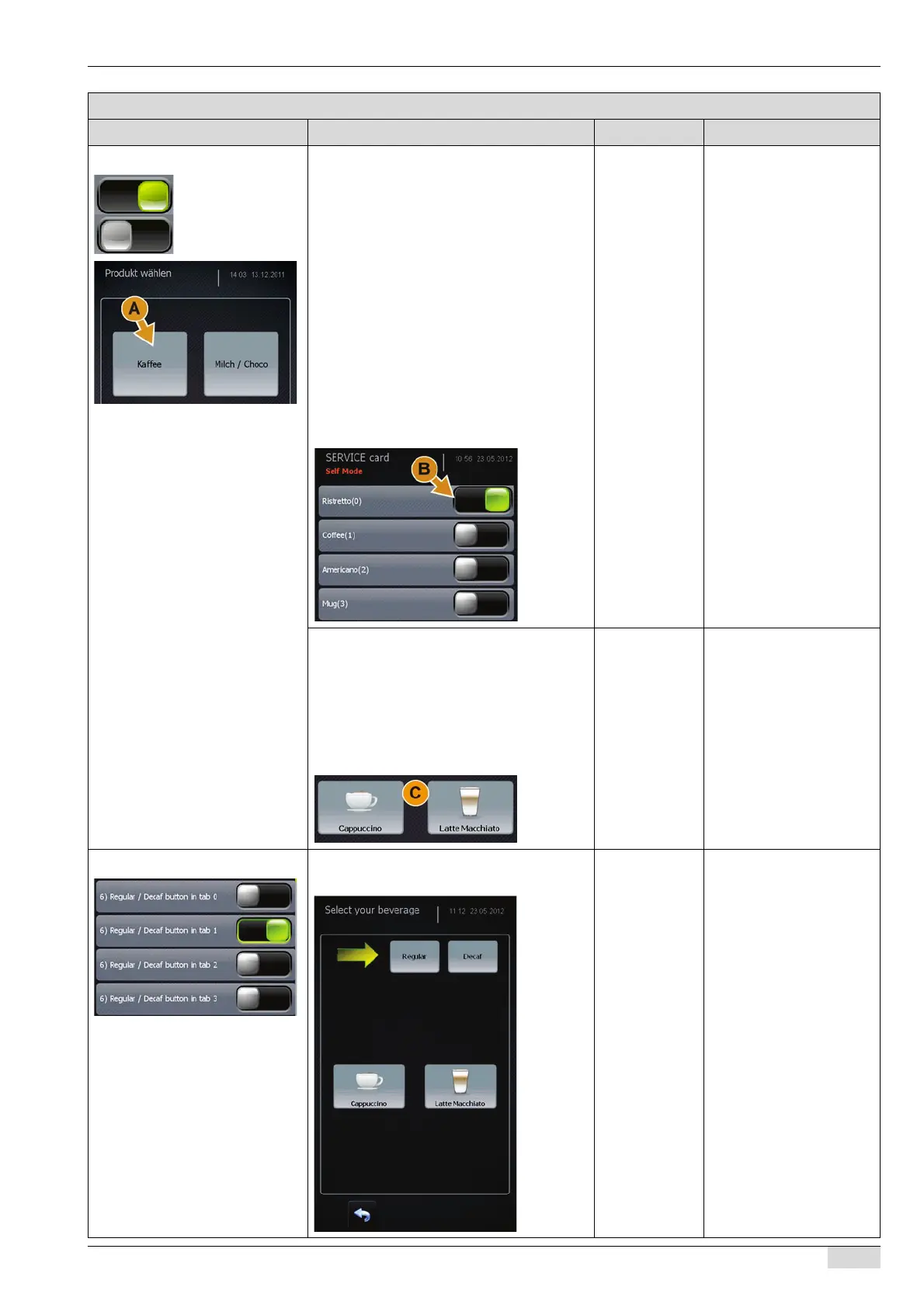
5) Screen for tabs active Beverage selection via the field of a bevera-
ge group.
With the parameter activated:
► Switch on the "5 Screen for tabs active"
parameter.
The fields (A) of the beverage groups
are shown.
Beverages from this beverage level
are available for selection if activated.
► Activate all parameters (B) for the de-
sired beverages.
► Save the setting.
Which activated beverages (C) ap-
pear depends on the selected bever-
age group field.
On/off The beverages in the
"Tabs" beverage groups
are preset in the "Product
configuration" parameter.
Only preset beverages ap-
pear in this parameter.
To display a field of a be-
verage group, a beverage
from a beverage group
must be activated.
The parameter is deactivated:
► Activate all parameters (B) for the de-
sired beverages.
► Save the settings.
The beverage fields (C) of the activat-
ed beverages are available for direct
selection.
6) Regular / DECAF buttons in tab Activates an additional selection option, [Re-
gular] or [DECAF], for beverage selection.
On/off The "5 Screen for tabs ac-
tive" parameter must be
switched on.
Parameters: Self mode settings
Display text Description Setting range Notes














 To Next Page