V800 Series High Performance Closed-Loop Vector Inverter User Manual
13.4 INTRODUCTION OF LCD OPERATING PANEL
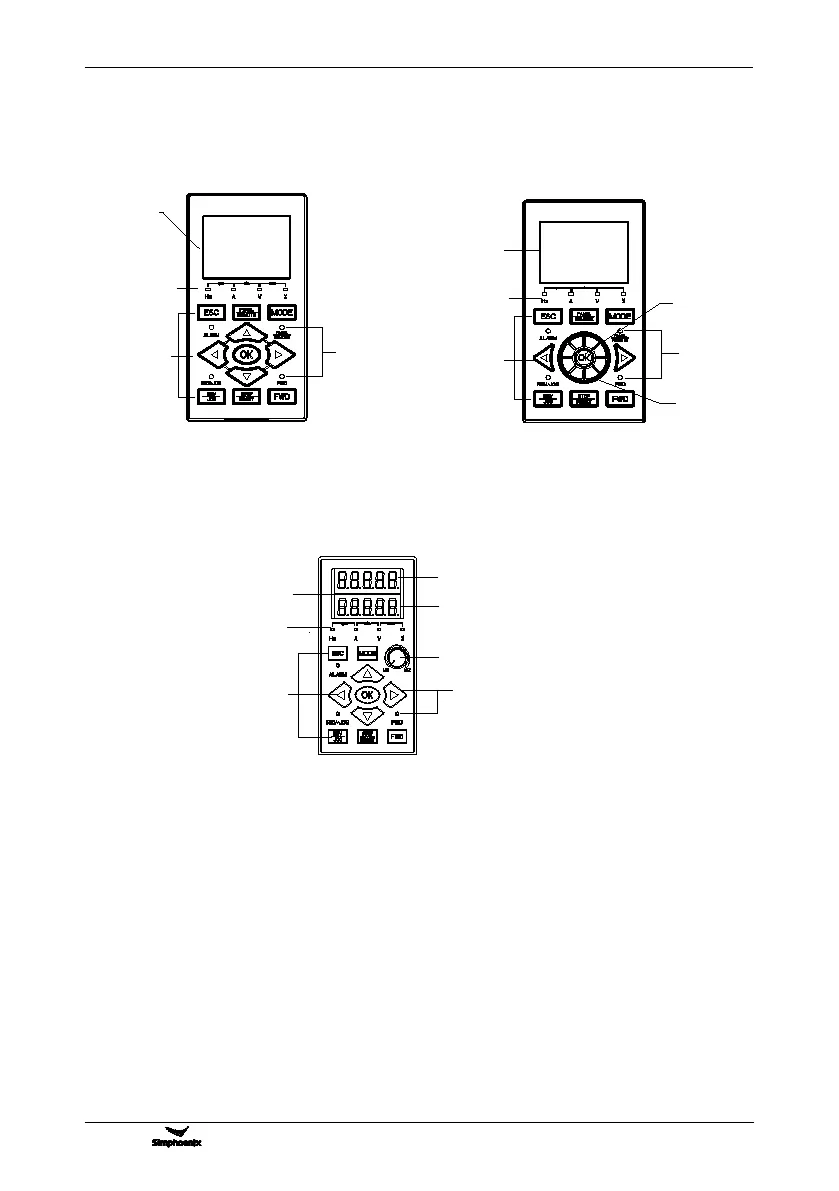
13.4.1 OUTSIDE VIEW OF LCD OPERATING PANEL
LCD
display zone
Unit
combination
indicator
Functional
operation
zone
Function
combination
indicator
LCD
display
area
Unit
combination
indicator
Functional
operation
area
Function
combination
indicator
Shuttle knob
Shuttle keys
13.4.2 LED OPERATION PANEL
Main display
Display lamp
Display lamps
Operation area
Auxiliary display
Potentiometer knob
LED Display
13.4.3 FUNCTION OF KEYS
Refer to Chapter 5 for the function and operation of keys on LCD panel.
Please refer to the product catalogue if you want to know more about optional accessories.
Figure 13-6-A Standard type of bilingual LCD
(Model DPNL360CA /PN: 050M007360001)
Figure 13-6-B Shuttle type of bilingual LCD
(Model DPNL360CA /PN: 050M007360002)
Figure 13-6-C double-line LED potentiometer panel
(Model DPNL350EN /PN:050M007033601)



 To Previous Page