Tsunami Mode-Locked Ti:sapphire Laser
7-6
power is achieved without CW breakthrough (refer to Appendix B.)
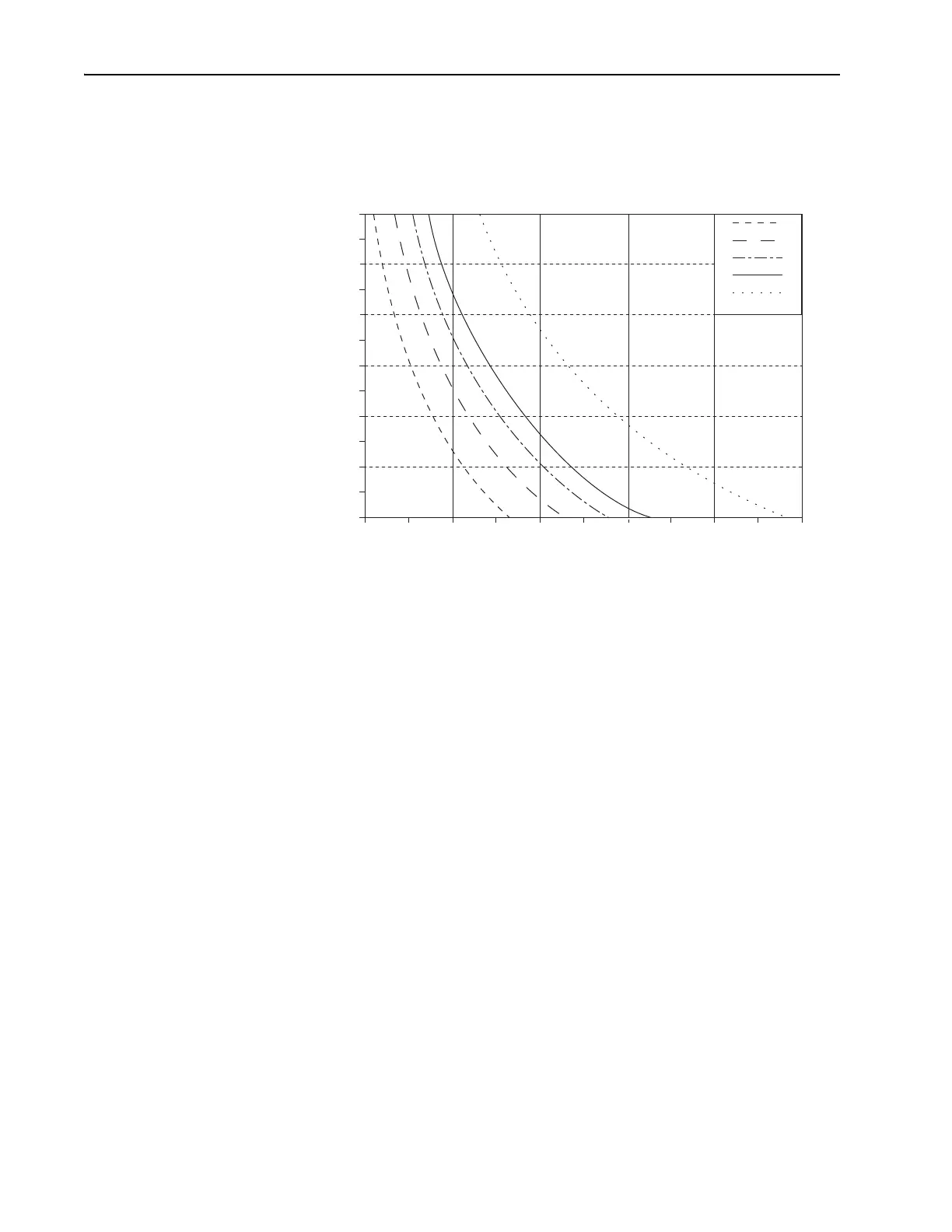
The graph in Figure 7-3 shows the relationship between bandwidth
and pulse width for the five specified wavelengths for a sech
2
-shaped
pulse.
Figure 7-3: Bandwidth vs Pulse Width for a Transform-limited sech
2
Pulse Shape.
8. Perform the procedure outlined under “Optimizing Laser Output” ear-
lier in this chapter.
This completes the fs wavelength selection procedure.
Selecting Wavelength, ps Configuration
(Using the Birefringent Filter)
Use an IR viewer, beam splitter, suitable attenuator, and a monochromator
to monitor the Tsunami laser as you perform the following procedure.
1. Using the IR viewer, beam splitter, and attenuator, pick off a portion of
the Tsunami output beam, attenuate it, and center it on the input slit of
the monochromator (refer to the monochromator manual for instruc-
tions).
2. Set the monochromator wavelength to the desired laser operating
wavelength.
3. Adjust the birefringent filter (bi-fi) micrometer to tune the laser until
the IR viewer detects light exiting the monochromator, then optimize
the output from the monochromator.
4. Adjust the GTI POSITION control for shortest pulse.
5. Perform the procedure outlined under “Optimizing Laser Output” ear-
lier in this chapter.
This completes the ps wavelength selection procedure.
710 nm
850 nm
790 nm
900 nm
1053 nm
40
50
60
70
80
90
100
51015202530
Bandwidth (nm)
Pulsewidth (fs)



 To Next Page