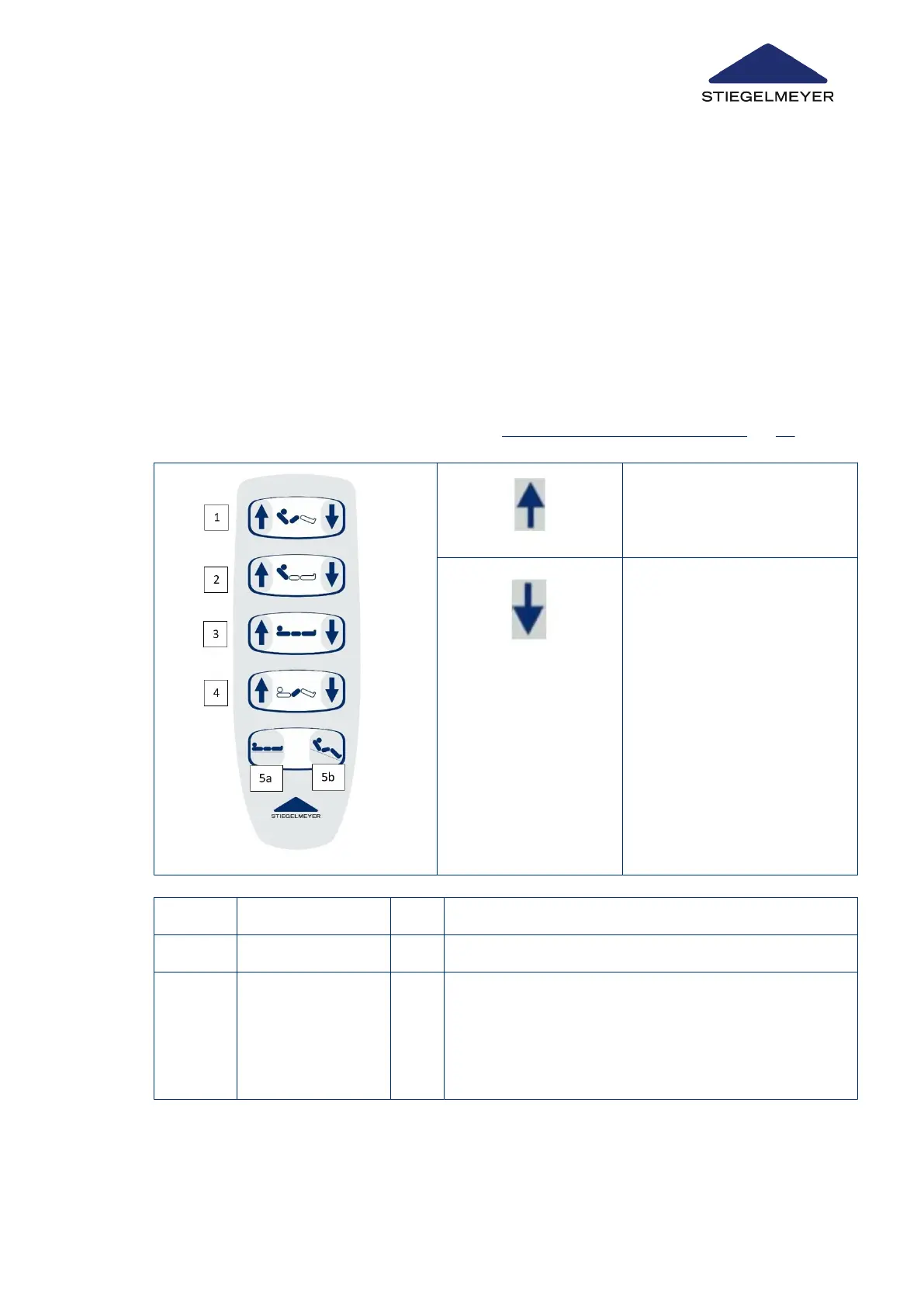
6.5.5.1 Handset (Standard)
Motorised adjustments can be activated by the patient or user via the handset. Explain the
handset functions to the patient:
•
The drives operate as long as the buttons are pressed.
•
Adjustments are possible in both directions.
•
If more than one button is pressed at a time, all adjustments stop (emergency OFF
safety function).
The sitting position is a convenient combination of auto contour + reverse-Trendelenburg po-
sition. This effectively reduces patient slippage towards the foot end. For more details about
the various adjustment functions, see chapter Setting the auto contour position » 72.
Press the button = Raise
Press the button = Lower
[1] Auto contour [2] Backrest
[3] Height adjustment [4] Thigh rest
[5a] Sleep position [5b] Sitting position
1. Raise the backrest and thigh rest.
2. Then tilt to a reverse-Trendelenburg position
Product description
Instruction Manual 22



 To Next Page