Operation 5
Driving
2
1
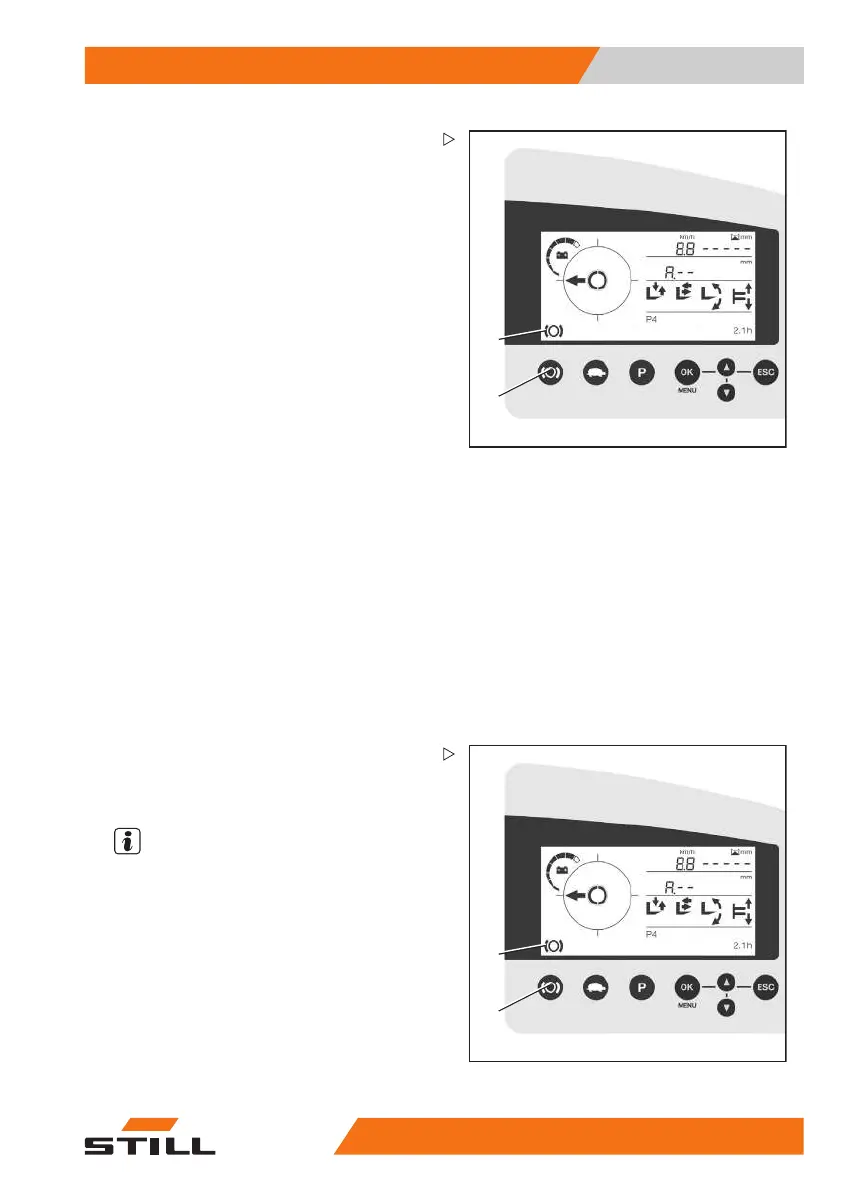
Releasing the parking brake by pushing the
button
When the truck is ready for operation, the
driver can release the parking brake at any
time by pushing the button.
– Sit down on the driver’s seat.
– Push the push button (1) to release the
parking brake.
The parking brake is released audibly and the
symbol (2) on the display and operating unit
disappears.
Releasing the parking brak
ebystartingto
drive
The parking brake can only be released by
starting to drive if it was applied automatically
by releasing the foot switch or vacating the
driver’s seat.
– Sit down on the driver’s seat.
– Select the drive directi
on (single-pedal
version only).
– Press the foot switch.
– Actuate the accelerator pedal.
The parking brake is re
leased automatically
and audibly, and the sy
mbol on the display
and operating unit dis
appears.
2
1
Functions of the park
ing brake when the
truckismoving
Actuation by the driver
NOTE
Brakingwiththep
arking brake while the
truckisinmotion
will result in heavy wear
of the brake linin
gs. Therefore, always use
regenerative bra
king or the mechanical brake
to brake while the
truck is in motion. Only use
the parking brake
while the truck is in motion
in the event of an e
mergency.
– Ensure that you have a secure grip on the
truck; hold onto the steering wheel with your
left hand.
50
988078001 [EN] 99



 To Next Page