Operation 5
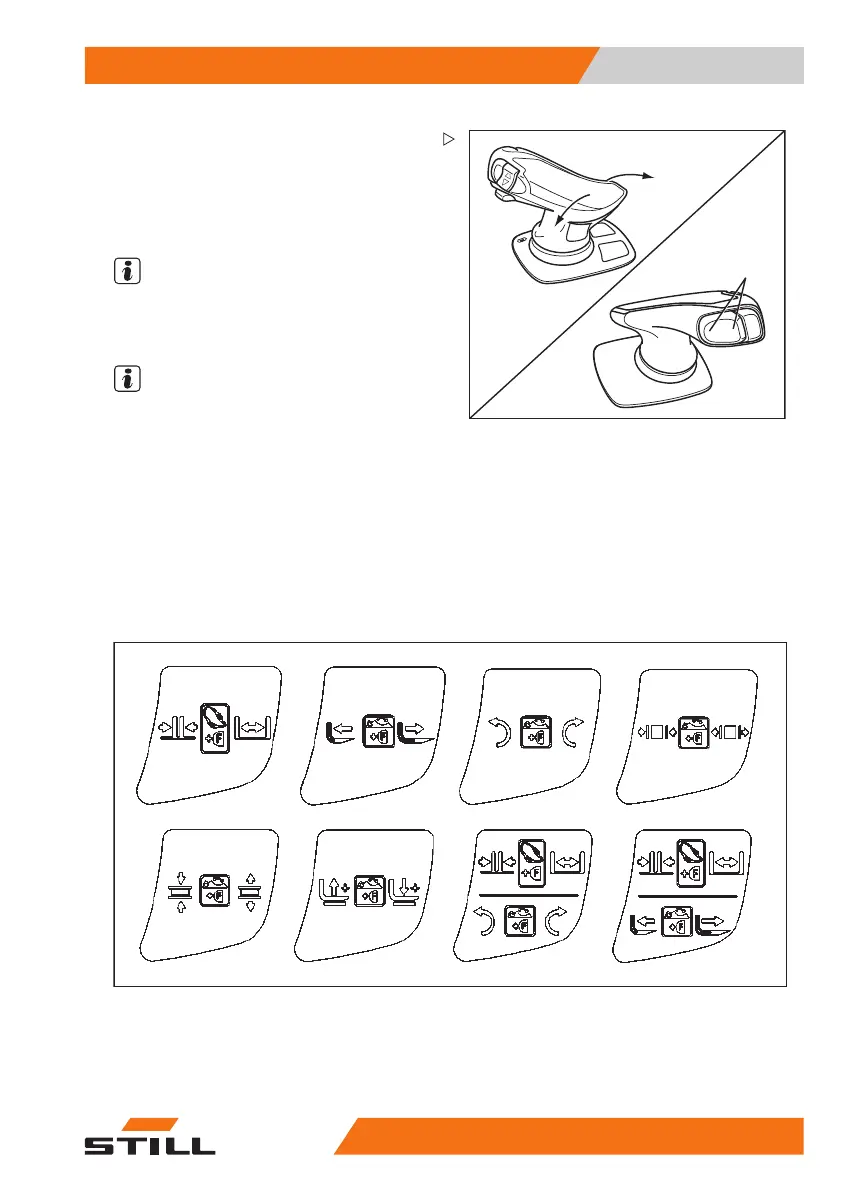
Workingwithattachments
6
4
5
– Actuate the shift button "F"(1).
– Move the joystick in the direction of the
arrow "4" or "5". Or:
– Move the vertical rocker butto
n (6) to the left
or right.
NOTE
The movement/action of these additional
functions can be found in the operating
instructions of the fitted attachment.
NOTE
The pictograms on the joystick are applied
according to the attachments fitted to this
truck at the factory. If an attachment with other
functions is fitted, the pictograms must be
checked for the correct representation and
changed if necessary. Please contact the
service centre if necessary.
– Note the following atta
chment functions and
pictograms!
Overview of pictogra
ms and operating devices
1234
5678
50
988078001 [EN] 139



 To Next Page