3-12 Sun Netra T5220 Server Service Manual • January 2012
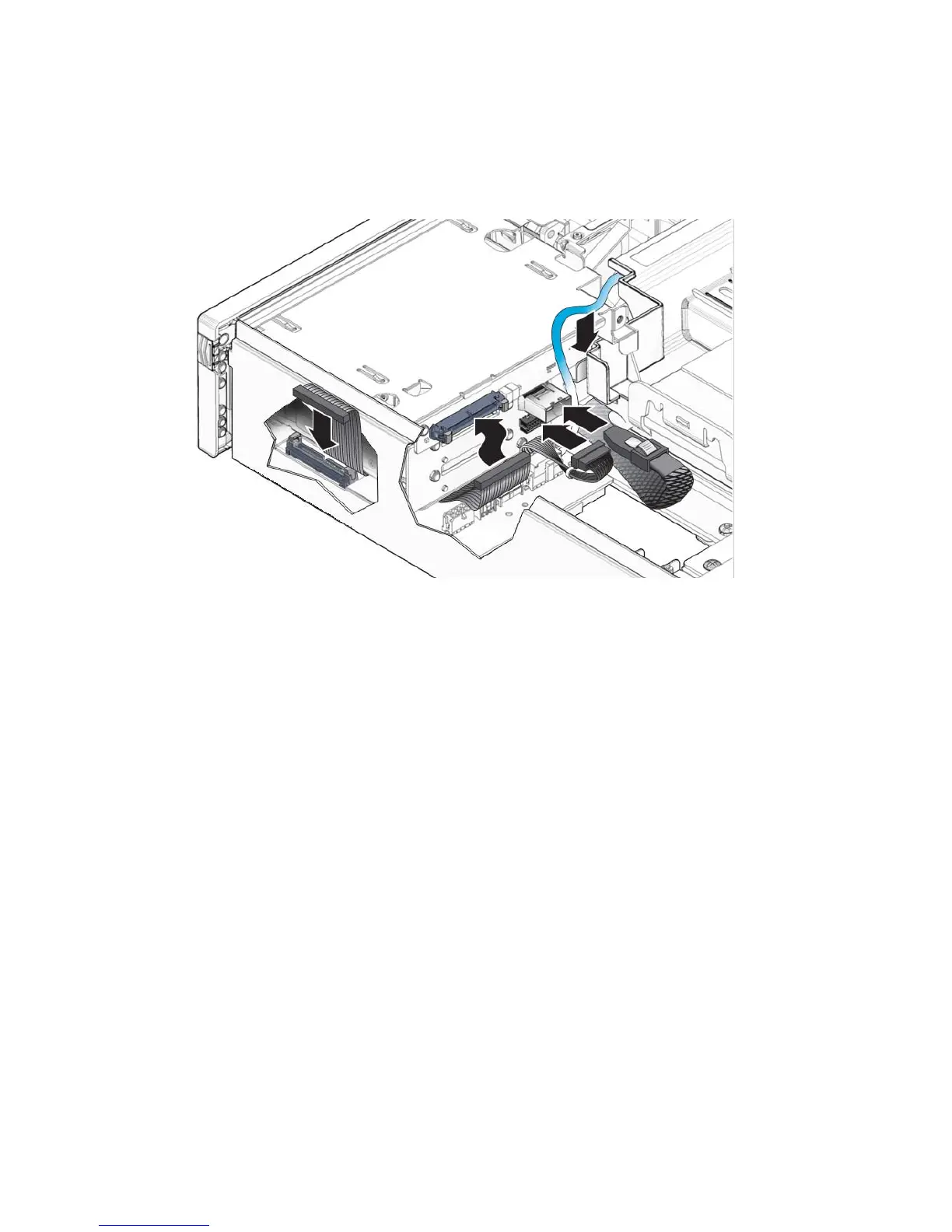
6. Connect the following cables to the media bay assembly (FIGURE 3-12):
FIGURE 3-12 Connecting the Media Bay Assembly Cables
7. Install the optical media drive and the hard drives. See:
■ Section 3.2.2, “Installing the Optical Media Drive” on page 3-7
■ Section 3.1.2, “Installing a Hard Drive” on page 3-5
8. Close the bezel.
9. Consider your next step:
■ If you installed the media bay bracket as part of another procedure, return to that
procedure.
■ Otherwise, perform the following tasks to bring the server back online:
■ Section 6.1.2, “Installing the Top Cover” on page 6-3
■ Section 6.1.3, “Removing Antistatic Measures” on page 6-4
■ Section 6.1.4, “Reinstalling the Server Chassis in the Rack” on page 6-5
■ Section 6.1.5, “Reconnecting Cables to the Server” on page 6-7
■ Section 6.1.6, “Powering On the Server” on page 6-8













 To Next Page