Returning the Server to Operation 147
Caution – The server weighs approximately 18.0 kg (40.0 lbs). Two people are
required to carry the chassis and install it into the rack.
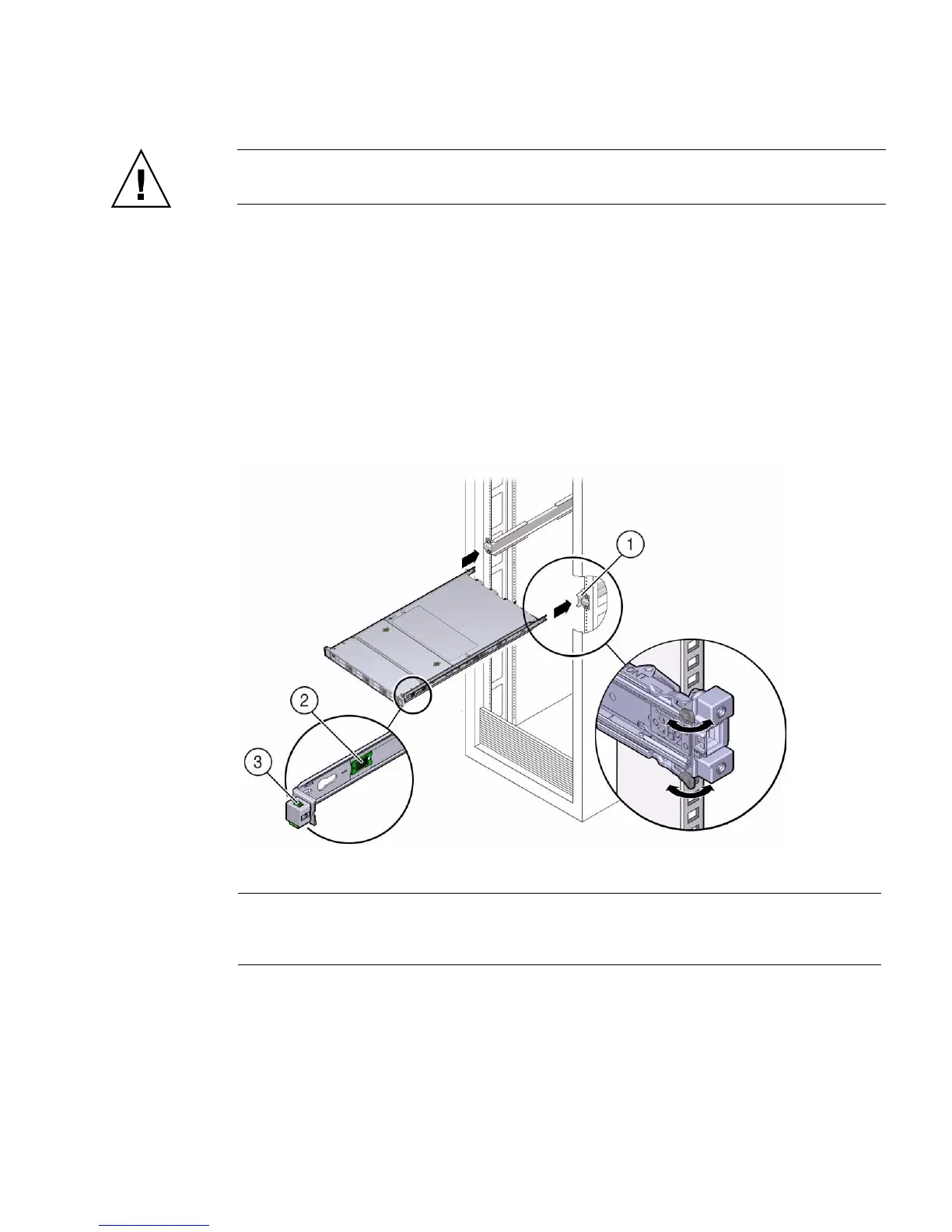
1. Push the slide-rails into the slide-rail assemblies in the rack as far as possible.
2. Raise the server so that the rear ends of the mounting brackets are aligned with
the slide-rail assemblies that are mounted in the rack.
3. Insert the mounting brackets into the slide-rails, and then push the server into
the rack until the mounting brackets encounter the slide-rail stops,
approximately 30 cm (12 inches).
The server is now in the extended maintenance position.
FIGURE: Returning the Server to the Rack
Related Information
■ “Remove the Server From the Rack” on page 41
■ “Remove Antistatic Measures” on page 146
■ “Reconnect Data Cables and Power Cords” on page 149
Figure Legend
1 Inserting mounting brackets into slide-rails
2 Slide-rail release tab (green)
3 Slide-rail lock



 To Next Page