About the Sun Server X4-2 5
Related Information
■ “Front Panel Controls and Indicators on a System With Eight 2.5-inch Drives” on
page 3
■ “Server Back Panel View” on page 5
Server Back Panel View
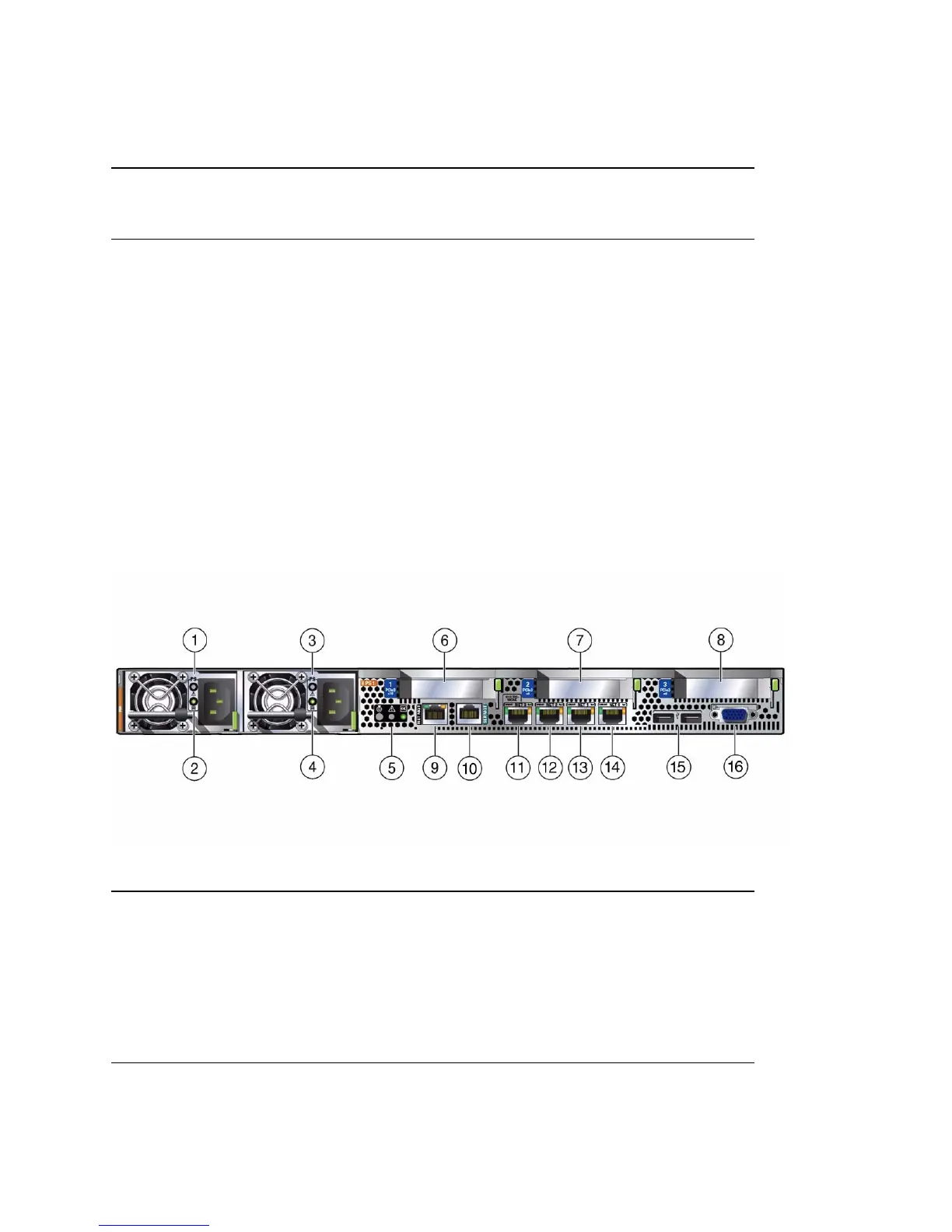
The following figure shows the Sun Server X4-2 back panel and the location of power
supplies, status indicators (LEDs), connectors, and PCIe slots.
FIGURE: Server Back Panel View
6 Power button 14 Storage drive 3
7 SP OK LED: green 15 SATA DVD drive
8 Top Fan Fault LED: amber 16 Not applicable
Figure Legend
1 Power Supply (PS) 0 9 Oracle Integrated Lights Out Manager (ILOM)
service processor (SP) network management
10/100BASE-T port (NET MGT)
2 Power Supply (PS) 0 status indicators:
Service Required LED: amber
AC OK LED: green
10 Serial management (SER MGT)/RJ-45 serial
port
3 Power Supply (PS) 1 11 Network (NET) 100/1000/10000 port: NET 3
(Nonfunctional in single-processor systems.)
Figure Legend (Continued)



 To Next Page