62 Sun Server X4-2 Service Manual • May 2014
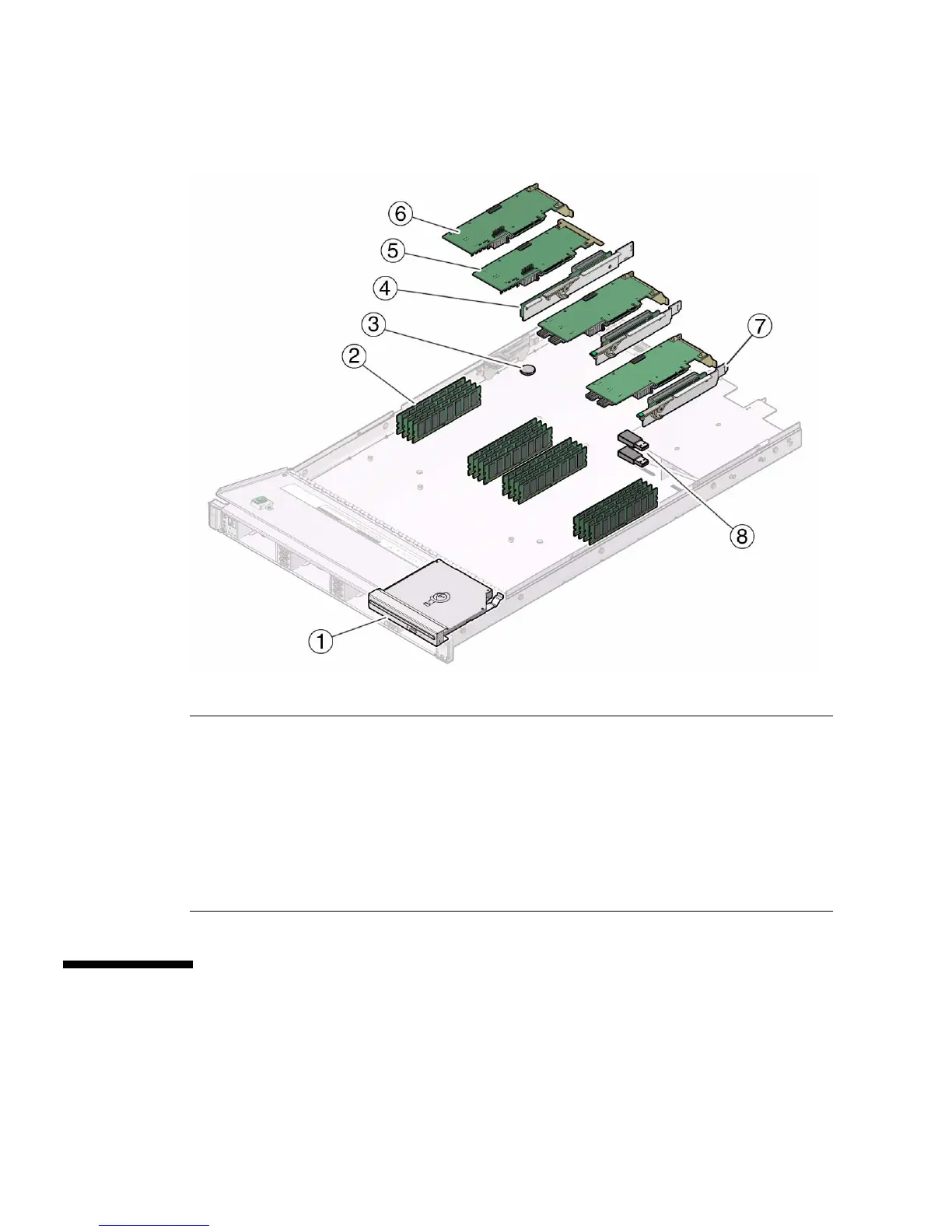
FIGURE: CRU Locations
Servicing the DIMMs (CRU)
This section describes how to remove and install DIMMs.
Figure Legend
1 DVD drive (CRU) 5 Internal HBA card (CRU) (installs in slot 4 on
PCIe riser for slots 3 and 4)
2 DIMMS (CRUs)
Note: A maximum of eight DIMMs are
supported in single-processor systems and
the DIMMs must be installed in DIMM sockets
associated with the P0 processor socket.
6 PCIe card (CRU) (installs in slot 3 on PCIe
riser for slots 3 and 4)
3 Battery (CRU) 7 PCIe riser for slot 1 (CRU) (nonfunctional in
single-processor systems)
4 PCIe riser for slots 3 and 4 (CRU) 8 USB flash drives (CRU)



 To Next Page