About the Sun Server X4-2 3
Front Panel Controls and Indicators on a System
With Eight 2.5-inch Drives
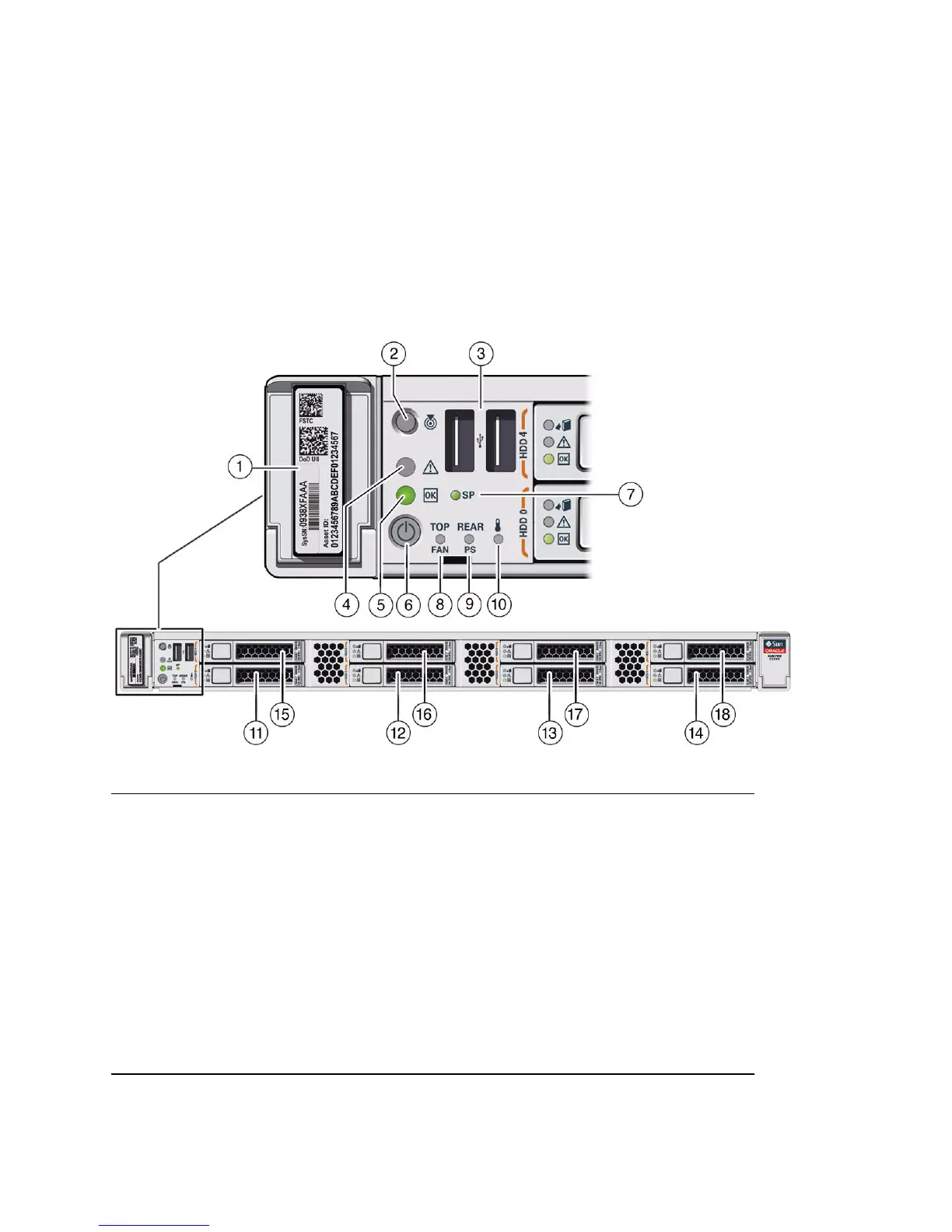
The following figure shows the controls, status indicators (LEDs), connectors, and
drives on the front panel of a Sun Server X4-2 configured with eight 2.5-inch storage
drives.
FIGURE: Front Panel View of a Server With Eight 2.5-inch Drives
Figure Legend
1 Product Serial Number (PSN) label and
Radio Frequency Identification (RFID) tag
10 System Over Temperature Warning LED:
amber
2 Locator LED/Locator button: white 11 Storage drive 0
3 USB 2.0 connectors (2) 12 Storage drive 1
4 Service Required LED: amber 13 Storage drive 2
5 Power/OK LED: green 14 Storage drive 3
6 Power button 15 Storage drive 4
7 SP OK LED: green 16 Storage drive 5
8 Top Fan Fault LED: amber 17 Storage drive 6
9 Rear Power Supply (PS) Fault LED: amber 18 Storage drive 7 (In Oracle Engineered
Systems, storage drive 7 might be populated
with a remote battery module for the host bus
adapter (HBA) card.)



 To Next Page