Servicing CRUs That Do Not Require Server Power-Off 47
rebuilt from the rest of the array with no need to reconfigure the RAID parameters. If
the replaced storage drive was configured as a hot-spare, the new storage drive is
automatically configured as a new hot-spare.
For instructions for configuring RAID on the server, refer to the Sun Server X4-2
Installation Guide, “Configuring Server Drives for OS Installation” on page 113.
Storage Drive Status Indicators
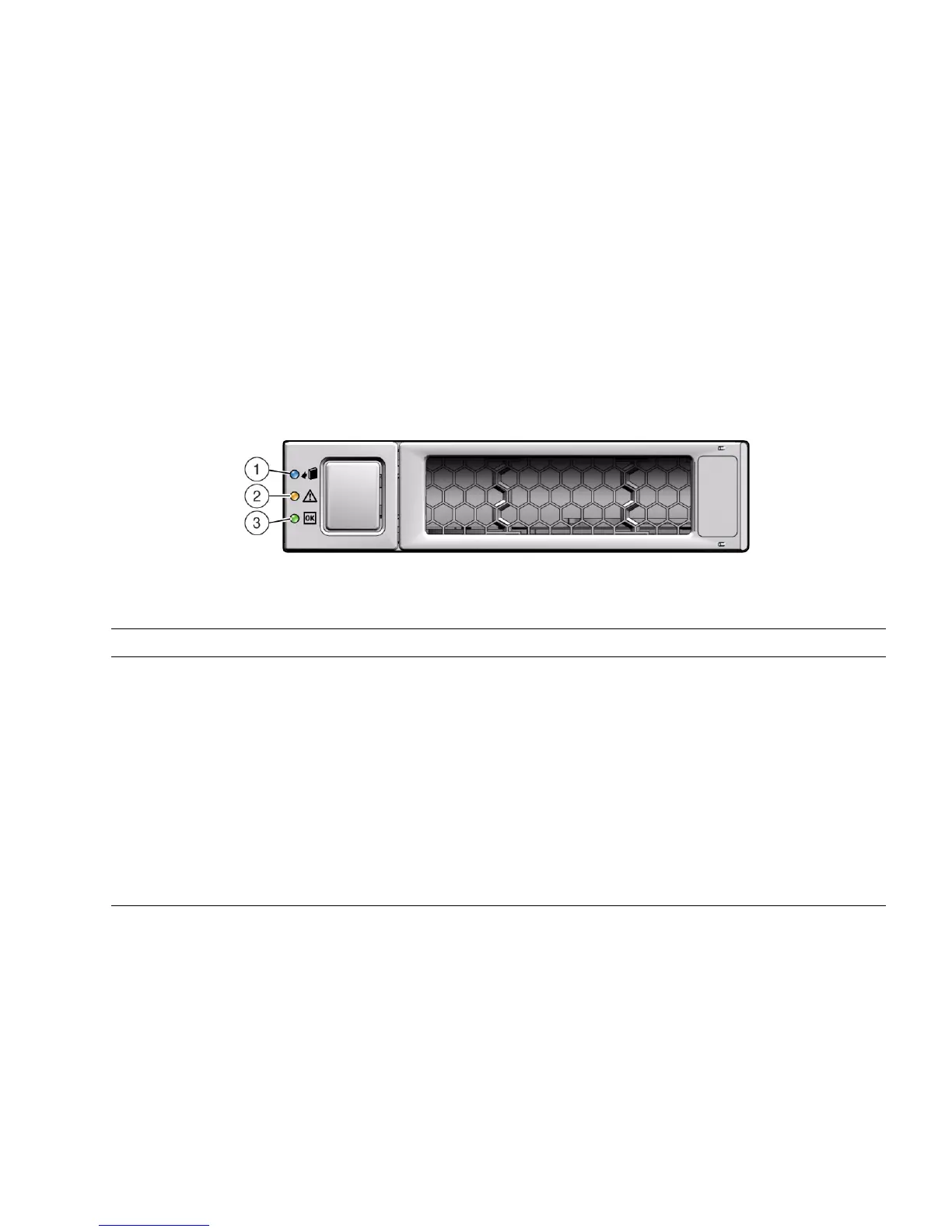
The following figure and table describe the storage drive status indicators (LEDs).
FIGURE: Storage Drive Status Indicators
▼ Remove a Storage Drive
1. Prepare the system for the drive removal.
See “Take Antistatic Measures” on page 42.
TABLE: Storage Drive Status Indicators
Legend LED Color State Meaning
1 OK to Remove Blue • STEADY ON – The storage drive can be removed safely
during a hot-plug operation.
• OFF – The storage drive has not been prepared for removal.
2 Service Required Amber • OFF – The storage drive is operating normally.
• STEADY ON – The system has detected a fault with the
storage drive.
3 OK/Activity Green • OFF – Power is off or the installed drive is not recognized by
the system.
• STEADY ON – The drive is engaged and is receiving power.
• STEADY BLINK – There is disk activity. The LED blinks on
and off to show activity.



 To Next Page