1-15
2345678
1
1
2
3
4
5
6
7
1-15
1.3. SETUP
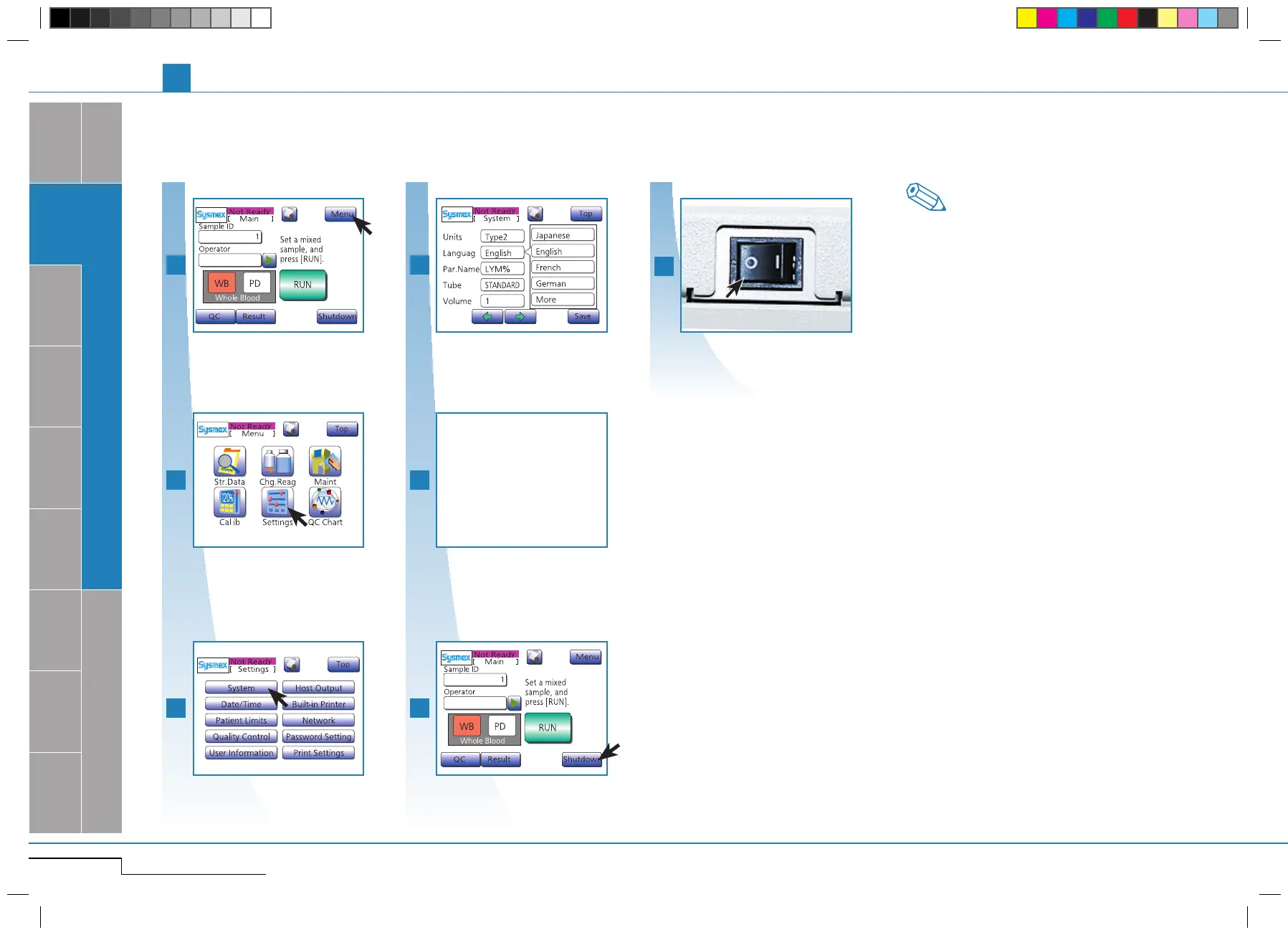
1.3.8. Set language
Default setting is English.
Press "Settings".
Press "System", then "Language".
First press "System", then "Language".
Select the language.
To apply the settings, press "Shut-
down".
To apply the settings, press "Shutdown" and
follow instructions.
Press "Settings".
After completion of the shutdown
process, Switch OFF.
After completion of the shutdown process,
Switch OFF.
In this section, only the settings relevant for instal-
lation are described. For details on all possible set-
tings see "Settings & Calibration" page 5-1.
Note
Press "Menu".
Press "Menu".
Press "Save".
"Save" settings.
pocH-100
i
Revised June 2008
INTRODUCTION
SYSTEM OVERVIEW, TECHNICAL INFORMATION & SETUP
Select the language.
Press "Save" and
then"OK"toupdate
the settings.



 To Next Page