1234 678
5
5 -13
1
2
3
4
pocH-100
i
Revised June 2008
SETTINGS & CALIBRATION
INTRODUCTION
1. Establish the reference values.
2. Calculate the mean value.
3. Analyze the samples in whole blood mode.
4. Calculate the mean value.
5. Calculate the calibration value using the following formula:
Enter calibration value; press "Ent." and
confirm with "OK".
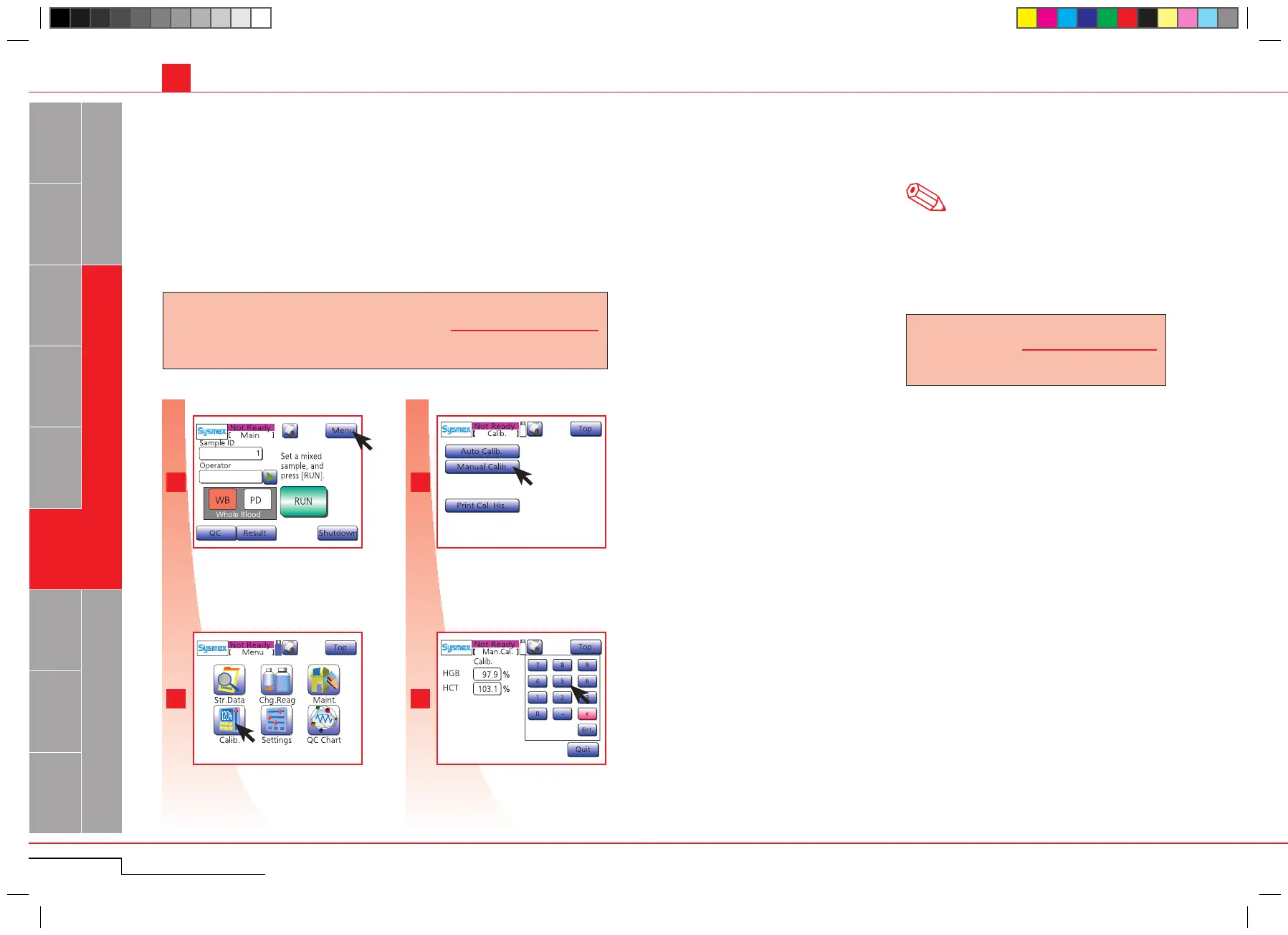
Press "Calib.".
Press "Menu".
5.2.3. Manual calibration
The calibration value must be calculated according to the formula shown below and entered manually.
Use normal and fresh blood of 5 or more samples.
A calibration error is displayed, if the mean calibra-
tion value for each analysis exceeds 105% or is less
than 95%, or if the new calibration value exceeds
120% or is less than 80%.
The calibration value can be calculated using the
following formula:
Note
Press "Menu".
Press "Calib.".
Enter calibration value and press
"Ent.".
New calibration value = Previous calibration value ×
Average of values gained
by this instrument
Average of values gained
by reference method
5.2. CALIBRATION
Calibration
value
New calibration
value
Current calibration
value
= 10 0 ×
Press "Manual Calib.".
Press "Manual Calib.".



 To Next Page