1234678
5
5 -12
1
2
3
4
5
6
7
8
pocH-100
i
Revised June 2008
SETTINGS & CALIBRATION
INTRODUCTION
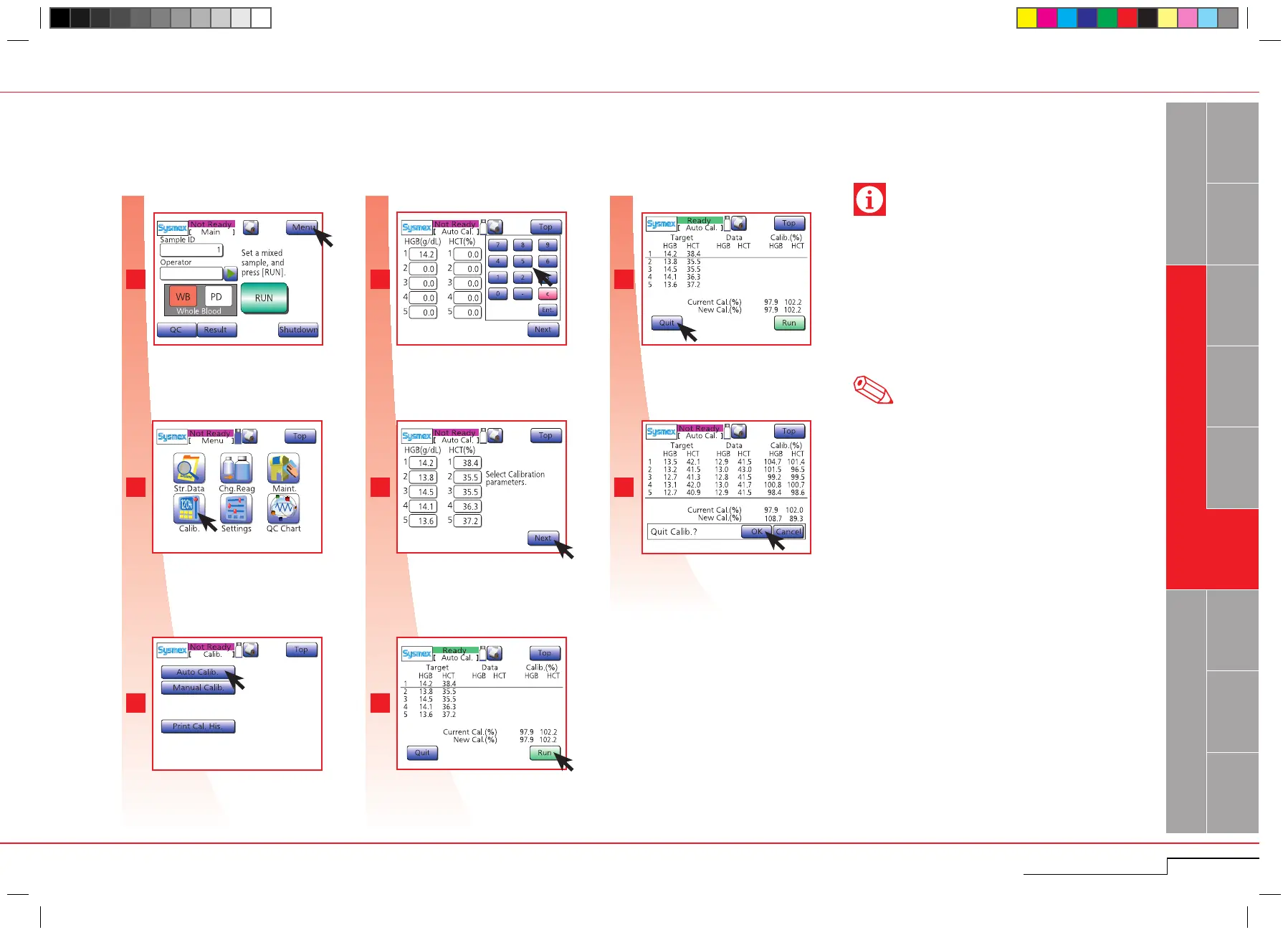
5.2.2. Automatic calibration
Press "Next" and "OK".
Set first sample and press "Run" and repeat
this for the remaining 4 samples.
After completion of all analyses, press
"Quit".
Press "OK".
Enter reference values for 5 each sample
and press "Ent.".
Press "Auto Calib.".
Press "Calib.".
Press "Menu".
The instrument determines the calibration value automatically by analyzing 5 calibration samples.
• Automatic calibration is always performed in the
WB mode.
• It is important to analyze the samples according to
their reference values. The values of the sample to
be analyzed are indicated by the underline cursor.
• Set "0" for any parameter which does not need to
be calibrated.
• Do not open the sample position while "Aspirating"
is displayed. Only open it when "Running" is dis-
played.
Press "Menu".
Press "Calib.".
Press "Auto Calib.".
Enter reference values and press
"Ent.".
Press "Next" and "OK".
Set first sample and press "Run".
Press "Quit.".
Press "OK".
Important
Note
If an error occurs during analysis, press "Cancel" and
analyze again.



 To Next Page