12 35678
4
4 -10
1
2
3
4
5
CLEANING & MAINTENANCE
INTRODUCTION
pocH-100
i
Revised February 2011
4.1.11. Calibrate LCD
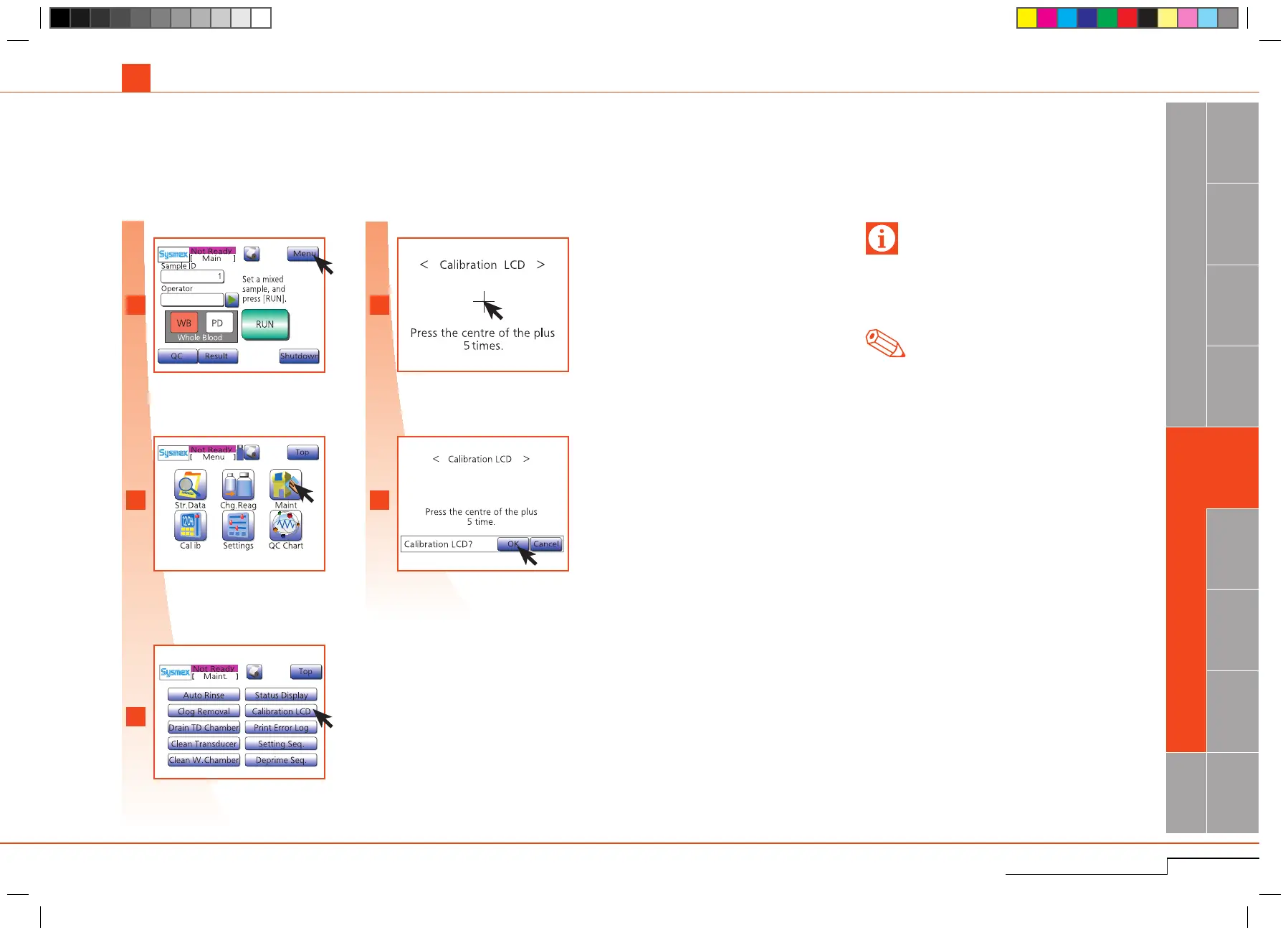
CalibratetheLCDifpaneloperationisnotproperlyaligned.
4.1. CLEANING
As needed
Press"Menu".
Press"Maint.".
Press"CalibrationLCD"andthen"OK".
Touch "+" each time it is displayed on the
screen(5times).
Press"OK".
Whencalibrationisperformedandacalibrationer-
roroccursfrequently,theremaybeaproblemwith
thetouchscreen.InthiscasecontactyourSysmex
servicerepresentativeforassistance.
Note
Iftheinputpositionwasoutsidearegulatedrange,
thecalibrationerrormessagewillappear,andthe
calibrationwillbediscontinued.
Press "Menu".
Press "Maint.".
Press "Calibration LCD" and then
"OK".
Press the centre of the plus 5 times.
Press "OK".
Important



 To Next Page